
QuickBooks to BAS lodgement: complete 2026 workflow
Instead of manually rebuilding your GST figures each reporting period, use this QuickBooks BAS lodgement workflow to reconcile your books, review your activity statement and lodge through the appropriate ATO channel. The process separates preparation from submission, so you finish with both accurate accounts and evidence that your BAS was lodged.
TL;DR
Want expert help? Daintree Consulting's tax and BAS services can take this off your plate. Book a free consultation.
QuickBooks BAS lodgement starts with reconciled transactions, correct GST codes and the reporting basis shown on your activity statement.
Preparing a BAS in QuickBooks is not proof of ATO lodgement; retain the submission receipt.
Daintree Consulting suits Australian businesses wanting bookkeeping, BAS compliance and advisory support together.
Check GST, payroll withholding and ATO instalments separately before approving your activity statement.
Why this matters
A BAS can look complete while the underlying books still contain missing purchases, duplicate income or incorrectly coded transactions. Submitting those figures turns a bookkeeping issue into a compliance issue.
QuickBooks is the preparation system; the ATO lodgement receipt is the evidence of submission. Keep those roles distinct throughout your 2026 workflow, including when an accountant or BAS agent handles the submission.
Daintree Consulting provides accounting, bookkeeping and payroll, tax and BAS compliance, and advisory services. Daintree Consulting is best for Australian businesses wanting bookkeeping, BAS compliance and advisory support together. The practical advantage is continuity between the records and the return; you still need to supply complete documents and approve the figures.
Before you start
Accounts and authority: Have access to the Australian QuickBooks Online company, its GST functions and relevant reports. For self-lodgement, arrange authorised access to ATO Online services for business. For agent lodgement, confirm the registered agent has the authority needed to act.
Records and reporting details: Gather bank and credit card statements, sales records, supplier tax invoices, payroll reports and the ATO activity statement. Confirm its period, GST reporting basis, reporting frequency and obligations before preparing figures.
The gotcha: A bank feed is not a reconciliation, and a bank payment is not automatically a GST-creditable purchase. Transfers, loan repayments, private spending and purchases without appropriate evidence need separate treatment.
Your QuickBooks navigation can differ by subscription and interface. This guide uses familiar labels such as Reports, Taxes and GST, without relying on a particular electronic-lodgement feature being enabled.
01 — Reporting settings
Confirm the activity statement period
Open the activity statement issued by the ATO. Identify the exact reporting period and obligations included, rather than assuming every BAS contains the same labels.
In QuickBooks, open Taxes, then the GST area. Check that the period you are preparing matches the ATO statement.
Confirm whether your GST reporting basis is cash or non-cash. Use the basis that applies to your GST registration, not whichever report setting produces a preferred result.
Check the relevant due date against the ATO statement or your registered agent’s confirmed lodgement schedule. Record payment responsibility separately from preparation responsibility.
Expected result: You have 1 clearly defined reporting period, the correct GST basis and an identified person responsible for submission.
A quarterly GST period covers 3 months; a monthly period covers 1 month. Do not substitute a financial-year report for the period on the activity statement, even when preparing several outstanding statements together.
For your 2026 checklist, record the actual due date rather than a recurring reminder labelled simply BAS due. An agent arrangement or an ATO extension changes the date only when it actually applies to your business.
Separate GST settings from payroll obligations
GST reporting and PAYG withholding are different obligations. Check whether your activity statement includes payroll withholding, PAYG instalments or other amounts in addition to GST.
Changing a GST report filter does not change the business’s registered reporting basis. If QuickBooks settings conflict with the ATO record, resolve the mismatch before preparing the statement rather than adjusting figures to force agreement.
02 — Transaction reconciliation
Reconcile the source records
Match bank-feed entries to existing invoices, bills and payments before creating new transactions. This avoids recording income or expenses twice.
Reconcile each relevant bank and credit card account to its statement closing balance. Investigate unexplained differences rather than posting a balancing adjustment without support.
Review transactions outside the bank feeds, including cash purchases, journals and transactions entered directly into the ledger.
Open Reports and review Profit and Loss and Balance Sheet for the relevant period. Use these 2 reports to identify unexpected balances, unusual expenses and amounts sitting in clearing accounts.
Check outstanding sales invoices and supplier bills, particularly when reporting GST on a non-cash basis. An unpaid transaction can still affect the GST calculation under that basis.
Expected result: The accounts agree with source records, duplicates are removed and unexplained balances have a documented resolution.
A reconciliation confirms that recorded bank movements agree with the bank statement. It does not prove that every transaction has the correct tax treatment. Keep those checks separate.
Review GST coding and evidence
Inspect sales and purchase transactions feeding the GST calculation. Check the substance of each transaction, not just the supplier name or the bank rule that coded it.
Review transfers, owner contributions, drawings, loan principal and private expenses. These are not ordinary taxable sales or creditable business purchases merely because money moved through the account.
Check GST-free and input-taxed transactions carefully. Those categories are not interchangeable, and their treatment affects GST reporting and entitlement to credits.
Confirm that purchases claimed for GST credits meet the applicable requirements, including supporting tax invoices where required and appropriate treatment of mixed business and private use.
Review bank rules that repeatedly apply an incorrect GST code. Correct both the affected transactions and the rule so the issue does not recur next period.
Expected result: GST amounts trace back to supported transactions rather than unexplained adjustments.
For mixed-use purchases, document the business-use basis. An expense’s deductibility for income tax does not, by itself, establish entitlement to a GST credit.
03 — BAS preparation and approval
Prepare the activity statement
Return to Taxes and GST in QuickBooks. Use Prepare BAS where that action appears for the relevant period.
Review the GST calculation and supporting transaction detail. Confirm the period and reporting basis again before treating the figures as ready for approval.
Compare the QuickBooks figures with the fields requested on your ATO activity statement. Complete the labels that apply to your reporting arrangement; do not assume every business reports the same GST labels.
Review payroll amounts separately where PAYG withholding applies. Reconcile W1 and W2 to the relevant payroll records, considering any corrections and payments outside the normal payroll process.
Check any PAYG instalment amount or rate against the ATO statement. Do not replace an ATO-issued instalment with a percentage of accounting profit without assessing the applicable rules.
Save the supporting reports and obtain approval from the business owner or authorised decision-maker before submission.
Expected result: You have an approved BAS working paper that explains every reported amount and any adjustment.
STP reporting does not replace the BAS. Payroll information reported through Single Touch Payroll still needs to agree with the relevant activity statement obligations. Employer superannuation contributions are not PAYG withholding and do not belong in W2.
Your 2026 approval record should identify the reporting period, final figures, approver and unresolved questions. If a question changes the tax treatment, resolve it before approval rather than leaving a note beside an unsupported number.
Choose who submits the BAS
Submission approach | Best for | Advantage | Responsibility or limitation |
|---|---|---|---|
Self-lodgement through ATO Online services for business | Owners with the access and knowledge to review their BAS | Direct control over submission and the receipt | You remain responsible for mapping figures correctly and resolving tax questions |
Lodgement through a registered tax or BAS agent | Businesses wanting professional review and submission support | A registered agent can review the statement within their permitted scope | You must provide complete records, arrange authority and approve the statement |
Neither approach fixes incomplete bookkeeping automatically. Choose the review and responsibility arrangement first, then confirm which submission channel will be used.
04 — Submission and records
Lodge and close the reporting period
For self-lodgement, access the relevant activity statement in ATO Online services for business. Transfer the approved figures into the corresponding fields and review the completed statement before submitting it.
For agent lodgement, provide the approved records through the agreed process. Confirm that the agent is submitting the statement, not only reviewing the QuickBooks report.
Retain the ATO submission confirmation or the agent’s lodgement evidence. Check the entity, reporting period and submitted amounts against your approved working paper.
Record the BAS outcome in QuickBooks using the appropriate workflow for your setup. Marking a period as lodged inside the accounting file is a recordkeeping action, not independent evidence of ATO acceptance.
Arrange payment separately where an amount is payable. Reconcile the eventual payment or refund to the relevant liability or clearing account rather than recording it as a fresh ordinary expense or sale.
Expected result: The statement is submitted, evidence is retained and the accounting records reflect the BAS outcome.
Use this sequence for each 2026 reporting period: reconcile, review, approve, submit, retain evidence. Separating those stages makes responsibility clear when an owner, bookkeeper and accountant share the work.
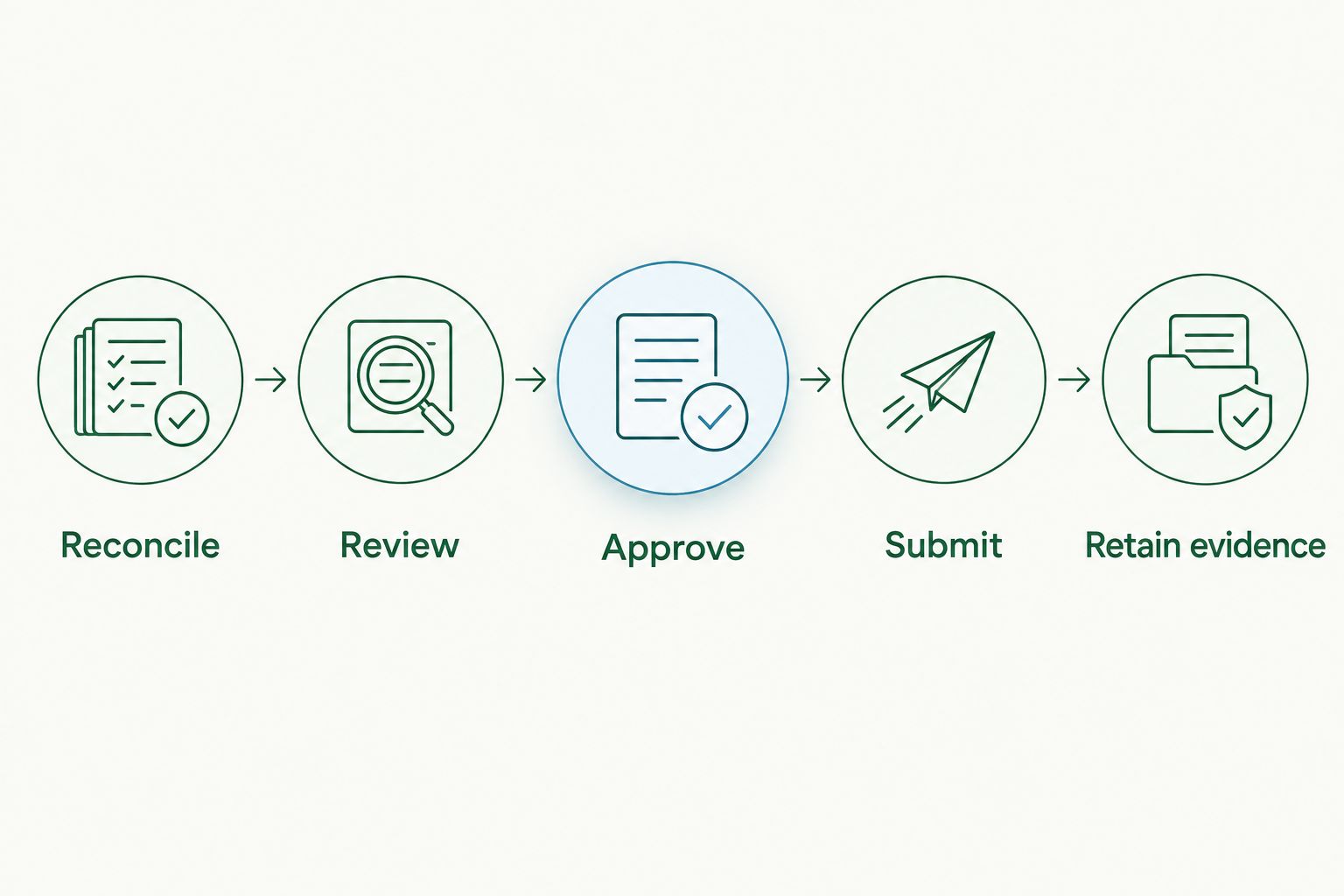
When a transaction changes after lodgement
An edited transaction can change QuickBooks reports without changing the BAS already lodged with the ATO. Treat that difference as an exception to investigate, not as a reason to submit the original period again.
Identify the changed transaction and its effect on GST or other reported amounts.
Compare the revised records with the retained lodged figures. Document why the difference arose.
Assess whether the ATO’s rules permit correction on a later activity statement or require revision of the original statement. The answer depends on the type of error and applicable limits.
Record the agreed treatment and retain the supporting explanation. Ask your registered agent to assess the correction when the treatment is unclear.
Expected result: Each post-lodgement change has an explicit correction decision, with no unexplained difference between the books and the submitted statement.
A late-entered purchase is not automatically treated the same way as an incorrectly reported sale. Avoid applying a blanket adjustment rule to every change.
Troubleshooting
QuickBooks GST does not match your expectation
Check the period, cash or non-cash basis, transaction dates and GST codes first. Then inspect the transaction detail behind the difference; the bank balance alone cannot explain a GST calculation.
A receipt appears twice
Look for a manually entered expense plus a bank-feed transaction added as a second expense. Keep the valid underlying transaction and match the bank entry correctly, checking any previous reconciliation before removing records.
Payroll totals do not match W1 or W2
Compare the activity statement period with payroll records and investigate adjustments, off-cycle payments and tax withheld. Do not change W2 simply to match the bank payment for wages: net wages and withheld tax are different amounts.
QuickBooks says lodged, but you have no receipt
Check the actual submission channel and ask the responsible person for confirmation. Verify the activity statement’s status with the ATO before attempting another submission; an internal status is not enough.
A BAS payment appears as an expense
Inspect the coding and reconcile it against the recorded BAS liability. GST settlement and PAYG withholding payments should not create duplicate operating expenses; obtain advice where the payment includes several ATO account components.
Customise your workflow
Keep routine processing with the person closest to the records, but assign tax-treatment questions and final approval explicitly. A shared checklist is useful only when each task has an owner and a clear completion point.
For a growing business, extend the BAS review into a regular cash flow and management-reporting discussion. Daintree Consulting’s BAS compliance and advisory services cover those connected needs, while the business retains responsibility for timely records and decisions.
For the remainder of 2026, focus on recurring exceptions: incorrect bank rules, missing documents and payroll adjustments. Fixing their source reduces repeat investigation without weakening the review.
Discuss your BAS workflow
Clarify responsibility for bookkeeping, BAS review and lodgement.
FAQ
Can I lodge my BAS directly from QuickBooks?
Check the submission features enabled in your Australian QuickBooks account before choosing a direct-lodgement workflow. You can prepare the figures in QuickBooks and submit through ATO Online services for business or an authorised registered agent; always retain submission evidence.
Does preparing a BAS in QuickBooks mean it is lodged?
No. Preparing or internally marking a BAS as lodged is not proof that the ATO received it. Retain the ATO confirmation or your registered agent’s lodgement evidence.
Should I use cash or accrual reporting for my BAS?
Use the GST accounting basis that applies to your business’s GST registration. Do not switch between cash and non-cash reporting simply because one calculation produces a smaller amount payable.
Do I need to reconcile QuickBooks before preparing my BAS?
Yes, reconcile relevant bank and credit card accounts before preparing your BAS. Reconciliation helps identify missing or duplicate entries, but you must also check GST coding and supporting documents.
Does Single Touch Payroll replace PAYG withholding on my BAS?
No, Single Touch Payroll does not replace your activity statement obligations. Review the relevant payroll amounts and reconcile W1 and W2 where those labels apply.
What should I do if I find an error after lodging my BAS?
Assess whether the error can be corrected on a later activity statement or requires revision of the original statement. The ATO’s correction rules depend on the error and applicable limits, so document the issue and obtain advice where needed.
Can Daintree Consulting help with QuickBooks BAS lodgement?
Daintree Consulting provides bookkeeping, payroll, tax and BAS compliance services for Australian businesses. Discuss your QuickBooks setup and the scope of preparation, review and submission support before assigning responsibilities.
One last thing
A successful lodgement does not certify that the underlying figures are correct. Before closing the period, make sure another authorised person can trace the submitted amounts back to the approved reports and supporting records. That is the difference between a completed task and an explainable BAS.
Talk to Daintree about your tax and BAS
Our ex-Big 4 team gives clear, senior-reviewed advice so you can act with confidence.
Book a free consultation →
Or explore our tax and BAS services.
