
Payday super: how to automate super payments when you run payroll
Instead of manually re-entering super contributions after every pay run, connect payroll to a super payment workflow that calculates contributions, sends approved payments and tracks fund receipt. For payday super from 1 July 2026, build the process around money reaching the employee’s fund—not merely leaving your bank account.
TL;DR
Want expert help? Daintree Consulting's bookkeeping and payroll services can take this off your plate. Book a free consultation.
Payday super starts on 1 July 2026; automate contributions alongside payroll, not as a separate quarterly task.
The standard deadline is seven business days after payday, subject to specific exceptions.
Daintree Consulting suits Australian businesses seeking bookkeeping, payroll and accounting support together.
Payroll automation needs payment approval, exception alerts and confirmation that contributions reached employees’ super funds.
Why this matters
Payday super changes the timing of an existing obligation. Under the Australian Taxation Office’s guidance for the rules commencing on 1 July 2026, employers must generally ensure super guarantee contributions reach employees’ funds within 7 business days of payday. Specific exceptions apply, so check the applicable deadline rather than assuming every contribution follows the standard timetable.
The super guarantee rate is 12% in 2026. Correct calculation matters, but a correct payroll figure does not prove that the contribution was paid on time.
Daintree Consulting is best for Australian businesses seeking bookkeeping, payroll and accounting support together. The firm’s accounting and advisory services provide a starting point when payroll administration needs to sit within a broader reporting and compliance process.
Treat the setup below as a control framework. Follow your payroll and payment providers’ current setup instructions for the actual screens; field names and available automation differ between systems.
Before you start
Access and authority: Have payroll administrator access, access to the super payment service and an authorised person who can approve payments from the nominated business bank account.
Employee and payroll records: Prepare employee super fund details, required member identifiers, employee choice records and the earnings classifications used to calculate super. Check self-managed super fund details separately where relevant.
The gotcha: A payroll connection or Single Touch Payroll submission does not, by itself, pay super. Confirm the payment service’s processing timetable, approval requirements and method for reporting rejected contributions before enabling automation.
Also nominate a backup approver. A workflow that depends on someone who is away on payday has not removed the manual bottleneck—it has moved it.
01 Payroll calculation settings
Start with the calculation, not the bank connection. Automating an incorrect earnings classification repeats the error every time you pay employees.
Confirm the payday super update. Check your payroll provider’s instructions for its 1 July 2026 changes. Establish which settings update automatically and which require action.
Review earnings classifications. Check how ordinary pay, allowances, bonuses, overtime and salary sacrifice arrangements are treated under the applicable rules. Do not assume every payroll category has the same super treatment.
Check employee fund records. Match the fund and member details against the employee’s valid instructions. Follow the ATO’s stapled fund process when it applies rather than selecting a default fund without checking.
Review a draft pay run. Compare the super calculation with the relevant earnings and investigate unexpected differences before finalising payroll.
Expected result: Each employee’s draft contribution has a clear calculation basis and a valid destination. You can explain the figure without relying on a system total alone.
For the 2026 transition, keep evidence of the settings reviewed and who approved them. That gives your payroll administrator a reference when a later adjustment produces a different result.
Do not treat a successful software update as confirmation that your historical payroll categories were correct. Review the categories your business actually uses.
02 Payment connection
Connect the calculation to a payment service that supports your payroll process. Confirm what the connection actually does: transferring contribution data and transferring money are separate functions.
Identify the payment route. Establish whether your payroll system submits contributions through an integrated service or exports data to a separate SuperStream-compatible service.
Complete the provider’s authorisation process. Set up the business bank account, required authorities and permitted approvers using the provider’s current instructions.
Confirm contribution data mapping. Check that the employee, fund, contribution period and contribution type transfer correctly. Resolve validation errors before sending a live payment.
Document the processing timetable. Record approval cut-offs, debit timing and the provider’s stated delivery process. Work backwards from the applicable fund-receipt deadline.
Check submission history. Establish how the system identifies contributions already submitted, particularly if staff can both export files and use an integrated payment function.
Expected result: You know which service moves the money, which account funds it and where to find submission and payment records.
An accepted file is not the same as a received contribution. Keep those statuses separate in your process, even when the software displays them on the same screen.
03 Approval and funding controls
Automating the hand-off is useful; removing every approval is not always appropriate. Choose controls that fit your payroll responsibilities and the payment service’s capabilities.
Assign responsibility. Name the person who prepares contributions, the person who approves payment and the backup for each role.
Set the approval trigger. Where supported, create the contribution batch after payroll is finalised. Require review before payment if the business needs a separate authorisation step.
Check available funds. Include super in the cash required for the pay run. Do not rely on the wage payment succeeding as proof that enough money remains for the super debit.
Set alerts. Enable available notifications for pending approvals, failed debits, rejected contributions and unresolved payment statuses.
Document the escalation. Specify who acts when an approval is missed or a payment fails. Base the internal response point on the provider’s processing timetable and the legal deadline.
Expected result: Every pay run has a funded contribution batch, a responsible approver and a clear response to failure.
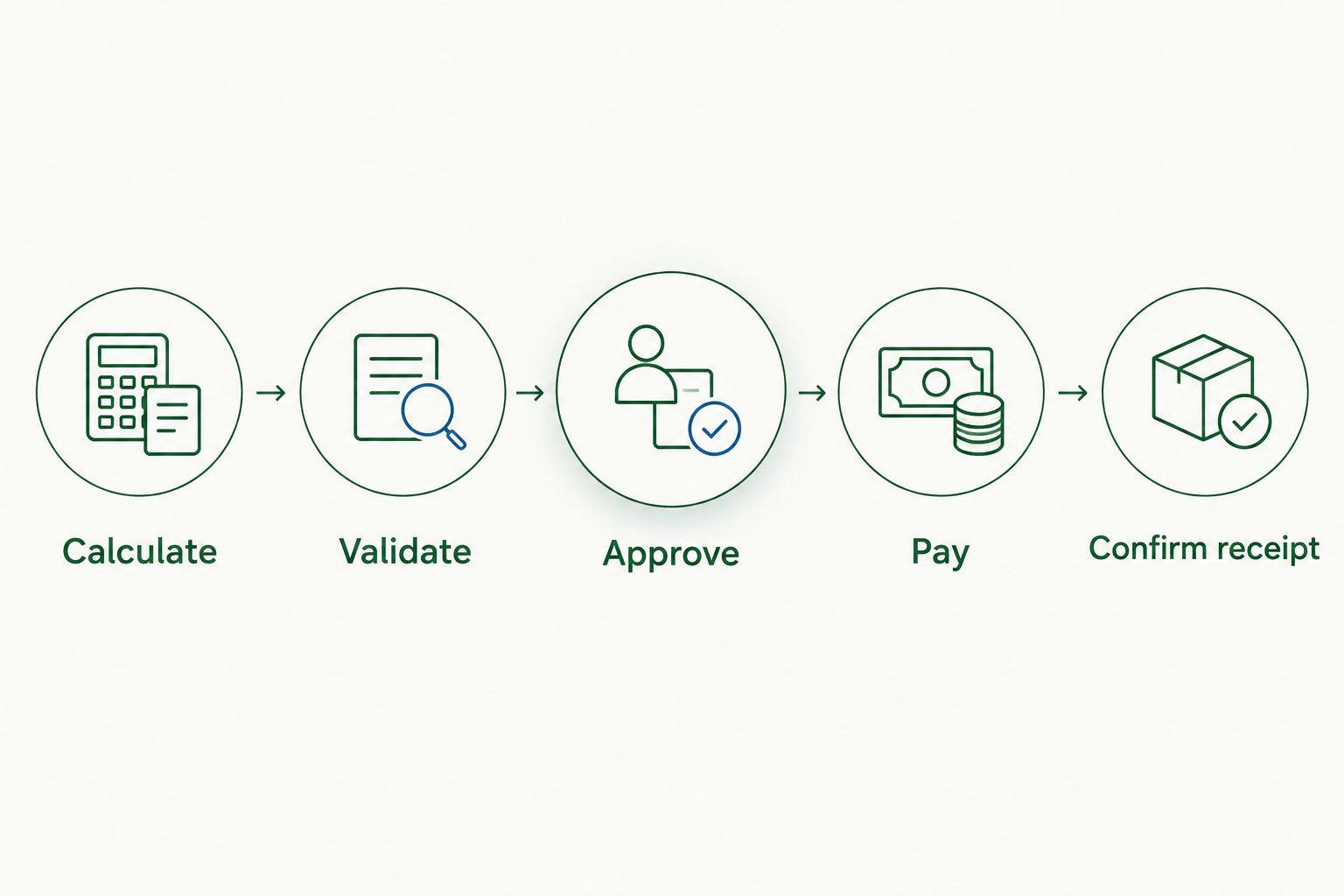
Use this sequence as the operating checklist: Calculate, Validate, Approve, Pay, Confirm receipt. Keep approval and receipt as distinct checkpoints.
04 Receipt and reconciliation
Close the loop after submission. Your workflow is incomplete if it creates payments but leaves rejected contributions sitting unnoticed.
Monitor processing. Review the payment service’s status records after the batch is submitted. Follow up unresolved items rather than assuming silence means success.
Investigate rejections. Identify the affected employee, contribution and reason. Correct the underlying record before arranging resubmission through the provider’s process.
Confirm receipt evidence. Retain the available records showing fund receipt. A bank debit establishes that money left your account, not necessarily that the fund accepted it.
Reconcile the accounts. Match payroll super liabilities, payment batches, bank movements and outstanding contributions. Investigate differences rather than clearing them with an unexplained journal.
Review the first live cycle. Check the complete path before relying on the workflow for later payrolls. Include an employee-level review, not just the batch total.
Expected result: Paid, outstanding and rejected contributions are distinguishable, with records supporting each status.
For payday super in 2026, make unresolved contributions part of the regular payroll review. A monthly reconciliation alone does not protect a deadline tied to each payday.
Choose the payment route that fits your payroll
Both an integrated connection and a separate payment service can support a controlled workflow. Choose based on the hand-offs your team can manage, not simply the number of screens involved.
Payment route | Best for | Main advantage | Main limitation |
|---|---|---|---|
Payroll-integrated super payment service | Businesses whose payroll provider supports the required payment workflow | Reduces repeated data entry between payroll and payment submission | Processing, approvals and receipt tracking still depend on the service’s capabilities |
Separate SuperStream-compatible payment service | Businesses needing a payment process outside their payroll system | Separates payment administration from payroll preparation | Adds a transfer and reconciliation step that needs clear ownership |
Use the route that gives you reliable receipt tracking and clear responsibility. Integration is useful, but it is not evidence of compliance on its own.
Daintree Consulting’s bookkeeping and payroll support fits businesses that want these responsibilities considered alongside their accounting. Outsourced support still needs agreed responsibilities for funding, approvals and exceptions; engaging a provider does not remove the employer’s obligations.
When payroll changes after approval
An off-cycle pay run, back payment or payroll correction needs its own controlled path. Do not assume the next scheduled batch will automatically resolve it.
Identify whether the change creates an additional contribution, corrects a calculation or relates to money already paid.
Review the contribution treatment and applicable deadline for that change.
Submit only the required adjustment through the provider’s documented process.
Check that the adjustment reaches the correct fund and appears in the reconciliation.
Do not resend an entire original batch to fix a single employee’s contribution. First establish whether the original payment was rejected, remains in progress or was received.
For overpayments, follow the fund’s or payment provider’s correction process. Do not assume an overpayment can simply be deducted from a future obligation without checking the rules.
Troubleshooting
Payroll is finalised, but no payment exists
Check whether the integration transfers data only, whether an approval remains outstanding and whether the payment connection is active. Finalising payroll and submitting an STP report do not establish that super was paid.
The bank debit fails
Check the bank details, payment authority and available funds, then follow the provider’s retry instructions. Confirm the failed batch’s status before creating another payment so you do not accidentally pay twice.
A fund rejects an employee’s contribution
Read the rejection reason and verify the employee’s fund and member details. Correct the source record as well as the payment record, then resubmit through the documented process and check the applicable deadline.
The payment shows as processing near the deadline
Contact the payment provider and establish the actual status. Do not treat a pending status as receipt, and do not send a duplicate without checking whether the original payment can still complete.
Payroll and the ledger disagree
Compare the same contribution periods and include adjustments, rejected items and payments still in transit. A timing difference needs an explanation and follow-up; an unexplained difference needs investigation.
Customise your workflow
Once the basic payment path works, extend it to employee onboarding, departures and off-cycle payroll. These events change employee records or contribution amounts and deserve the same validation as a standard pay run.
Add super payment status to your cash-flow review. Forecast the cash needed for wages and contributions together, while keeping their payment approvals and reconciliation records distinct.
For your 2026 handover document, record:
Who maintains employee fund details.
Who reviews calculations and authorises payments.
Who monitors receipt and resolves exceptions.
Who reconciles the liability and retains evidence.
Daintree Consulting can support bookkeeping, payroll and broader accounting needs. Start by clarifying which responsibilities stay with your business and which sit with your adviser.
FAQ
When does payday super start in Australia?
Payday super starts on 1 July 2026. Prepare the payroll calculation, payment connection, approval process and receipt monitoring before the change takes effect.
Does payday super mean the fund must receive money on payday?
The standard rule requires contributions to reach the employee’s fund within seven business days after payday, rather than necessarily on payday itself. Specific exceptions apply, so check the ATO guidance for the contribution concerned.
Can I automate super payments through payroll?
You can automate supported parts of the process when your payroll and payment services provide the required connection. Check separately how calculations, payment approvals, bank debits and fund-receipt reporting operate.
Does Single Touch Payroll pay my employees’ super?
No. Single Touch Payroll reports payroll information to the ATO; it does not itself transfer super contributions to employees’ funds. You need a separate payment process, even when it is integrated into the same software.
What super guarantee rate should payroll use in 2026?
The super guarantee rate is 12% in 2026. The amount payable also depends on the applicable earnings rules and employee circumstances, so review classifications rather than applying the rate indiscriminately to every payment.
What should I do if an automated super payment fails?
Check the payment status and failure reason immediately, then correct the issue through the provider’s process. Confirm whether any money was received before resubmitting, and seek advice if the contribution will be late.
Can my bookkeeper manage payday super?
A bookkeeper can manage agreed payroll and super administration tasks, including preparation, monitoring and reconciliation. Document who authorises payments, provides funds and resolves exceptions; the employer remains responsible for meeting its obligations.
One last thing
Make the final check employee-specific, not batch-specific. A payment batch can contain contributions with different outcomes. Before closing the payroll cycle, confirm that every unresolved employee contribution has an owner and a next action—not just that the batch left your bank account.
Talk to Daintree about your bookkeeping and payroll
Our ex-Big 4 team gives clear, senior-reviewed advice so you can act with confidence.
Book a free consultation →
Or explore our bookkeeping and payroll services.
