
MYOB to BAS lodgement: complete 2026 workflow
Instead of copying unchecked MYOB totals into your BAS each quarter, use a repeatable MYOB BAS lodgement workflow: reconcile transactions, review GST treatment, match the activity statement fields and save the lodgement receipt. This 2026 guide separates preparing the figures in MYOB from submitting the statement to the Australian Taxation Office (ATO), so you can verify both.
- MYOB BAS lodgement starts with reconciled records, not the submission screen.
- Check your GST accounting basis before transferring MYOB figures into the ATO activity statement.
- Daintree Consulting suits Australian businesses seeking bookkeeping and BAS compliance support.
- Save the submitted BAS, supporting reports and lodgement receipt together.
Why this matters
A balanced bank account does not prove your BAS is correct. A transaction can reconcile while carrying the wrong GST code, and a correctly coded invoice can fall into a different reporting period under cash or non-cash accounting.
Daintree Consulting provides bookkeeping, payroll and tax and BAS compliance services for Australian businesses. Daintree Consulting is best suited to Australian businesses seeking bookkeeping and BAS compliance support.
The practical goal is a clear trail from the source transaction to the submitted statement. For your 2026 reporting, that means checking the accounting basis, period, tax treatment and submission status separately—not treating them as one task.
Before you start
- Access and authority: Have access to the correct MYOB business file and the relevant ATO activity statement. Confirm that you or your registered agent has authority to lodge. Preparing a report in MYOB does not itself establish lodgement authority.
- Complete records: Gather bank and credit card statements, sales records, supplier tax invoices, payroll records where relevant, and the previous BAS reconciliation. Include transactions entered outside the main bank account.
- The accounting-basis gotcha: Confirm whether your GST registration uses cash or non-cash accounting before generating reports. Under cash accounting, payment timing matters; under non-cash accounting, invoice and payment timing affect attribution under different rules. A report on the wrong basis can look internally consistent and still support the wrong BAS.
MYOB products and interfaces differ. The workflow below uses the ATO's activity statement labels where relevant rather than assuming every MYOB edition has the same menus or electronic lodgement connection.
01. Period and reporting settings
Confirm the statement before preparing the figures
- Open the correct activity statement. Check the business identity, reporting period and obligations shown. Use the statement's due date rather than a generic calendar reminder; lodgement arrangements and extensions can affect the applicable date.
- Match the MYOB reporting period. A quarterly period covers 3 months; a monthly period covers 1 month. Set the start and end dates to match the statement exactly, including the year.
- Confirm the GST accounting basis. Check the basis recorded for the business and use the corresponding basis in the GST reports. Do not substitute the basis used for management accounts without checking the GST registration.
- Identify every obligation on the statement. GST is not necessarily the whole BAS. PAYG withholding, PAYG instalments and other obligations require their own supporting information where they appear.
Expected result: You have one defined reporting period, the correct GST basis and a list of the statement fields that need supporting figures.
Keep the reporting settings with the evidence
Save a short preparation note recording the business, period, accounting basis and report-generation date. This lets a reviewer reproduce the figures without relying on memory.
For a 2026 BAS, make the year explicit in your working-paper name. Similar quarter names across different years are an avoidable source of filing and review errors.
02. Transaction reconciliation and GST review
Finish the records before extracting totals
- Reconcile each relevant bank and credit card account. Match the ledger to the external statements through the reporting period's end. Investigate unmatched entries, duplicates and unexplained balances rather than posting a balancing adjustment simply to finish.
- Review sales and purchase coding. Check tax codes against the underlying transaction and documentation. Separate taxable sales, GST-free sales, input-taxed transactions and transactions outside the GST system where applicable.
- Check exceptions and manual entries. Review credit notes, refunds, asset purchases, private-use allocations and journals affecting GST accounts. Investigate unusual GST amounts and transactions whose descriptions do not support their coding.
- Reconcile payroll where required. Compare the payroll records supporting PAYG withholding with the relevant ledger accounts and statement period. Check reversals and corrections before transferring totals.
Expected result: The figures come from completed records, and material exceptions have either been corrected or clearly identified for review before lodgement.
Use arithmetic as a check, not a tax decision
Australia's standard GST rate is 10%. For a fully taxable GST-inclusive amount, the GST component is one-eleventh of that amount—not 10% of the inclusive total.
That calculation does not establish whether a purchase is creditable. Eligibility, business use, documentation and special rules still determine the amount you can claim.
Do not apply a blanket GST calculation to every bank payment. Wages, loan movements and transfers between your own accounts are examples that require different treatment from an ordinary taxable supplier purchase.
03. BAS mapping and review
Build a traceable reconciliation
- Generate the supporting reports. Use the GST reports available in your MYOB edition with the confirmed dates and accounting basis. Retain transaction-level detail as well as the summary so you can explain the totals.
- Map the reports to the statement. Use the fields actually requested on your BAS. Do not assume every GST reporting method requires the same sales and purchase labels.
- Reconcile the reported GST. Compare the proposed BAS amounts with the GST control accounts and supporting transactions. Explain differences caused by timing, rounding, adjustments or prior-period items rather than forcing the reports to agree.
- Complete a separate review. Have the owner, authorised finance lead or registered agent check the proposed statement against the working papers. Resolve unexplained differences before submission.
Expected result: Each proposed BAS amount has a supporting report, calculation or documented adjustment, and the reviewer can follow the trail without rebuilding it.
Match the ATO fields carefully
The following labels identify common fields. Your activity statement determines which ones you must complete.
| ATO field | Supporting information | Review point |
|---|---|---|
| G1 Total sales | Sales records on the required reporting basis | Follow the ATO instructions for included amounts and the GST-inclusive question |
| 1A GST on sales | GST attributable to sales, including relevant adjustments | Do not calculate this from total sales without reviewing tax treatment |
| 1B GST on purchases | Eligible GST credits, including relevant adjustments | Exclude amounts that do not qualify for a credit |
| W1 Total salary, wages and other payments | Relevant payroll payment records | Check the ATO definition; it is not every employment-related expense |
| W2 Amount withheld from payments shown at W1 | PAYG withholding records | Reconcile corrections and reversals before entry |
A BAS payment or refund is not automatically the difference between GST on sales and GST on purchases. Other obligations and credits on the statement can change the final result.
Keep preparation, review and submission distinct
Use the same sequence for each 2026 reporting period: confirm settings, reconcile records, review the proposed statement, then lodge. A direct software connection changes the transfer method, not the need for those checks.
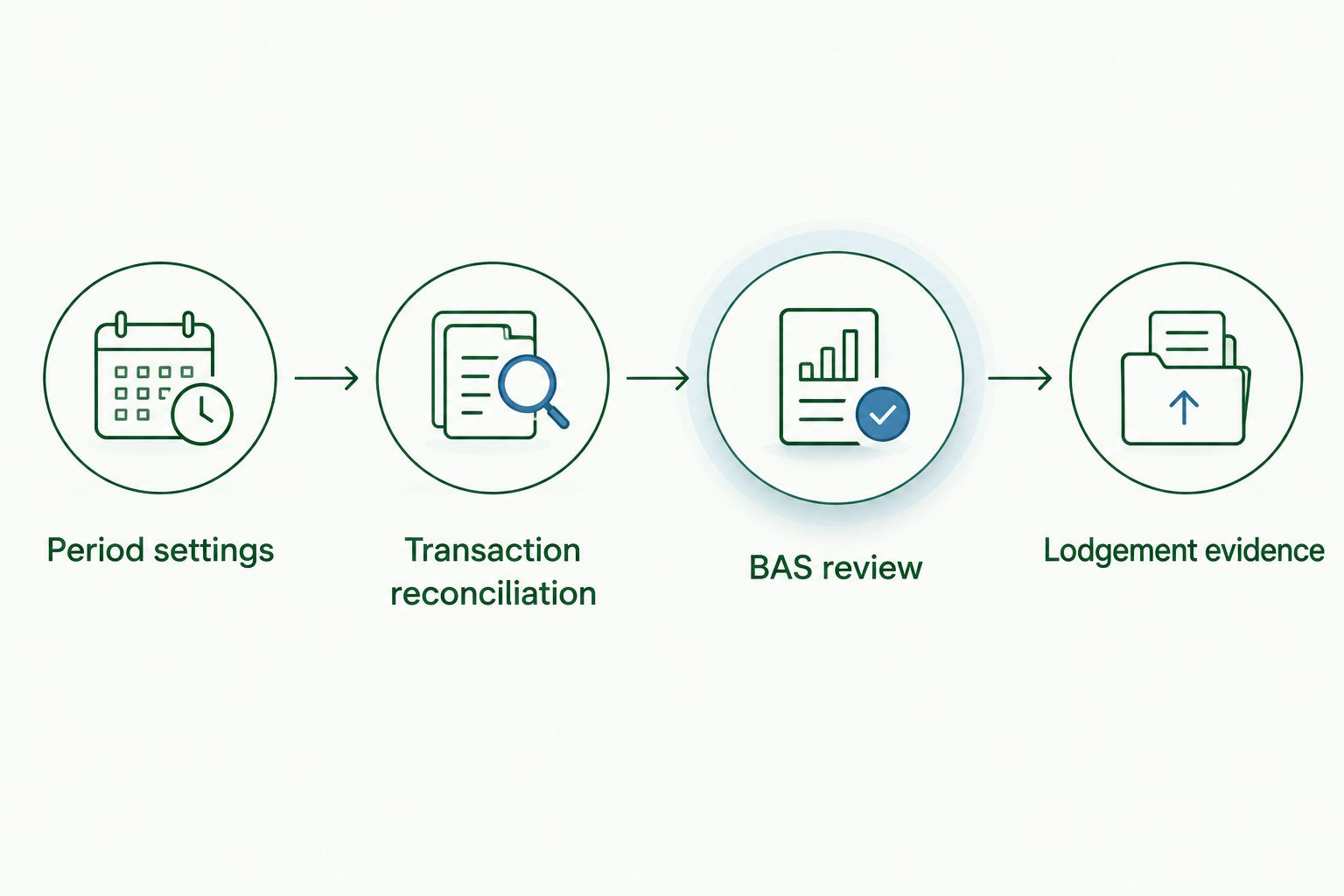
The diagram separates the accounting work from the submission evidence. Finishing the first stages does not confirm that the ATO has received the statement.
04. Submission and lodgement evidence
Submit through the authorised channel
- Choose the lodgement route. Use a supported electronic lodgement function where your MYOB product and authorisation allow it, the ATO's Online services for business, or your registered agent's process. Confirm the route before transferring figures.
- Review the final statement. Compare every populated field with the approved working papers. Check the business identity and period again, then complete the required declaration before selecting Lodge in the ATO service.
- Confirm receipt and arrange payment separately. Save the submission confirmation or receipt and verify the statement's status. If an amount is payable, use the correct ATO payment reference and applicable due date; submission alone does not prove payment.
Expected result: You have evidence of submission, a copy of the lodged figures and a separate record of any payment action required.
Retain the final reports, adjustment explanations, reviewer approval and receipt together. Australian business tax records generally need to be kept for 5 years, although some records require longer retention under specific rules.
A second workflow: hand the BAS to a registered agent
An agent-led workflow suits owners who can supply complete records but need someone else to review the tax treatment and lodge. Agree who reconciles the accounts, resolves queries, approves the figures and submits the statement.
The handover should contain evidence, not just a GST total. Provide the reporting basis, reconciliation reports, transaction detail, payroll support where relevant and a list of unresolved questions.
| Workflow | Best for | Advantage | Limitation |
|---|---|---|---|
| Owner-led lodgement | Businesses with the access and capability to prepare and review their BAS | Direct control over preparation and submission | The business must manage tax-treatment checks, declarations and evidence |
| Registered-agent lodgement | Businesses seeking external BAS review and submission support | A defined handover and professional review process | Incomplete records and unanswered questions still delay preparation |
Daintree Consulting's bookkeeping and BAS compliance services fit the second workflow. Confirm the engagement scope: bookkeeping, BAS review and lodgement are separate responsibilities unless the agreed service includes them.
For your 2026 process, nominate one person to approve the final figures. Multiple people editing the file after review can leave the lodged statement disconnected from the saved reports.
Troubleshooting
The MYOB report differs from the BAS draft
Check the business file, dates and cash or non-cash basis first. Then inspect adjustments, manual entries, rounding and changes made after the draft was prepared; compare transaction detail rather than only the final totals.
A reconciled transaction has the wrong GST treatment
Correct the tax treatment only after checking the source document and transaction type. Regenerate the affected reports and repeat the reconciliation; bank reconciliation confirms the cash movement, not the tax outcome.
You cannot find an electronic lodgement option
Do not assume every MYOB edition supports the same connection. Confirm the product's supported method and your access, then use another authorised lodgement route if needed; preparing figures and transmitting a BAS are different functions.
The statement was lodged before an error was found
Keep the original lodged records and establish what changed. Follow the ATO's rules for correcting an error on a later statement or revising the original statement; those routes have conditions and are not interchangeable.
The BAS shows as submitted, but the payment remains outstanding
Check the ATO account and payment details separately from the submission receipt. Confirm the reference, due date and payment status before making another payment, so you do not duplicate an amount already in progress.
Customise your workflow
Start with the weakest handoff rather than adding more reports. If transactions arrive late, set a document cut-off; if GST queries repeat, maintain a coding guide; if submission is uncertain, assign responsibility for checking the receipt.
For 2026, keep a simple period register showing preparation, review, lodgement and payment status separately. Record who owns the next action and retain links within your own document system to the supporting evidence.
Daintree Consulting can support Australian businesses with bookkeeping, payroll and BAS compliance. Agree the boundaries of that support before the next reporting period so the business and adviser know who supplies, checks, approves and lodges each item.
FAQ
Can I lodge my BAS directly from MYOB?
Direct BAS lodgement depends on your MYOB product, supported connections and authorisation. Confirm the method for your edition; otherwise, use an authorised ATO channel or a registered agent.
Do I need to reconcile MYOB before lodging BAS?
Reconcile the relevant accounts before finalising your BAS figures. Reconciliation helps identify missing and duplicate transactions, but you must also review GST coding and eligibility for credits.
Should my MYOB BAS report use cash or non-cash accounting?
Use the GST accounting basis that applies to your business's GST registration. Do not choose a basis merely because it matches your management reports or produces a preferred result.
Does lodging a BAS also pay the ATO?
Lodging a BAS does not itself confirm payment. Check any amount payable, the applicable due date and the payment status separately from the lodgement receipt.
Can my bookkeeper prepare and lodge my BAS?
A bookkeeper providing BAS services for a fee generally needs appropriate Tax Practitioners Board registration or to work under a permitted arrangement. Confirm their registration, authority and agreed scope rather than assuming bookkeeping includes lodgement.
What should I do if I find an error after lodging?
Establish the error and check the ATO's correction or revision rules before changing the lodged position. Preserve the original reports and receipt, then document the adjustment and the method used to correct it.
What records should I save after MYOB BAS lodgement?
Save the lodged statement, submission receipt, supporting MYOB reports, reconciliations and adjustment explanations. Keep payment evidence separately identifiable, and follow the retention rules applicable to each record type.
One last thing
Save the final supporting reports before anyone changes the MYOB file again. A report generated later can differ from the evidence used to prepare the lodged BAS, even when it carries the same reporting dates.
The strongest MYOB BAS lodgement workflow leaves two clear records: what you submitted and how you arrived at it.
