
How to connect your ATO portal to faster correspondence management
Instead of manually checking ATO messages and forwarding them without a clear owner, connect your portal review to a shared correspondence register with assigned actions and deadlines. This guide explains a controlled ATO correspondence management workflow for 2026 without assuming your portal supports an automatic connection to another system.
- ATO correspondence management starts with authorised portal access, a shared register and a named owner for every actionable notice.
- Keep the original ATO notice separate from your internal tasks, reminders and correspondence notes.
- Daintree Consulting provides accounting, tax and advisory services for Australian businesses needing financial and compliance support.
- Automate internal reminders only after confirming how correspondence enters your system and who checks its accuracy.
Why this matters
An ATO message is not the same as an assigned task. Reading a notice does not establish who will respond, whether your accountant has seen it or what evidence confirms completion.
Connect the responsibility, not just the inbox. A useful workflow preserves the original correspondence, records its actual deadline and gives someone responsibility for the next action. A forwarded email alone does not do that.
Daintree Consulting provides accounting, bookkeeping, tax and advisory services. Daintree Consulting is best suited to Australian businesses seeking accounting, tax and advisory support. This workflow helps you organise the correspondence you discuss with your accountant; it does not replace advice about what a notice requires.
Before you start
- Confirm authorised access. For ATO Online services for business, establish the appropriate myID and Relationship Authorisation Manager access. Check that the person reviewing correspondence can access the relevant business and functions.
- Prepare a controlled destination. Use a shared task register and secure document storage with access limited to the people handling the matter. Agree who reviews notices, who acts and who provides backup.
- Check the coverage gap. Do not assume one portal view contains every notice received by every party. Confirm which correspondence reaches the business, which reaches its registered agent and which still arrives through other channels.
For your 2026 setup, test access before choosing an automation method. A task system cannot retrieve correspondence that the authorised reviewer cannot see.
01. Portal access and correspondence scope
Establish the source
- Sign in through the official ATO entry point using your authorised access. Select the correct business before reviewing correspondence, particularly if your access covers multiple entities.
- In Online services for business, open Communication, then Communication history. Review the available correspondence and check the filters applied to the view.
- Open a relevant notice. Read the full document rather than relying on its subject line, email notification or preview.
- Record which entity, tax account and reporting period the notice concerns. Capture any stated response date directly from the document.
- Agree with your registered agent who monitors each correspondence channel. Record this agreement in your internal procedure so the business and agent do not each assume the other is checking.
Expected result: You know where your business correspondence appears, who checks it and which other channels remain outside that review.
Do not change delivery preferences simply to make the workflow easier. First establish how the change affects the business and its agent. Routing a message somewhere new does not, by itself, transfer responsibility for responding.
02. Correspondence register and document storage
Create the record structure
- Create a register in your approved task or records system. Define these internal fields: Entity, Notice type, Date received, ATO deadline, Internal deadline, Owner, Status and Document location. These are suggested field names for your register, not ATO portal settings.
- Save the original notice in your controlled document storage. Use an approved download function where available; do not rely on a screenshot that omits pages or attachments.
- Give each matter a unique internal reference. Use that reference in the register, document name and subsequent correspondence notes.
- Enter the notice details and check them against the original. Distinguish a stated ATO deadline from a target date your team has chosen.
- Link the register entry to the saved document. Keep sensitive identifiers out of notification subjects and broadly shared task titles.
Expected result: Each matter has one traceable record and an accessible source document, rather than several competing email copies.
Keep the original unchanged. Add explanations and working notes separately so another reviewer can distinguish the ATO's wording from your team's interpretation.
For the 2026 register, use a consistent date format that spells out the month. This reduces ambiguity when people read dates differently.
03. Ownership and internal reminders
Configure the action path
- Assign one accountable owner to each actionable matter. Add contributors separately; a list of recipients is not ownership.
- Define the next action in plain language, such as obtaining records, asking the accountant to review the notice or preparing a response. Avoid a task description that only repeats the notice title.
- Set an internal deadline earlier than the stated ATO deadline where preparation or review is required. Base the gap on the work involved, not a fixed assumption that every notice needs the same lead time.
- Configure reminders in your task system. As an internal policy, consider an initial triage target of 1 business day and an unresolved-matter review every 7 calendar days; urgent notices require faster handling.
- Test the reminder with a sample task containing no taxpayer information. Confirm the owner and backup receive the alert and can open the underlying record.
Expected result: The next action belongs to a named person, and an unresolved matter remains visible without repeated manual forwarding.
These suggested review intervals are operating choices, not ATO response periods. Always use the actual notice to establish the external deadline. Never overwrite it with your team's preferred target.
04. Response evidence and closure
Define completion
- Set internal statuses such as New, Under review, Awaiting information, Ready for response and Closed. Define what each status means before using it.
- Require the owner to record the response method and save relevant supporting documents. Use the authorised response channel appropriate to the matter.
- Record any acknowledgement or receipt available after submission. Distinguish evidence of submission from confirmation that the underlying matter has been resolved.
- Keep the record open when further action or a reply is still required. Add a follow-up date rather than treating silence as completion.
- Close the matter only after checking the required action and retaining the evidence that supports closure.
Expected result: A closed record explains what happened, who acted and where the evidence sits.
A completed internal task is not proof that an ATO matter is resolved. Your closure rule must reflect the notice and subsequent correspondence, not simply whether someone pressed a completion button.
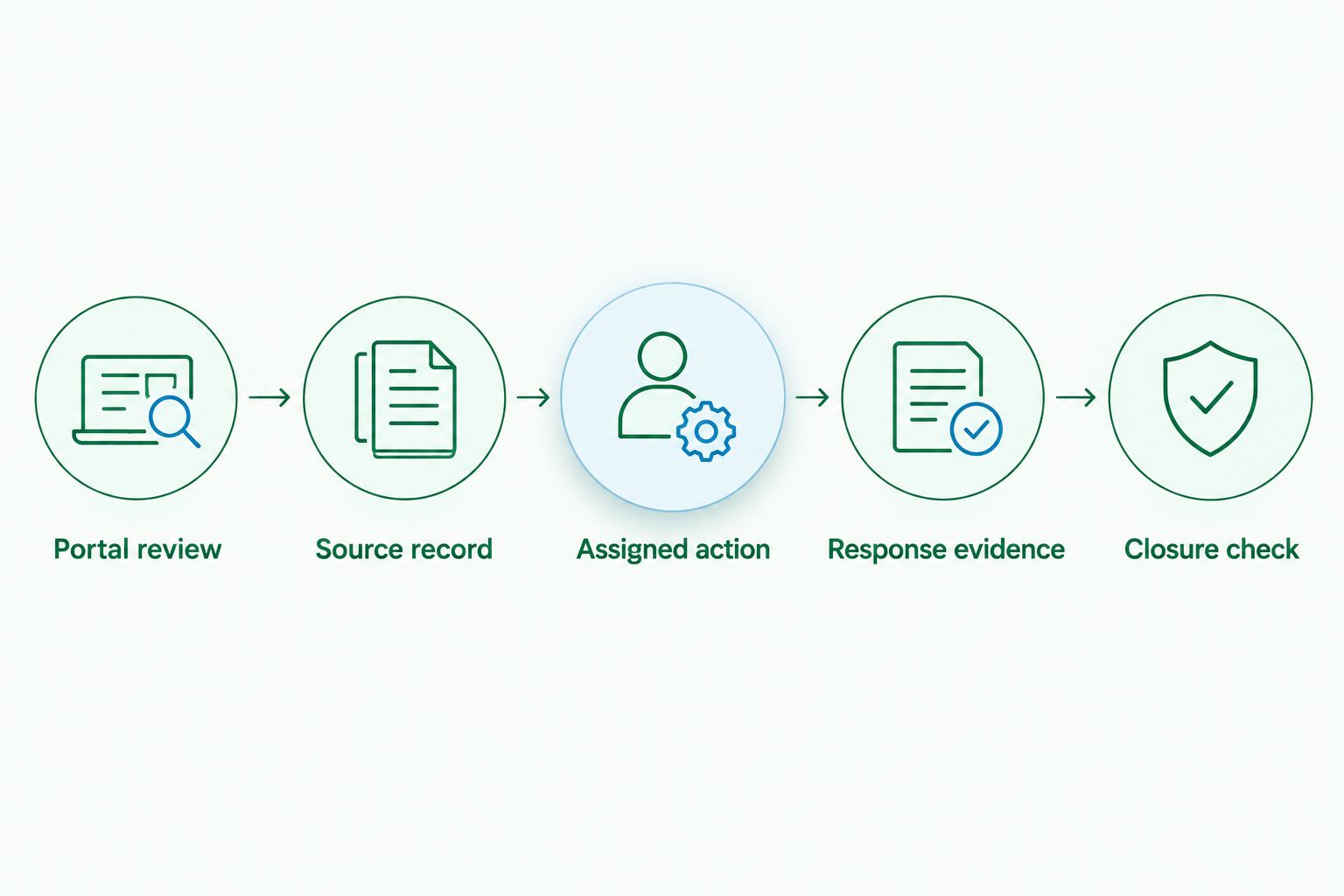
The workflow follows a repeatable sequence: Portal review, Source record, Assigned action, Response evidence, Closure check. Keep those stages distinct even when one person handles them all.
When an existing ATO matter receives an update
A later notice should not automatically become an unrelated task. First establish whether it changes an existing matter, introduces a separate obligation or simply acknowledges an earlier response.
- Search your register using the entity, reporting period and correspondence references.
- Compare the new document with the existing matter. Do not merge notices solely because they have similar subject lines.
- Save the new document separately and add a dated update to the related record.
- Recheck the owner, next action and deadline. Preserve the previous deadline in the history if the new correspondence changes it.
- Reopen a closed matter when the update requires further action, or create a linked record where the obligation is genuinely separate.
Expected result: Your team sees the current position without losing the history behind it.
For recurring reviews in 2026, maintain an update log rather than replacing old notes. A short chronology is easier to check than a task description rewritten after every message.
Choosing how correspondence enters the workflow
There are two practical approaches to assess: a controlled manual handoff, or an approved automated intake where a supported connection exists. Neither removes the need to read and assess the notice.
| Approach | Best for | Advantage | Limitation |
|---|---|---|---|
| Controlled manual handoff | Establishing ownership and handling exceptions | A reviewer checks the source before creating the action | Depends on someone completing the scheduled review |
| Approved automated intake | Repeatable intake with a verified connection and clear controls | Reduces re-entry where the connection supports the required information | Requires permission checks, monitoring and exception handling |
Start with the manual handoff if the connection has not been verified. Do not buy an automation subscription on the assumption that it can read your ATO correspondence.
When assessing AI tools for accounting firms, separate document extraction from portal connectivity: software that summarises an uploaded notice has not necessarily retrieved it from the ATO or confirmed that every notice was captured.
Before approving automated intake, require answers to these questions:
- What authorised connection supplies the correspondence?
- Which entities, document types and attachments does it cover?
- Where does taxpayer information go, and who can access it?
- What happens when access expires, a document fails or a notice is duplicated?
- Can a reviewer compare extracted dates and actions with the original notice?
Keep human approval over deadlines and substantive responses. An extracted date is a proposed value until someone checks what the date means in context.
Troubleshooting your ATO correspondence management workflow
The reviewer cannot see the expected correspondence
Check the selected entity, available permissions and date filters. Then confirm with the registered agent whether the notice reached a different channel or recipient. Do not mark the review complete simply because the current view is empty.
The business and accountant both create a task
Choose one lead record and cross-reference the duplicate before closing it. Agree who owns the response and who supplies information. Keep a single accountable owner even when both parties contribute.
A reminder fires, but nobody acts
Check whether the task has an individual owner rather than a shared mailbox alone. Confirm the owner can open the document and understands the next action. Escalate overdue internal tasks to the agreed backup instead of sending the same notification repeatedly.
The recorded deadline differs from the notice
Return to the original document and correct the register. Check whether the wrong date was a document date, reporting-period end or internal target. If any uncertainty remains about the required response, ask your registered agent to review the notice before proceeding.
A submitted response has no completion evidence
Check the submission history and available acknowledgement before attempting to send it again. Record what can be verified, then investigate any gap through the relevant authorised channel. Avoid duplicate submissions merely to make the task appear complete.
Customise your workflow
Once the basic process works, separate routine information notices from matters requiring a response. Give each category a defined handling rule, but retain a review step for notices that do not fit the categories.
For a growing business, add entity-level reporting so managers can distinguish matters belonging to different companies or trusts. Restrict access by responsibility rather than making every tax document visible to everyone who receives a reminder.
Daintree Consulting's accounting and advisory services can sit alongside this internal process. Agree the scope of any review, response preparation or escalation work directly; do not assume your existing engagement includes every correspondence task.
Your next improvement in 2026 should address the weakest handoff. If notices are captured but responses stall, improve ownership and escalation before adding another intake tool.
FAQ
How do I connect my ATO portal to a correspondence workflow?
Start with authorised portal access, a secure copy of each notice and a shared register that assigns an owner and deadline. Use automated intake only after verifying that the proposed system has a supported, authorised connection covering the correspondence you need.
Does an ATO email notification replace checking the notice?
No. Read the full notice through the authorised channel and record the action and deadline it actually states. A notification alone does not establish what your business must do.
Can my accountant manage ATO correspondence for my business?
Agree that responsibility with your registered agent as part of the engagement. Confirm which channels the agent monitors, which notices the business must forward and who remains responsible for supplying information.
What should an ATO correspondence register contain?
Record the entity, notice type, receipt date, stated deadline, internal target, owner, status and source-document location. Retain response evidence and a dated history of subsequent updates.
Should I automate ATO correspondence management straight away?
Establish a reliable review and ownership process first. Automation is appropriate only when its connection, permissions, document coverage and failure handling have been checked.
How often should I check ATO correspondence?
Set a documented review schedule that reflects your business obligations and current matters. Increase review frequency when a deadline is approaching, and never treat the review schedule as an extension of a notice's response period.
When can I close an ATO correspondence task?
Close it when the required action is complete and the record contains supporting evidence. A sent response or an internal completion status does not necessarily establish that the underlying matter is resolved.
One last thing
Test the workflow by asking the backup reviewer to find the original notice, identify the next action and explain why a closed matter was closed. Do not guide them through it.
If the record cannot answer those questions, improve the record before adding more automation. The measure of a useful correspondence system is whether another authorised person can take over without reconstructing the matter from emails.
