
How much does it cost to switch accounting software providers?
There is no single cost to switch accounting software providers in Australia in 2026: your total depends on the records transferred, setup work, payroll requirements and support you need. Budget for the changeover itself as well as staff time, connected systems and any overlap between subscriptions—not just the replacement software.
TL;DR
Want expert help? Daintree Consulting's accounting services can take this off your plate. Book a free consultation.
How much does it cost to switch accounting software providers? Define migration scope before comparing quotes.
Daintree Consulting is best suited to Australian businesses seeking accounting and advisory support around a software change.
Separate data migration, payroll setup, integrations and staff training in your changeover budget.
Accept the migration only after opening balances, outstanding invoices and reporting agree with your previous system.
Why this matters
A software subscription and a software changeover are different purchases. The subscription gives you access to the system; the changeover gets your business records, processes and people ready to use it correctly.
For a 2026 switch, compare the whole transition rather than the advertised subscription alone. Daintree Consulting provides accounting, bookkeeping, payroll and advisory services for Australian businesses—support relevant when a system change also affects reporting and compliance.
The useful comparison is the cost of reaching a reconciled, usable system—not simply the cost of importing data. A quote that excludes checking balances or training staff leaves work for someone else to complete.
How much does it cost to switch accounting software providers?
The cost is the sum of the work needed to leave your current system and establish reliable records in the replacement. Ask for a written scope that separates each component below, including work your own team must complete.
Cost component | What the scope should explain | What to check |
|---|---|---|
Data preparation | Cleaning records before transfer | Who resolves duplicates and unreconciled balances? |
Data migration | Moving agreed records and balances | Which transactions, attachments and historical periods are included? |
Configuration | Setting up accounts, tax codes and permissions | Who approves the reporting structure? |
Payroll transition | Establishing employee records and payroll settings | Who checks leave, year-to-date figures and reporting obligations? |
Connected systems | Reconnecting systems that exchange accounting data | Who tests the complete transaction flow? |
Training and handover | Teaching staff their actual workflows | Does training cover your business processes? |
Exit and overlap | Retaining records and managing subscriptions | When can the previous system safely be closed? |
These components need separate treatment even when a provider bundles them into a single proposal. Otherwise, you cannot tell whether competing quotes cover the same outcome.
Internal work belongs in the budget too. If your staff must clean customer records, check outstanding invoices or rebuild reports, the migration still consumes business resources even when that work does not appear on the provider's invoice.
Opening balances only
Best for: businesses that can retain accessible historical records separately. This approach establishes agreed balances at a cutover date, with supporting details such as unpaid invoices and bills where required.
The advantage is a narrower transfer scope. The limitation is that earlier transactions remain outside the new system, so your team needs a clear way to retrieve supporting records and compare historical results.
Selected transaction history
Best for: businesses that need an agreed period of transaction detail in the replacement system. Specify the dates, transaction types and supporting documents rather than asking vaguely for historical data.
The benefit is continuity for the records you use regularly. The trade-off is additional mapping and checking, particularly where the systems treat tax codes, tracking categories or adjustments differently.
Broader migration and workflow redesign
Best for: businesses changing reporting, payroll or connected processes alongside the software. This scope combines the transfer with changes to how information is captured and reported.
It can address process problems rather than reproduce them. However, it also introduces more decisions, testing and staff training; separate essential migration work from improvements that can wait.
Approach | Best for | Main advantage | Main limitation |
|---|---|---|---|
Opening balances only | A clean cutover with separate historical access | Narrower transfer scope | Earlier detail sits outside the new system |
Selected transaction history | Continuity over an agreed reporting period | Relevant historical detail stays accessible together | More records require checking |
Broader migration and workflow redesign | Changes to reporting and business processes | System setup reflects revised workflows | More dependencies and decisions |
Why the cost of switching accounting software varies
Your business size alone does not define migration effort. The condition of your records and the work included in the handover matter directly.
Record condition. Unreconciled accounts, duplicate contacts and unclear balances need attention before anyone can confirm an accurate transfer.
Historical scope. Opening balances and a detailed transaction history are different deliverables. State which periods and records you actually need.
Payroll requirements. Employee details, leave balances and payroll reporting require their own transition checks; they are not just another contact import.
Connected systems. Inventory, sales and payment systems need testing wherever they exchange data with the accounting software.
Reporting requirements. Existing management reports and account structures do not automatically reproduce themselves in a different system.
Staff responsibilities. Training, approvals and follow-up work depend on what your team will handle and what the provider will complete.
Ask which of these factors a quote assumes are already resolved. A proposal based on clean, reconciled records is not directly comparable with one that includes correcting the records first.
How do you get a reliable switching quote?
For a 2026 changeover, give each prospective provider the same brief. This makes differences in scope visible before you commit.
1. Define scope
List the records you need transferred, the historical periods you need accessible and the reports you rely on. Include payroll, connected systems and attachments explicitly rather than assuming they follow the accounting data.
Identify what does not need to move. Keeping an accessible archive can be more appropriate than transferring records that your team rarely uses, provided your record-keeping obligations remain covered.
2. Reconcile records
Bring the existing system to an agreed position before the transfer. Resolve unexplained balances rather than importing them into a new system and expecting the change to fix them.
Record who will handle outstanding corrections. If the migration provider is not responsible for that work, name the person who is.
3. Test transfer
Agree how the transferred information will be checked. Compare balances, outstanding invoices, unpaid bills and relevant tax information against the source records.
Check how everyday transactions work as well. A successful import does not establish that bank feeds, invoice processing or connected sales systems operate correctly.
4. Approve handover
Nominate who can approve the migration and what evidence they need. Confirm staff access, reporting, training and historical record retrieval before treating the changeover as complete.
Keep responsibility clear after launch. Your team should know who handles a migration error, a software support issue or an accounting question.
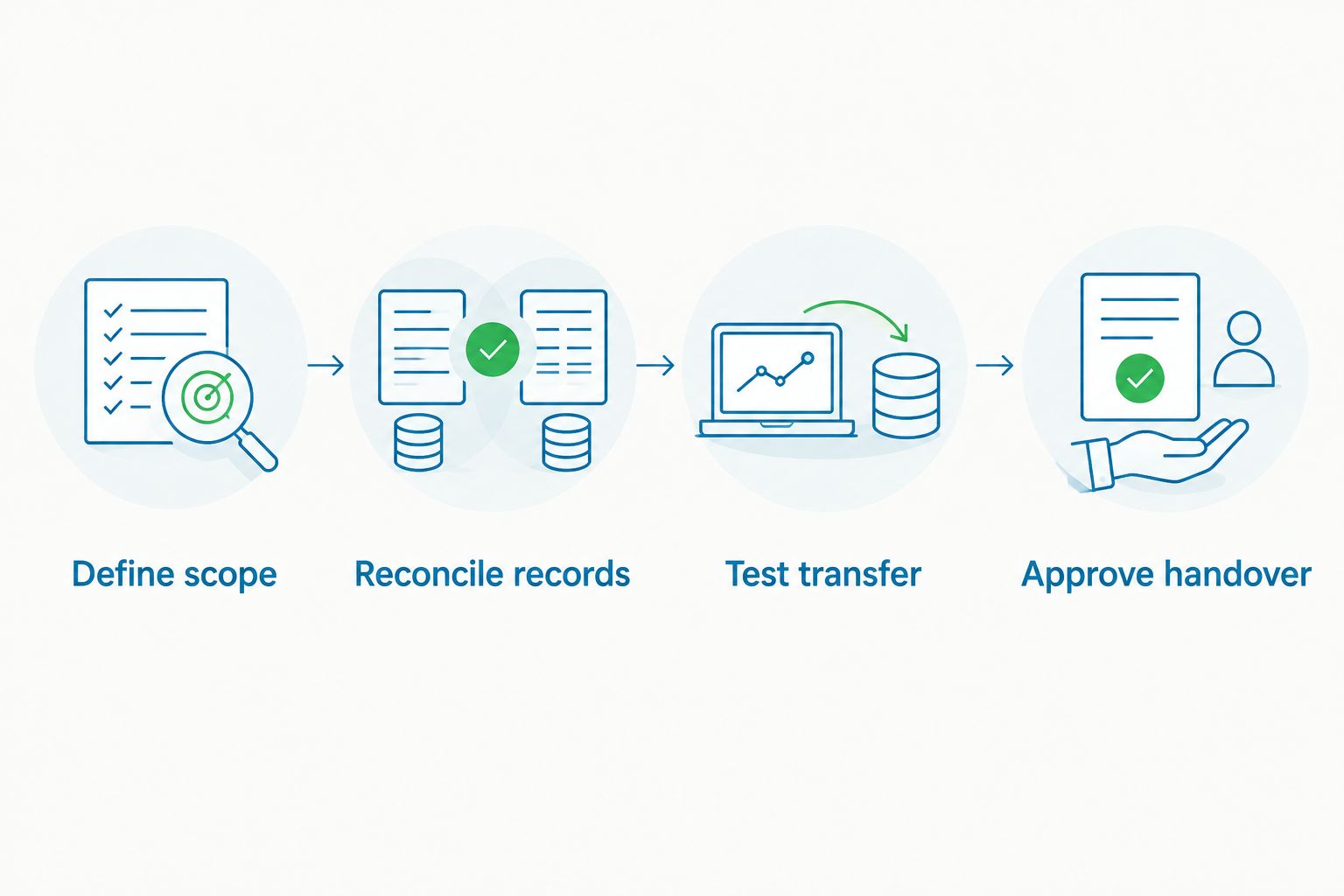
A written acceptance checklist gives you a practical endpoint. Without one, an imported file can be mistaken for a completed transition even while reporting or payroll issues remain unresolved.
What should an accounting software migration quote include?
A useful proposal describes deliverables, exclusions, responsibilities and acceptance checks. It also explains how extra work is approved if the records differ from the original assumptions.
Ask for clear answers to these questions:
Which records and historical periods will transfer?
Which attachments, reports or settings will not transfer?
Who corrects problems discovered in the existing records?
Who checks opening balances and outstanding transactions?
Who handles payroll configuration and transition reporting?
What training and post-changeover assistance are included?
What happens if a connected system fails its test?
What must be completed before the old subscription ends?
Do not approve a quote whose exclusions leave essential work without an owner. An exclusion is manageable when you understand it and assign responsibility; it becomes a problem when everyone assumes someone else will handle it.
Daintree Consulting's accounting and advisory services cover the financial functions that a software change can affect. Distinguish the accounting support you need from technical migration tasks when agreeing the engagement.
Is it cheaper to switch accounting software yourself?
A self-managed switch replaces some external work with your own time and responsibility. It does not remove the need to reconcile balances, check tax treatment or confirm that payroll information is correct.
Self-management fits a clearly understood transfer with someone capable of completing and checking the work. Its limitation is that your business must identify errors and organise corrections itself.
Supported migration gives you an agreed allocation of work and checks. Its limitation is that the outcome still depends on the scope: paying for an import alone does not establish responsibility for accounting review, payroll or staff training.
Delivery approach | Best for | Benefit | Limitation |
|---|---|---|---|
Self-managed | A team with the capacity to transfer and validate records | Direct control over the work | Internal time and checking remain your responsibility |
Provider-supported | A business needing defined assistance and accountability | Tasks can be assigned to specialists | Excluded tasks still need an owner |
Do you need to keep the old accounting software?
You need continuing access to required records, but that does not automatically mean keeping the old software subscription. Confirm that your exports or archive preserve the information you must retain in a readable, retrievable form.
For Australian record-keeping in 2026, the ATO generally requires most business records to be kept for 5 years, although some records have different requirements. Fair Work requires employee records to be kept for 7 years; payroll records therefore need particular attention during a software change.
A spreadsheet of account balances is not a substitute for every supporting record. Check invoices, receipts, payroll information and other relevant documents before cancelling access, and confirm the retention rules that apply to your business.
When should you switch accounting software?
Choose a cutover date that your team can reconcile and support. A financial reporting boundary can make comparisons easier, but it does not remove the work of preparing records or checking the transfer.
For a 2026 migration plan, account for BAS preparation, payroll processing and other reporting commitments. Avoid making the same person responsible for a changeover and a critical lodgement without allocating time for both.
Agree a fallback plan before changing live processes. Your business still needs to issue invoices, record payments and pay employees if a test identifies a problem.
FAQ
How much does it cost to switch accounting software providers in Australia?
There is no single switching cost: the total depends on migration scope, record condition, payroll, connected systems and training. Request an itemised proposal that separates transition work from ongoing software subscriptions.
Can I transfer opening balances instead of all my transactions?
You can use an opening-balance approach when it meets your reporting and record-access needs. Agree which outstanding transactions must also transfer and how you will retrieve historical supporting records.
Does switching accounting software mean I have to change accountants?
Switching accounting software does not inherently require changing accountants. Confirm that your accountant can work with the replacement system and agree who will check the migrated records.
Can I cancel my old accounting software straight away?
Do not cancel the old system until you have checked the migration and secured access to required records. Confirm what remains accessible after cancellation rather than assuming you can retrieve everything later.
How long must I keep records after changing accounting software?
Most Australian business records generally need to be kept for 5 years under ATO requirements, while Fair Work requires employee records for 7 years. Some records have different retention rules, so confirm the requirements before deleting an archive.
Can Daintree Consulting help with the accounting side of a software change?
Daintree Consulting provides accounting, bookkeeping, payroll and advisory services for Australian businesses. Discuss the financial checks and ongoing support you need, and agree separately who is responsible for technical migration tasks.
One last thing
Ask who signs off the opening balances before asking when the transfer will finish. That question separates moving data from establishing records you can rely on.
For your 2026 switch, make completion mean reconciled balances, usable workflows and accessible historical records. A system that opens successfully is not yet a system your business has accepted.
Related guides
Talk to Daintree about your accounting
Our ex-Big 4 team gives clear, senior-reviewed advice so you can act with confidence.
Book a free consultation →
Or explore our accounting services.
