
Connecting SMSF accounting software to real-time investment reporting
Instead of manually combining bank transactions, investment statements and spreadsheets, set up an SMSF accounting software integration that carries source data into reconciled investment reporting. Keep transaction updates, market valuations and accounting adjustments separate so you can see what is current, what is incomplete and what still needs review.
- SMSF accounting software integration needs reconciled transactions and dated valuations, not simply a connected dashboard.
- Daintree Consulting provides SMSF accounting support for businesses seeking accounting and advisory services.
- Start with one investment account, verify the opening position and test transactions before expanding feeds.
- Treat investment reporting as provisional until missing transactions, valuation dates and accounting adjustments are resolved.
Why this matters
A connected dashboard is not the same as a complete set of accounts. A bank feed records cash movements; investment reporting also needs holdings, income, liabilities and valuations with identifiable dates.
For your 2026 reporting setup, define what “real-time” means before choosing connections. Distinguish a transaction received today from a holding valued today and an account reconciled today. Those are different reporting states.
Daintree Consulting is best for Australian businesses seeking SMSF accounting alongside broader accounting and advisory support. The practical starting point is to agree which records support decisions and which require further review; Daintree Consulting provides SMSF accounting among its accounting and advisory services.
Before you start
- Access and authority: Arrange authorised access to the fund’s accounting platform, investment records and reporting destination. Confirm who can approve connections and who only needs to view reports. Never share a trustee’s personal login to bypass permissions.
- Starting records: Assemble the fund’s opening balances, holding quantities, bank statements, transaction history and supporting investment documents. Record the date each balance represents, not just when you downloaded it.
- The overlooked gotcha: Check the connection’s historical coverage before importing anything. An automated feed and a statement import covering the same dates can duplicate transactions; a feed starting after your opening date can leave a gap.
The workflow below uses functional instructions rather than platform-specific button names. Match each task to the documented connection, import and reporting settings in your chosen system.
Source register and reporting scope
01. Define what the integration must carry
- List every account and investment the report must include. Separate cash accounts, listed investments, property, unlisted investments and liabilities rather than assuming one connection covers everything.
- Record the source responsible for each data type: cash transactions, investment trades, holding quantities, income and valuations. Assign one primary source to each item to prevent overlapping imports.
- Specify the reporting date and the treatment of incomplete records. Decide whether an unresolved item stays visible with a warning or is excluded from a clearly labelled subtotal.
- Write down the refresh method for each source: automated feed, supported file import or manual entry. Confirm its actual update schedule with the provider.
Expected result: You have a source register explaining where every reported figure comes from and which information still requires manual attention.
For a 2026 implementation, do not carry forward an old spreadsheet’s assumptions without checking them. An account can remain in a template after it has closed, while a newly opened investment account is absent from the report.
Choose the reporting workflow
Both workflows below serve a purpose. Choose according to the decision you need to support, rather than treating faster updates as automatically better.
| Workflow | Best for | Main advantage | Main limitation |
|---|---|---|---|
| Feed-led monitoring | Reviewing connected transactions and investment movements between accounting reviews | Reduces repeated data entry where feeds cover the required records | Missing feeds and dated valuations can leave the overall picture incomplete |
| Reconciled reporting | Reviewing a defined period with checked balances and documented adjustments | Gives readers a clearer basis for comparing balances and performance | Requires review work before the report is treated as complete |
Use feed-led monitoring for visibility and reconciled reporting for confirmed period results. Neither workflow replaces the other. A report should identify which standard it meets.
Connection settings and account mapping
02. Connect a controlled starting account
- Choose 1 investment account as your initial test scope. Prefer an account with clear statements and understandable transactions, rather than starting with the fund’s most complicated asset.
- Establish its opening position at the agreed start date. Match cash, holding quantities and any relevant unsettled transactions to supporting records before enabling ongoing imports.
- Authorise the supported connection through the provider’s documented process. Use the permissions required for reporting; do not add payment or trading authority merely to retrieve information.
- Set the import start date after checking both historical coverage and existing entries. Resolve overlaps before importing the same period from another source.
- Map the incoming account, investment identifiers and transaction categories to the corresponding accounting records. Check whether amounts arrive gross or net of fees and withholding tax.
Expected result: The test account receives identifiable transactions without creating duplicate accounts, duplicated trades or an unexplained opening difference.
Do not assume a connection transfers every field shown on a statement. Verify descriptions, transaction dates, settlement dates, quantities, fees and currency where those details are relevant. Missing detail needs a documented supplementary process.
03. Validate transactions before extending coverage
- Select 3 source transactions with different accounting treatments, where present: a purchase, an income receipt and a fee. Trace each from the source statement into the accounting record.
- Check amount, date, investment identity and classification. For investment income, confirm that the cash receipt is not being treated as the entire tax record when separate distribution information is required.
- Compare holding quantities and cash balances at 2 reporting dates. Use the opening date and a later statement date to check whether the integration preserves the position over time.
- Investigate every difference before connecting the remaining accounts. Record its cause and correction so the same issue does not spread across the fund.
Expected result: You can explain how source activity becomes accounting entries and demonstrate that balances agree at the dates tested.
These are recommended setup checks, not a statutory testing threshold. Increase the review where transactions involve foreign currency, corporate actions, transfers or other accounting complexity.
Reporting destination and refresh controls
04. Build a report that exposes incomplete information
- Connect the reporting destination using the accounting platform’s supported reporting connection or export process. Keep the accounting records as the reference point for reconciled balances.
- Include cash balances, investment holdings, income and liabilities relevant to the report’s purpose. Identify exclusions explicitly rather than presenting a partial portfolio as the whole fund.
- Show the reporting date, source refresh time, valuation date and reconciliation status separately. Preserve the date attached to each valuation instead of replacing it with the dashboard refresh date.
- Assign responsibility for reviewing feed failures and unmatched entries. Document who investigates an exception and who approves the correction.
- Review totals against supporting records before distributing the report. Save a dated version when the report supports a trustee discussion or accounting review.
Expected result: Readers can distinguish updated source data from reviewed accounting information without asking the preparer to explain every figure.
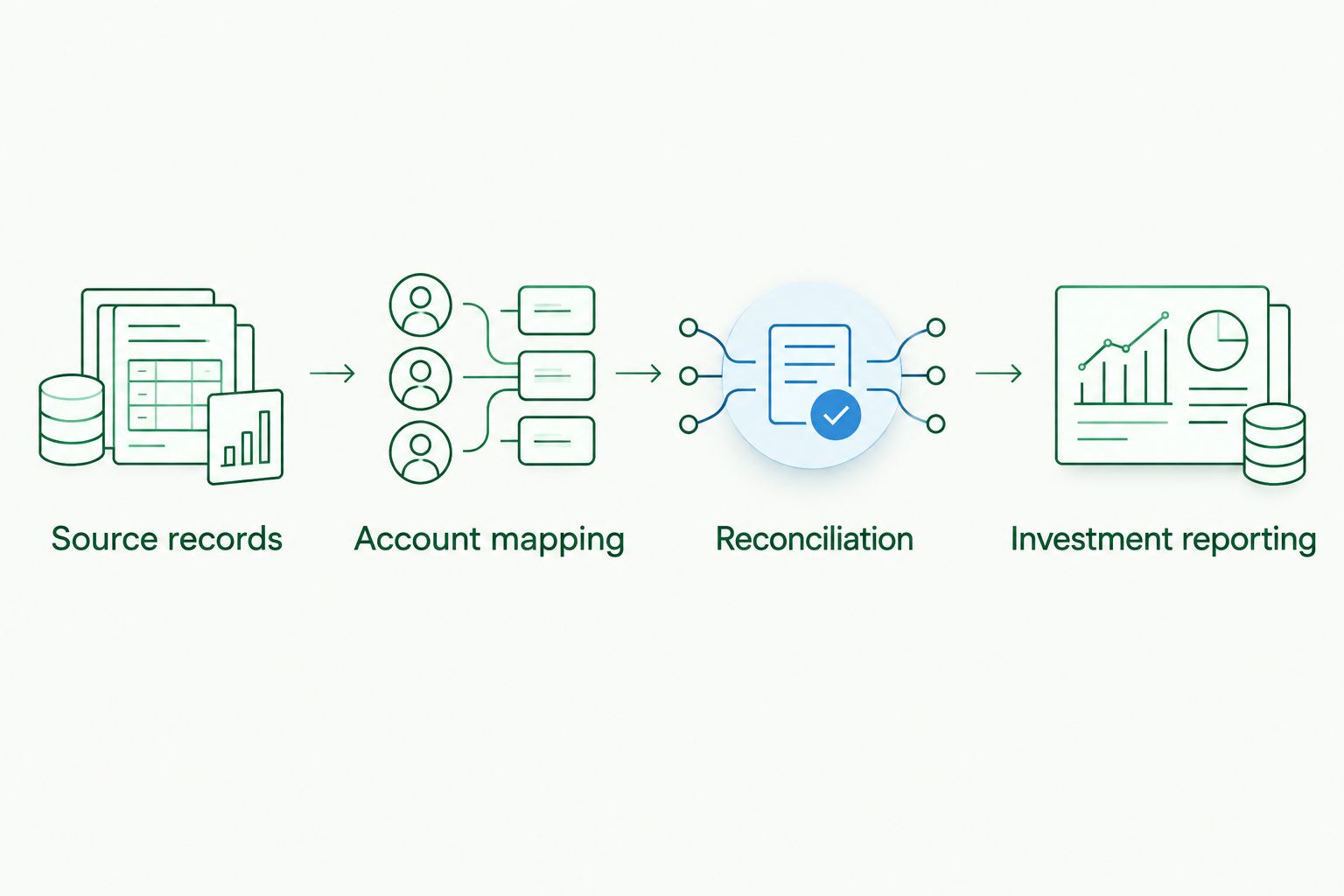
Use this sequence for your 2026 reporting process: Source records, Account mapping, Reconciliation, then Investment reporting. A connection moves data; the review stages establish what that data means.
Read valuations separately from feed status
A refreshed cash feed does not revalue a property or an unlisted investment. Keep the valuation basis and date visible wherever those assets appear alongside frequently updated market information.
Do the same with performance reporting. Cash added to a fund is not investment income, and a transfer between accounts is not a new investment return. Check how the report handles contributions, withdrawals, transfers and fees before relying on its performance figures.
Do not label the whole fund “live” when only part of its data is current. Describe exactly what has refreshed and what remains based on an earlier valuation.
Refresh reporting whenever records change
A second workflow is useful when corrected accounting records need to update an existing report. This is different from importing new transactions: it keeps reporting aligned with reviewed changes.
- Identify the changes that require a refresh, such as a corrected transaction category, revised valuation or completed reconciliation.
- Use the destination’s supported refresh process. If automated refresh is unavailable, assign a manual refresh task to the person completing the accounting review.
- Recheck the affected balances and reporting period. Confirm that a correction has replaced the earlier treatment rather than appearing as an additional entry.
- Retain the report version used for any completed review, alongside the revised version and an explanation of the change.
Expected result: The current report reflects approved corrections while earlier decision records remain understandable.
For your 2026 reporting calendar, distinguish routine data updates from reports formally issued to trustees. Refreshing a dashboard should not silently rewrite the record of an earlier review.
Troubleshooting
Transactions appear twice
Compare the import source and date range for the duplicated entries. A statement upload can overlap an active feed, and repeated imports can reproduce existing records.
Stop the overlapping import, identify the authoritative entries and correct duplicates through the platform’s documented process. Preserve the supporting records and review the affected balances afterwards.
Cash agrees, but investment holdings do not
Check opening quantities, transfers, unsettled trades and corporate actions. Cash reconciliation alone cannot confirm that the fund holds the correct investment quantities.
Compare the holdings register with the investment statement at the same date. Correct the underlying transaction or opening position rather than inserting an unexplained balancing entry.
The dashboard looks current, but valuations are old
Inspect the source valuation date, not just the dashboard’s refresh time. Refreshing a report can display the same older value again.
Keep the original date visible and arrange an appropriate valuation update where required. Do not substitute an estimate without identifying its basis and obtaining the necessary accounting review.
Income does not match the cash received
Check whether fees, withholding amounts or separate distribution components explain the difference. Some investment income requires information beyond the cash transaction.
Use the relevant supporting statement to complete the accounting treatment. Avoid changing the income figure simply to force agreement with the bank receipt.
The feed stops updating
Check the provider’s connection status, permissions and authorisation requirements. Establish the last successfully imported transaction before restarting or replacing the connection.
If you use an interim import, record its date range. Check for overlap when the automated feed resumes.
Customise your workflow
Extend the integration only after the starting account reconciles. Add each remaining source with its own opening date, mapping review and exception owner; do not assume that settings suitable for one asset type suit another.
Ask Daintree Consulting about SMSF accounting support if transaction handling, valuations or reporting adjustments need accounting review. The benefit of professional review is clearer treatment of the records; the trade-off is that unresolved documents and valuation questions still require your attention.
Keep a short operating note with the source register. It should explain who checks exceptions, how corrections reach the report and when a report is ready to share. Review that note whenever an account, investment or responsible person changes.
FAQ
What is an SMSF accounting software integration?
An SMSF accounting software integration transfers supported financial data between source systems, accounting records and reporting tools. Its coverage depends on the connection, so confirm which transactions, holdings and valuation details actually transfer.
Can SMSF investment reporting be genuinely real-time?
SMSF investment reporting can only be as current as its underlying data. Display transaction refresh times and valuation dates separately, particularly where a fund holds assets without continuously updated values.
Do I still need to reconcile accounts after connecting a feed?
Yes, a connected feed does not establish that accounting records are complete or correctly classified. Reconcile balances and investigate missing, duplicated or incorrectly mapped transactions.
Should I connect every SMSF investment account at once?
Start with one investment account and validate its records before extending the integration. A controlled starting account makes mapping and import problems easier to isolate.
Can a dashboard replace the fund's annual accounts or audit?
No, a dashboard does not replace annual financial statements or the SMSF's required independent audit. It supports visibility between reviews but does not establish compliance by itself.
What should I check before relying on investment performance figures?
Check how the report treats contributions, withdrawals, transfers, fees and valuation dates. Those settings determine whether the displayed movement represents investment performance or other changes in the fund.
Can Daintree Consulting help with SMSF accounting?
Daintree Consulting provides SMSF accounting services alongside broader accounting and advisory support. Discuss the fund's records and reporting needs to establish the appropriate accounting scope.
One last thing
For your 2026 setup, make a report’s limitations as visible as its balances. A dashboard refreshed today can still contain a valuation from an earlier date. Before sharing it, check the oldest material valuation and the last completed reconciliation—not just the latest refresh timestamp.
