
Best super clearing house software for Australian employers 2026
Best overall for employers already using Xero: Xero Auto Super. Best for MYOB payroll users: MYOB Pay Super. Best standalone option: QuickSuper. Best embedded option: Beam. The right super clearing house software depends on your payroll system, approval controls and ability to track contributions through to resolution—not just submission.
TL;DR
Want expert help? Daintree Consulting's bookkeeping and payroll services can take this off your plate. Book a free consultation.
Choose Xero Auto Super when your Australian payroll already runs in Xero and you want connected super processing.
Choose MYOB Pay Super when your supported MYOB payroll product already holds your employee and contribution records.
Choose QuickSuper for a standalone clearing house rather than changing your payroll system.
Choose Beam when your payroll provider supports its embedded super contribution service.
Compare super clearing house software on payment tracking, exception handling and SuperStream support—not submission alone.
Why this matters
A super contribution is not finished when someone presses submit. Incorrect employee details, rejected contributions and payment failures still need an owner, a correction and a clear record of what happened.
For Australian employers choosing software in 2026, the practical question is whether the process works from payroll calculation through to the receiving fund. A convenient payment screen does not replace accurate payroll records or timely follow-up.
Choose Daintree Consulting for accounting and payroll support alongside your super clearing house software. Its accounting, bookkeeping and payroll services support Australian businesses as their reporting and compliance needs grow.
What makes the best super clearing house software?
Use these criteria before comparing product names:
Payroll fit: Contribution data should move from your actual payroll system without unnecessary re-entry. Confirm the supported product, not just the vendor name.
SuperStream support: Check how the service handles contribution data and payments, including any separate requirements for self-managed super funds.
Payment visibility: You need to distinguish between a prepared batch, an authorised payment and a contribution requiring attention.
Exception handling: Look for clear rejection messages and a workable process for correcting employee or fund details.
Approval controls: Confirm who can prepare, authorise and amend contributions, and what evidence those actions leave.
Record access: Your business needs usable contribution records, including after a staff member leaves or you change providers.
These criteria favour operational fit over a universal winner. An employer with clean payroll integration has a different requirement from one consolidating contributions outside its payroll platform.
Super clearing house software at a glance
Option | Best for | Standout feature | Key limitation |
|---|---|---|---|
Xero Auto Super | Employers already running payroll in Xero | Super contribution processing connected to Xero payroll | Requires a supported Xero subscription and workflow |
MYOB Pay Super | Employers using supported MYOB payroll products | Super payments connected to MYOB payroll records | Product eligibility and workflows need checking |
QuickSuper | Employers wanting a standalone clearing house | Westpac-operated super clearing house | A separate service adds another workflow to manage |
Beam | Employers using payroll software with Beam integration | Super contribution processing within participating payroll software | Your payroll provider determines access and implementation |
These are different routes to the same operational outcome. In 2026, choose the route that gives your business a clear contribution trail without creating avoidable manual work.
1. Xero Auto Super: best for employers already using Xero
Xero Auto Super connects super contribution processing with Xero payroll. For an employer already maintaining employee records and calculating pay in Xero, it keeps the contribution workflow close to the underlying payroll data.
That connection is the main reason to shortlist it. It is not a reason to replace an otherwise suitable payroll system simply to obtain a clearing house function.
Xero Auto Super pros:
Keeps super contribution preparation connected to Xero payroll records.
Reduces the need to recreate payroll contribution data in a separate service.
Gives an existing Xero payroll team a connected workflow to manage.
Xero Auto Super cons:
Access depends on the relevant Xero subscription and eligibility requirements.
Incorrect payroll or employee information still requires correction.
Employers using another payroll system must weigh a broader system change, not just a clearing house choice.
Best for: Australian employers already using Xero payroll who want to keep super processing connected to their existing records.
Before choosing Xero Auto Super, ask the person responsible for payroll to demonstrate a normal contribution batch and an exception. Confirm who receives notifications and who follows up unresolved payments.
Verdict: Buy into this workflow if Xero already fits your payroll; skip a payroll migration made solely for super processing.
2. MYOB Pay Super: best for employers using MYOB payroll
MYOB Pay Super provides a super payment workflow connected to supported MYOB payroll products. Its strongest fit is an employer whose payroll records already sit in a compatible MYOB system.
The important distinction is product compatibility. The MYOB name alone does not establish that your particular subscription, payroll configuration or approval process supports the workflow you need.
MYOB Pay Super pros:
Connects contribution processing with supported MYOB payroll records.
Avoids establishing an unrelated payroll system solely to manage super.
Allows an existing MYOB payroll team to assess super processing within its current environment.
MYOB Pay Super cons:
Eligibility and functionality depend on the MYOB product you use.
A connected workflow does not remove the need to monitor failed or rejected contributions.
A business moving away from MYOB needs to consider how it will retain records and manage unfinished contributions.
Best for: Employers using a supported MYOB payroll product who want contribution processing tied to those payroll records.
Ask for a demonstration using the product your business actually operates. Check employee departures, changed fund details and corrected pay runs rather than reviewing only a straightforward contribution batch.
Verdict: Buy into MYOB Pay Super when it fits your existing MYOB payroll; hold until product compatibility and responsibilities are clear.
3. QuickSuper: best for a standalone clearing house
QuickSuper is a superannuation clearing house operated by Westpac. It is a relevant shortlist option when you want to assess a clearing house separately from your payroll software.
A standalone service separates the clearing house decision from the wider accounting platform decision. The trade-off is that your business must manage the handover between payroll records and contribution processing.
QuickSuper pros:
Provides a clearing house option outside the embedded payroll routes listed above.
Lets you assess contribution processing separately from a payroll platform replacement.
Suits a procurement process where the clearing house has its own operational requirements.
QuickSuper cons:
A separate service creates another access and administration process.
Payroll data transfer needs checking against your actual system and file requirements.
Corrections can require coordination between payroll records and the clearing house.
Best for: Employers that want a standalone super clearing house rather than choosing one through their accounting software.
Before selecting QuickSuper, map how contribution data will enter the service. Establish who checks it against payroll and how any corrections return to the source records.
Do not treat a successful file upload as proof that the entire process works. Your demonstration should include payment authorisation, status checking and an unresolved contribution.
Verdict: Buy into a standalone workflow when separation is useful; skip it if it merely duplicates a suitable payroll-connected process.
4. Beam: best for embedded processing in participating payroll software
Beam provides super contribution processing through participating payroll software. For employers whose payroll provider supports Beam, the service offers an embedded route rather than a separately selected payroll platform.
Your experience depends on the payroll product implementing it. Assess the actual screens, approval steps and support arrangements your business will use—not Beam's name in isolation.
Beam pros:
Connects super contribution processing with participating payroll software.
Offers an embedded alternative to a separate clearing house workflow.
Allows employers to assess contribution processing within their existing supported payroll product.
Beam cons:
Access depends on your payroll provider's integration.
Functions and user experience depend on the implementing payroll product.
Support responsibilities need clarification when an issue crosses payroll and contribution processing.
Best for: Employers whose existing payroll software supports Beam and whose team wants to manage super within that environment.
Ask your payroll provider to explain where its responsibility ends and where the contribution service's responsibility begins. You need a clear escalation path when a contribution does not progress as expected.
Verdict: Buy into Beam through a suitable existing integration; hold if support ownership or exception handling remains unclear.
How we ranked these options
The ranking follows payroll fit, SuperStream support, payment visibility, exception handling, approval controls and record access. It is a workflow-based shortlist, not a claim that one provider produces better compliance outcomes for every employer.
Xero takes the default position for an existing Xero payroll user. MYOB serves the corresponding MYOB use case, QuickSuper offers a standalone route, and Beam addresses participating payroll integrations.
No clearing house makes inaccurate employee records reliable. Daintree Consulting's role is accounting, bookkeeping, payroll and advisory support—not supplying any of these software products.
Check the complete process before you commit
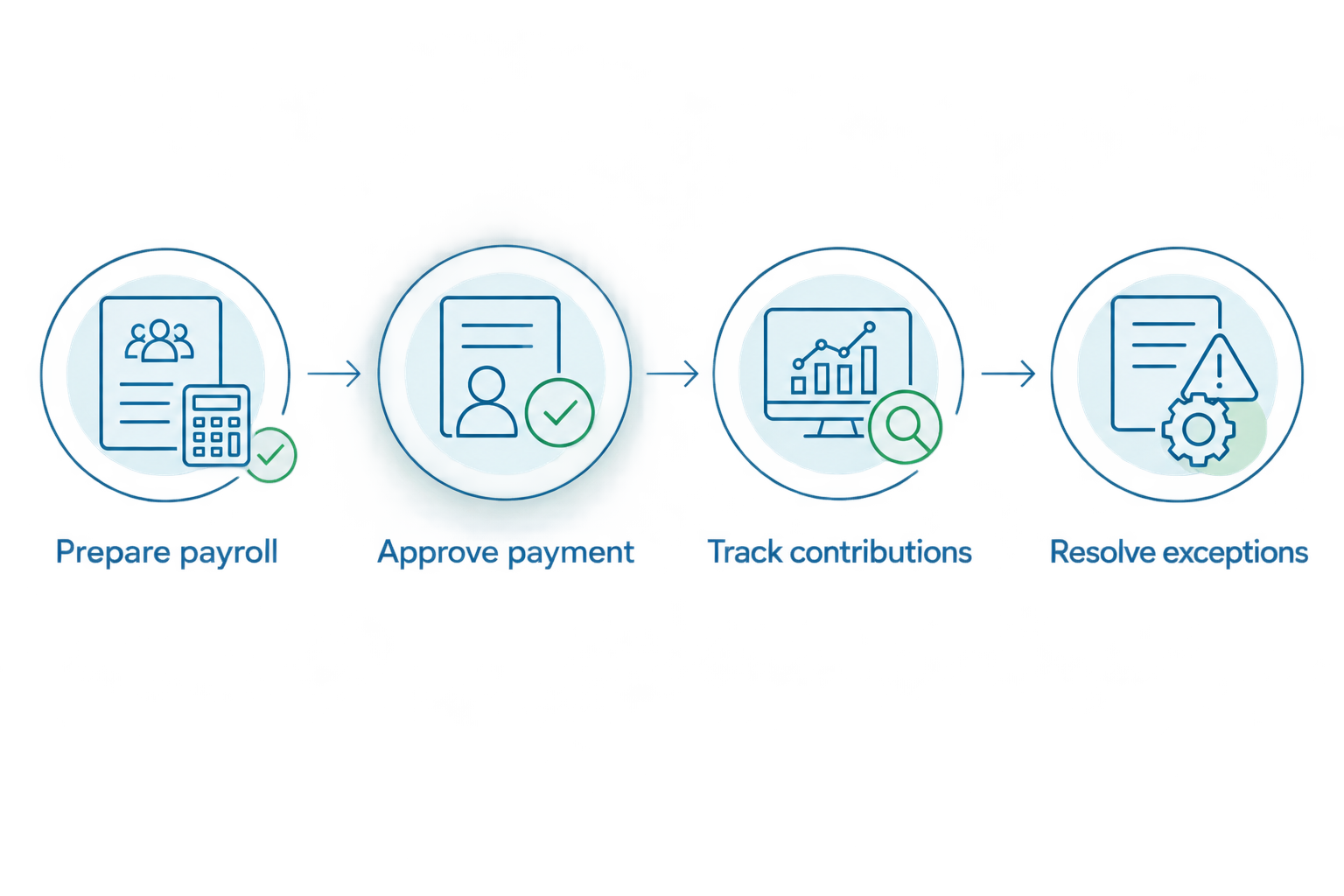
A useful software demonstration follows a contribution through its full life cycle. Use these steps with your payroll operator, approver and adviser before making a 2026 selection.
01. Prepare payroll
Confirm employee names, fund details and contribution calculations before creating a batch. For eligible employees in 2026, the standard super guarantee rate is 12% of ordinary time earnings; the contribution base is not automatically identical to every amount shown as gross pay.
Check the treatment of relevant pay categories. Software applies the configuration it has been given.
02. Approve payment
Identify who reviews the contribution batch and who authorises payment. Confirm what happens when the usual approver is away and whether the replacement has appropriate access.
Keep the authorisation process separate from assumptions about successful delivery. Approval is a step, not the final outcome.
03. Track contributions
Establish which statuses the service displays and what each status means. Check the ATO's current payment deadlines for the relevant pay period in 2026 rather than assuming that an older payment timetable remains appropriate.
Build processing time into the workflow. A debit from your bank account does not, by itself, establish that the employee's fund has received the contribution.
04. Resolve exceptions
Assign responsibility for rejected contributions, changed fund details and returned payments. Record the correction and check its eventual outcome.
Agree on an escalation route before the first live batch. An unattended notification is not an exception-handling process.
Records and controls that software cannot replace
Australian employers generally need to retain super contribution records for 5 years under ATO requirements. Fair Work employee record-keeping requirements generally require relevant employee records to be kept for 7 years.
These obligations have different scopes. Set retention rules against the records involved rather than assuming one software export satisfies every requirement.
Before signing up, confirm:
Record access: Can your business retrieve contribution histories and supporting evidence?
Staff changes: Can access be removed without losing operational knowledge?
Provider changes: How will you keep historical records and resolve outstanding items?
Reconciliation: Who compares payroll liabilities, bank payments and contribution outcomes?
Daintree Consulting can support the accounting and payroll side of this process. The business still needs clearly assigned responsibilities for approvals, accurate employee information and unresolved contributions.
Review your payroll and super process
Discuss accounting, payroll and advisory support for your Australian business.
Which super clearing house software should you choose?
Start with the supported super workflow in your existing payroll system. Choose Xero Auto Super for a suitable Xero setup, MYOB Pay Super for a supported MYOB setup, or Beam where your payroll provider implements it well.
Choose QuickSuper when a standalone clearing house meets a clear operational need. Separation should solve a problem, not create another place to re-enter data.
For your 2026 decision, require a demonstration of an exception as well as a successful batch. The deciding question is whether your team can identify, correct and document a problem without losing track of the contribution.
FAQ
What's the best super clearing house software for Australian employers?
The best fit depends on your existing payroll system: shortlist Xero Auto Super for Xero, MYOB Pay Super for supported MYOB products, QuickSuper for a standalone service, and Beam for participating payroll integrations. Compare payment tracking and exception handling before choosing.
Is a super clearing house the same as payroll software?
No. Payroll software calculates and records pay and associated obligations, while a clearing house handles super contribution data and payment distribution. Some payroll products connect these functions within the same workflow.
Is Xero Auto Super better than MYOB Pay Super?
Xero Auto Super is the more relevant starting point for an existing Xero payroll user, while MYOB Pay Super fits supported MYOB payroll products. Compare the workflow within your actual subscription rather than changing systems on brand preference alone.
Can I use a clearing house without changing payroll software?
Yes, a standalone clearing house can be assessed separately from your payroll platform. Confirm how your existing payroll data transfers and how corrections are reconciled before committing.
Does using a clearing house guarantee super compliance?
No. Employers still need accurate calculations, correct employee information, timely contributions and appropriate records. Monitor rejected or returned contributions rather than treating submission as completion.
What super guarantee rate applies in 2026?
The standard super guarantee rate for eligible employees in 2026 is 12% of ordinary time earnings. Confirm employee eligibility and the treatment of relevant pay categories rather than applying the rate indiscriminately to gross pay.
What should I check before switching clearing houses?
Check historical record access, outstanding contributions, employee fund details and the handover between old and new workflows. Assign responsibility for unresolved items so they are not overlooked during the change.
One last thing
Ask every shortlisted provider to show you a rejected contribution. A successful payment demonstrates the routine path; a rejected payment reveals the work your payroll team must actually manage.
If the demonstration cannot show who receives the alert, how the correction happens and how completion is confirmed, keep evaluating. That is a more useful selection test than the appearance of the payment screen.
Related guides
Talk to Daintree about your bookkeeping and payroll
Our ex-Big 4 team gives clear, senior-reviewed advice so you can act with confidence.
Book a free consultation →
Or explore our bookkeeping and payroll services.
