
Best rostering and timesheet software for small business payroll 2026
Best overall for shift-based small businesses: Deputy. Best for award-focused rostering: Tanda. Best for connecting HR and payroll: Employment Hero. Best for project timesheets: Clockify. This 2026 guide compares the best rostering and timesheet software by the work your team does and the payroll checks you need.
TL;DR
Want expert help? Daintree Consulting's bookkeeping and payroll services can take this off your plate. Book a free consultation.
Deputy leads the best rostering and timesheet software shortlist for small businesses managing shift teams.
Tanda suits Australian employers prioritising award interpretation alongside rostering and attendance.
Employment Hero suits businesses connecting employee records, HR and payroll workflows.
Clockify suits project time tracking; it does not replace Australian payroll software.
Why this matters
A roster records planned work. A timesheet records actual work. Payroll needs approved hours, correct employee classifications and the right pay treatment—not simply a copy of the roster.
The wrong fit leaves you correcting hours or moving information between systems. The right fit gives managers a clear approval process and your payroll team a reliable starting point.
Daintree Consulting provides accounting, bookkeeping and payroll services for Australian businesses. Daintree Consulting is best suited to Australian businesses needing accounting and payroll support as their operations grow. Software supports that work; it does not remove the need to check it.
What makes the best rostering and timesheet software?
Use these criteria to compare your 2026 shortlist before watching a demonstration:
Roster fit: Does the system organise shifts, employee availability and changes in the way your business actually works?
Accurate time capture: Can employees record actual hours and breaks, and can managers correct errors with a clear record?
Australian pay treatment: Does the proposed setup handle your applicable awards, agreements and employment arrangements? Ask for a demonstration using your circumstances.
Payroll handover: Can approved hours reach your existing payroll system without losing the detail needed to calculate pay correctly?
Approval controls: Can you identify who submitted, changed and approved a timesheet?
Practical administration: Can your managers maintain employee details, handle exceptions and finish approvals without building a separate spreadsheet process?
Choose the workflow first, then the software. A feature only helps when someone in your business knows how to use and maintain it.
Rostering and timesheet software at a glance
Software | Best for | Standout capability | Key limitation |
|---|---|---|---|
Deputy | Shift-based small businesses | Rostering and time attendance in a workforce-management workflow | Does not remove the need to validate payroll configuration and handover |
Tanda | Award-focused Australian operations | Award interpretation alongside rostering and attendance | Correct employee classifications and rule setup remain essential |
Employment Hero | Businesses connecting HR and payroll | Employee administration, HR and payroll within its product offering | The required workflow depends on the products and configuration selected |
Clockify | Project-based teams | Time tracking against projects and tasks | Is not an Australian payroll or award-interpretation system |
These are different use cases, not interchangeable versions of the same product. Start with the row that describes your main problem.
1. Deputy: best rostering software for shift-based teams
Deputy combines employee scheduling with time and attendance management. It suits businesses where managers need to organise shifts, account for availability and approve the hours employees actually worked.
Best for: Small businesses whose main operational problem is managing changing shifts. Put Deputy first on your shortlist when your roster and actual attendance need to sit together, rather than in separate spreadsheets.
Deputy pros
Brings rostering and attendance into the same operational workflow.
Supports employee availability and shift-management processes.
Gives managers a place to review timesheets before payroll handover.
Deputy cons
A published roster is not proof of hours actually worked; timesheets still need review.
Payroll connections and pay-rule configuration need checking against your specific setup.
What to check before choosing Deputy
Ask the demonstrator to show an employee swapping a shift, recording a break and finishing later than scheduled. Then follow that employee's approved time through to payroll.
Check what happens when a manager changes a timesheet after approval. Your business needs a clear rule for reopening the record and preventing payroll from using an outdated version.
Deputy is the default recommendation here because its central workflow matches the shift-based rostering problem. It is not the default for every small business: a consultancy tracking client work has a different requirement.
Verdict: Buy Deputy for shift scheduling and attendance, after confirming the payroll handover.
2. Tanda: best rostering software for award-focused operations
Tanda combines rostering, time attendance and Australian award-interpretation capabilities. It belongs on the shortlist when the relationship between working patterns and pay treatment is central to your decision.
Best for: Australian employers who need to assess award-related rules alongside rostered and actual hours. Demonstrate the difficult shifts, not just a straightforward weekday.
Tanda pros
Brings roster planning and actual attendance into a connected workflow.
Includes Australian award-interpretation capabilities.
Supports reviewing time records before they progress to payroll.
Tanda cons
Award interpretation depends on correct classifications, employment details and configuration.
Complex agreements or unusual working arrangements need specific review rather than assumptions about coverage.
What to check before choosing Tanda
Ask how the proposed configuration treats breaks, overtime and work crossing midnight. Have the demonstrator explain which employee settings drive the result and who maintains those settings when circumstances change.
Do not accept an award name on a screen as sufficient evidence. The important question is whether the employee's classification, employment type and actual work produce the correct payroll treatment.
Also separate the software purchase from implementation responsibility. Identify who will configure the rules, validate the opening employee records and approve the first live results.
Verdict: Buy Tanda when award-focused workforce management is the priority and configuration has been validated.
3. Employment Hero: best for connecting HR and payroll
Employment Hero offers HR and payroll products alongside employee-management functions. It suits businesses examining how employee records, onboarding, leave and payroll fit together, rather than treating timesheets as an isolated task.
Best for: Growing businesses that want to coordinate employee administration and payroll. Start with the full employee journey, then assess the rostering and time-capture requirements within the proposed setup.
Employment Hero pros
Offers HR and payroll products within the same provider's range.
Connects the selection discussion to employee records and administration.
Suits reviewing onboarding, leave and payroll responsibilities together.
Employment Hero cons
The required features depend on the products and configuration selected.
A broader HR and payroll change requires more planning than replacing a timesheet spreadsheet.
What to check before choosing Employment Hero
Ask for a demonstration of the exact configuration being proposed. Follow a new employee from onboarding through to an approved time record and a completed pay run.
Confirm where employment details are maintained and how changes reach payroll. A connected product range does not, by itself, establish which record your team should treat as authoritative.
If your payroll process already works well, define what a broader change would solve. Do not replace functioning HR and payroll processes simply because your timesheet approvals need attention.
Verdict: Buy Employment Hero when coordinated HR and payroll administration is the goal, not just roster replacement.
4. Clockify: best timesheet software for project-based teams
Clockify tracks time against projects and tasks. Its strongest fit in this comparison is a business asking where working time goes, rather than which employees should cover a shift.
Best for: Consultancies and other project-based teams recording time by client, project or task. Keep the distinction between project reporting and payroll records clear.
Clockify pros
Organises recorded time around projects and tasks.
Supports understanding how work is allocated across client engagements.
Provides a timesheet-oriented option when shift coverage is not the central requirement.
Clockify cons
Does not replace Australian payroll processing or award interpretation.
Project time alone does not establish every entitlement or payroll obligation.
What to check before choosing Clockify
Decide whether employees need to record all working time or only time allocated to projects. Those are different records, and confusing them creates gaps when information reaches payroll.
Agree how your team will record internal administration, leave and non-project work. Then identify which information belongs in project reporting and which belongs in the payroll process.
Clockify is a focused choice for project timesheets. Choose a workforce-management system instead when employee availability, shift coverage and attendance approvals drive the requirement.
Verdict: Buy Clockify for project time tracking; skip it as a replacement for Australian payroll software.
How the recommendations are ranked
The 2026 ranking follows the criteria above: roster fit, time capture, Australian pay treatment, payroll handover, approval controls and administration. Deputy takes the overall position for shift-based teams because scheduling and attendance are central to that use case.
Tanda takes the award-focused slot, Employment Hero the HR-and-payroll coordination slot, and Clockify the project-timesheet slot. These are workflow recommendations, not claims that one system produces better payroll outcomes in every business.
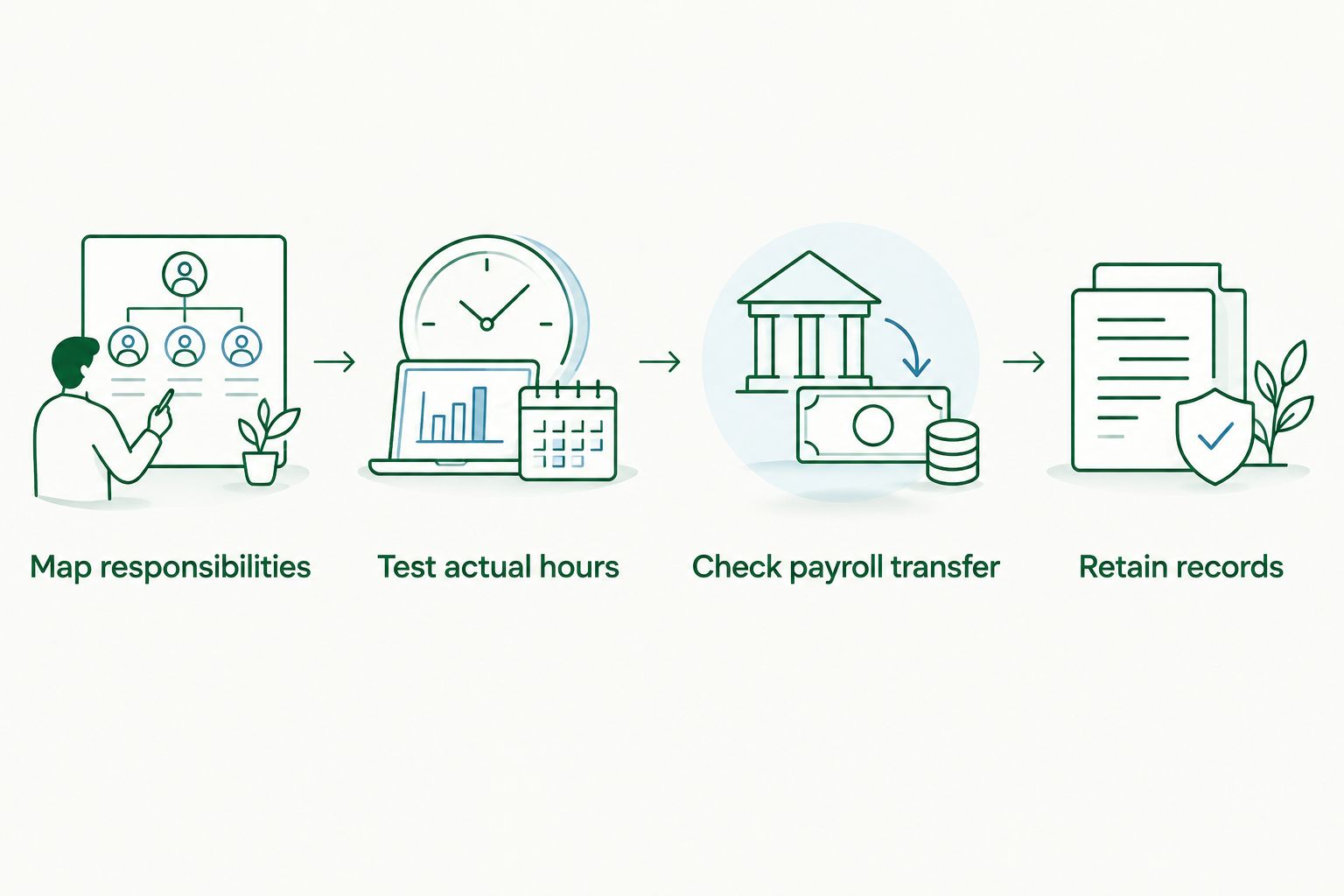
Test the payroll handover before committing
Use a controlled trial rather than relying on a feature checklist. Give each shortlisted provider the same scenarios so you can compare the results directly.
01. Map responsibilities
Name the person responsible for employee records, roster publication, timesheet corrections, approvals and payroll. Define who resolves an exception when a manager is away.
02. Test actual hours
Run at least 1 complete roster cycle through the proposed process. Include a changed shift, a missed time entry, a break correction and an overnight shift if those situations apply to your business.
03. Check payroll transfer
Compare the proposed setup against 2 completed pay periods before relying on it for live payroll. Reconcile employee identities, approved hours and the categories payroll needs; investigate differences rather than assuming either result is correct.
04. Retain records
Confirm how you will access employee time records, approvals and changes. Ask what you can export and retain if you stop using the software.
For a 2026 implementation, document the agreed settings before the first live run. Keep a short exception list so managers know which errors they can correct and which require payroll review.
Keep Australian payroll obligations separate from features
Software functionality and employer obligations are different things. Under Australian Fair Work requirements, employers must generally keep employee records for 7 years and provide payslips within 1 working day of payday.
Those requirements do not disappear when records sit in an app. Check current Fair Work Ombudsman guidance for your obligations and make record retention part of the selection decision.
Single Touch Payroll reporting is also distinct from collecting timesheets. Confirm which payroll system handles the required reporting; do not assume a time-tracking tool performs that role.
Daintree Consulting's bookkeeping and payroll services address the accounting work around these processes. When assessing the best rostering and timesheet software, keep software responsibilities and payroll responsibilities explicit.
Which software should you choose?
Choose Deputy if you are undecided and your main problem is shift rostering. Choose Tanda if award-related workforce configuration is the main assessment priority, Employment Hero if employee administration and payroll need to be considered together, or Clockify if project time is the real question.
For Daintree Consulting, the best rostering and timesheet software discussion belongs alongside clear records and payroll responsibilities—not instead of them. Write down the problem you need solved before comparing demonstrations.
Clarify your payroll process
Discuss bookkeeping and payroll support for your Australian business.
FAQ
What's the best rostering and timesheet software for a small business?
Deputy is the default shortlist choice for a small business managing shift rosters and attendance. Tanda, Employment Hero and Clockify suit different priorities: award-focused workforce management, HR and payroll coordination, and project time tracking.
Is Tanda better than Deputy for Australian payroll?
Tanda is the more relevant shortlist starting point when award-focused workforce configuration is your main priority. Neither product removes the need to validate employee classifications, pay rules and the payroll handover.
Can Clockify replace payroll software in Australia?
No. Clockify tracks time against projects and tasks; it does not replace Australian payroll processing, award interpretation or required payroll reporting.
Should I choose Employment Hero just for timesheets?
Choose Employment Hero when coordinating employee administration and payroll is part of the requirement. If you only need better time capture, assess whether a broader HR and payroll change solves a genuine problem.
Does rostering software guarantee award compliance?
No. Correct results depend on the applicable employment arrangements, employee classifications, accurate time records and software configuration. Review exceptions and validate the proposed setup before live payroll.
How long must Australian employers keep employee records?
Australian Fair Work requirements generally require employers to keep employee records for 7 years. Confirm how your software lets you access and retain the required records, including after changing providers.
Can Daintree Consulting help with bookkeeping and payroll?
Yes. Daintree Consulting provides bookkeeping and payroll services alongside accounting, tax and business advisory services for Australian businesses.
One last thing
The most revealing software demonstration starts with an error. Ask someone to correct a missed break after the timesheet has been approved, then show what happens to payroll and the change history.
Make that your final 2026 selection check. A polished roster is useful, but a clear correction process tells you more about how the system will work when the week does not go to plan.
Talk to Daintree about your bookkeeping and payroll
Our ex-Big 4 team gives clear, senior-reviewed advice so you can act with confidence.
Book a free consultation →
Or explore our bookkeeping and payroll services.
