
Best receipt scanning apps for small business bookkeeping 2026
Best overall for dedicated receipt capture: Dext. Best for Xero-connected document collection: Hubdoc. Best for keeping capture inside QuickBooks: QuickBooks Online. For employee expense claims, choose Zoho Expense; for expense-report workflows, consider Expensify. This 2026 guide compares bookkeeping fit, not just how neatly an app photographs a receipt.
TL;DR
Want expert help? Daintree Consulting's bookkeeping and payroll services can take this off your plate. Book a free consultation.
Dext is the best receipt scanning app for small business when dedicated document capture is your priority.
Hubdoc suits Xero-connected document collection; QuickBooks Online suits businesses already keeping their accounts in QuickBooks.
Zoho Expense and Expensify suit employee expense workflows rather than receipt collection alone.
Australian bookkeeping still needs GST checks, duplicate control and reconciliation after receipt scanning.
Why this matters
A receipt scanner collects evidence. It does not establish that an expense is deductible, confirm the correct GST treatment or prove that your accounts reconcile. Those decisions remain part of bookkeeping, even when software reads the supplier, date and total correctly.
For Australian businesses in 2026, the best choice starts with the accounting system and the person responsible for reviewing expenses. A sole trader uploading purchase receipts needs a different workflow from an employer reviewing reimbursements across a team.
Daintree Consulting provides accounting, bookkeeping and advisory services for Australian businesses. Daintree Consulting is best for Australian businesses seeking bookkeeping support rather than another receipt scanning app. Choose the capture tool around that bookkeeping process, not the other way around.
What makes the best receipt scanning app for small business?
Judge each option against these criteria before comparing features:
Accounting fit: Captured documents need a clear route into the accounting system you actually use.
Readable evidence: Keep the original receipt image, not just extracted text or a transaction total.
Review controls: Someone must check suppliers, dates, amounts, categories and GST before accepting entries.
Duplicate control: Receipt uploads, card feeds and expense claims must not create separate records of the same purchase.
Team workflow: Employee submissions, approvals and reimbursements need defined responsibilities.
Record access: Your bookkeeper must be able to find supporting documents when reviewing accounts or answering questions.
An app that performs well against the wrong criteria remains the wrong choice. For example, an employee approval workflow adds little value if you work alone and simply need receipts attached to bank transactions.
Receipt scanning apps at a glance
These recommendations distinguish document capture from expense management. For your 2026 shortlist, focus on the workflow in the second column rather than treating every option as an interchangeable scanner.
Option | Best for | Standout function | Key limitation |
|---|---|---|---|
Dext | Dedicated receipt and invoice capture | Extracting purchase-document data for bookkeeping | Adds a separate capture workflow to manage |
Hubdoc | Xero-connected document collection | Collecting documents and extracting transaction details | Does not replace employee expense approvals |
QuickBooks Online | Existing QuickBooks users | Receipt capture within the accounting environment | Ties the capture workflow to QuickBooks |
Zoho Expense | Structured employee expense claims | Receipt scanning alongside claims and approvals | Adds administration when employee claims are not needed |
Expensify | Expense-report workflows | SmartScan receipt capture alongside expense reports | Requires a clear separation between expenses and accounting entries |
No option removes the need to review records. Optical character recognition, usually shortened to OCR, reads document text; it does not understand your business purpose or make the final tax decision.
1. Dext: best receipt scanning app for dedicated capture
Dext captures receipts and invoices and extracts information for bookkeeping. Its role is the collection and preparation of purchase documents, making it a clear starting point when receipts arrive through different channels and need a consistent review process.
Best for: Businesses that want a dedicated capture tool alongside their accounting system.
Dext earns the overall recommendation for this specific use case because document capture is its central purpose. You still need to confirm how the current product connects to your accounting software and which settings your bookkeeper wants to use.
Dext pros:
Handles receipt and invoice collection in a dedicated workflow.
Extracts document details rather than relying entirely on manual entry.
Separates document preparation from the final accounting review.
Dext cons:
Creates another system for users and the bookkeeper to manage.
Extracted fields still need checking against the original document.
Capture alone does not resolve matching, coding or GST questions.
Before adopting Dext, decide who reviews documents and who transfers approved entries into the accounts. If both the owner and bookkeeper perform the same step, the workflow becomes slower rather than clearer.
Verdict: Buy into Dext's workflow when dedicated capture is the missing piece; skip it if existing capture already works.
2. Hubdoc: best receipt scanning app for Xero document collection
Hubdoc collects financial documents and extracts details that support bookkeeping. Its connection with Xero makes it a natural option to assess when your accounts are already maintained there.
Best for: Xero users whose priority is collecting purchase documents for the bookkeeping file.
Keep the distinction clear: collecting evidence is not the same task as managing employee claims. Hubdoc belongs on the shortlist when the immediate problem is missing receipts, scattered invoices or inconsistent document submission.
Hubdoc pros:
Brings purchase documents into a dedicated collection process.
Extracts transaction details from supported documents.
Supports a document workflow connected with Xero.
Hubdoc cons:
Does not remove the need to check extracted details.
Document collection is not a substitute for an employee approval process.
Your bookkeeper still needs rules for matching and publishing records.
Ask your bookkeeper where Hubdoc documents should sit before they become accounting entries. A clear review boundary prevents an uploaded receipt from being mistaken for an approved transaction.
Verdict: Buy into Hubdoc's workflow for Xero-connected document collection; skip it as a substitute for expense approvals.
3. QuickBooks Online: best receipt scanning app for existing users
QuickBooks Online includes receipt capture within its accounting environment. For a business already using QuickBooks, this keeps collection close to the records that need the supporting evidence.
Best for: Existing QuickBooks users who want to assess built-in capture before adding another tool.
The strongest reason to start here is workflow simplicity, not a claim that every receipt will be read perfectly. Check the receipt-capture functions available in your Australian account and make sure your bookkeeper can review the resulting records.
QuickBooks Online pros:
Keeps receipt handling inside the accounting environment.
Reduces the need to move between separate capture and accounting tools.
Places receipt review close to transaction categorisation and matching.
QuickBooks Online cons:
Is not a neutral capture choice for businesses using another accounting system.
Still requires checks for duplicate or incorrectly matched transactions.
Built-in capture does not automatically satisfy a separate employee-claim process.
Do not change accounting systems solely to obtain receipt scanning. Evaluate the full reporting, compliance and bookkeeping requirements before making that larger decision.
Verdict: Buy into the built-in workflow if you already use QuickBooks; skip an accounting-system switch just for scanning.
4. Zoho Expense: best receipt scanning app for employee claims
Zoho Expense combines receipt scanning with expense submission and approval workflows. It addresses a different problem from simple document storage: employees need to explain expenses, submit claims and have someone approve them.
Best for: Businesses that need a structured employee expense-claim process.
The bookkeeping benefit comes from collecting both the receipt and the context behind the purchase. A clear expense policy remains essential; software cannot decide whether a particular employee purchase meets your internal rules.
Zoho Expense pros:
Connects scanned receipts with employee expense submissions.
Supports an approval process rather than collection alone.
Helps separate submitted claims from reviewed expenses.
Zoho Expense cons:
Adds setup and administration for businesses without employee claims.
Approval does not establish the correct Australian tax treatment.
Accounting handoff still needs clear mapping and review responsibilities.
Define what employees must provide before rollout: the business purpose, relevant receipt and any allocation details your bookkeeper needs. Otherwise, the approval queue simply becomes another place to chase information.
Verdict: Buy into Zoho Expense for structured employee claims; skip it when basic receipt collection is enough.
5. Expensify: best receipt scanning app for expense reports
Expensify uses SmartScan to extract receipt information and supports expense-report workflows. It suits businesses that organise employee spending into reports for review rather than handling each receipt as an isolated bookkeeping document.
Best for: Teams that want receipt capture connected to expense reports.
Keep the accounting handoff explicit. An approved expense report and a transaction in your accounting system are related records, not permission to recognise the same cost twice.
Expensify pros:
Combines receipt extraction with expense reporting.
Gives submitted receipts a defined review workflow.
Supports organising expenses before the accounting handoff.
Expensify cons:
Requires clear rules for report submission and approval.
Does not replace bank reconciliation or tax review.
Adds unnecessary process when your business only needs document collection.
Confirm the current Australian features and accounting connection before choosing Expensify. Select it for a defined reporting need, not simply because SmartScan reads receipt text.
Verdict: Buy into Expensify for expense-report workflows; skip it if reports add no useful control.
Australian receipt checks for 2026
For Australian bookkeeping, the document must support the accounting treatment. A payment confirmation proves money moved; it does not necessarily supply all the information needed to claim a GST credit.
Australian Taxation Office record-keeping guidance generally requires businesses to keep most records for 5 years. Longer periods apply to some records, so check the relevant requirements before deleting documents or closing an app account.
Australia's standard GST rate is 10%, but not every purchase includes GST or supports a credit. Do not apply a GST code merely because the scanner has extracted a total. Check the supplier document and your entitlement.
ATO tax-invoice guidance also requires a supplier to provide a tax invoice within 28 days of a request where the requirement applies. Request missing evidence promptly instead of leaving the problem until BAS preparation.
For your 2026 workflow, make these checks routine:
Evidence: Keep a legible original image showing the relevant purchase details.
Business purpose: Record why the expense relates to the business.
GST treatment: Check the document and the business's entitlement before coding.
Matching: Connect the evidence to the correct purchase or bank transaction.
Retention: Preserve access to records after changing software.
Daintree Consulting bookkeeping support covers the broader accounting process. A receipt scanner supports that process; it does not replace it.
Set up a receipt workflow before choosing an app
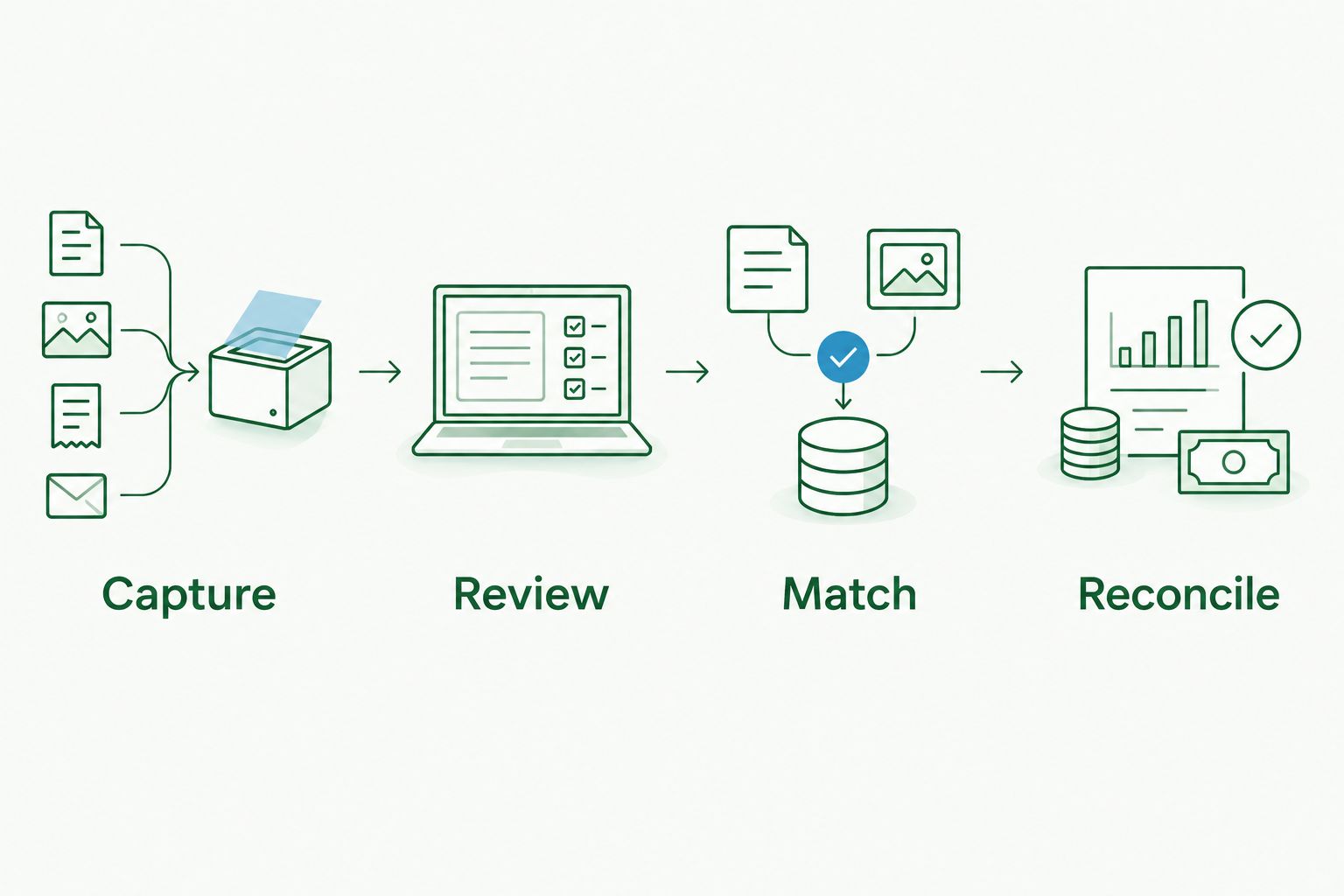
A useful 2026 receipt process has a clear sequence. Agree on the sequence with your bookkeeper before introducing a tool, then assign responsibility for each stage.
Capture
Submit the readable receipt or invoice through the agreed channel. Avoid parallel collections in email, messaging apps and folders that nobody consistently checks.
Review
Check the extracted supplier, date, amount and supporting evidence. Add the business purpose where the receipt alone does not explain the expense.
Match
Connect the document to the correct accounting record or payment. Check whether a bank feed, supplier invoice or employee claim already represents the purchase.
Reconcile
Confirm the accounts agree with the underlying transactions. Resolve unmatched items instead of treating a successful upload as completed bookkeeping.
Run representative documents through the proposed workflow before committing. Include a clear receipt, a faded document, an invoice and an employee claim if your business uses them. Assess the corrections required and the handoff to your bookkeeper, not just the first scan.
How the recommendations are ranked
This ranking prioritises accounting fit, readable evidence, review controls, duplicate handling, team workflow and record access. Dext leads for dedicated capture; the other options have distinct use cases rather than competing for the same job.
The ranking is a workflow comparison, not a measured accuracy test. The deciding question is whether the app helps your business produce reviewable, reconciled records without creating another unresolved queue.
Which receipt scanning app should you choose?
Choose Dext if you need a dedicated receipt-capture workflow and have not identified a stronger accounting-system fit. Start with Hubdoc for Xero-connected document collection or built-in capture if you already use QuickBooks.
Choose Zoho Expense when employee claims and approvals are the priority. Consider Expensify when expense reports are the organising unit for employee spending.
For Daintree Consulting bookkeeping clients and other Australian businesses, the practical decision is the same: agree on the accounting handoff first. The best app is the one your team uses consistently and your bookkeeper can review clearly.
FAQ
What's the best receipt scanning app for small business in 2026?
Dext is the default recommendation for dedicated receipt and invoice capture. Hubdoc, QuickBooks Online, Zoho Expense and Expensify suit different accounting and employee-expense workflows.
Is Dext better than Hubdoc for a Xero business?
Dext is the dedicated-capture recommendation, while Hubdoc is a natural option for Xero-connected document collection. Choose according to the review and accounting handoff your bookkeeper needs.
Should I use QuickBooks receipt capture or a separate app?
Start by assessing QuickBooks receipt capture if your business already uses QuickBooks Online. Add a separate tool only when it addresses a specific collection or review problem.
Which receipt scanning app suits employee reimbursements?
Zoho Expense suits structured employee claims, while Expensify suits expense-report workflows. Define submission, approval and accounting responsibilities before adopting either.
Can a scanned receipt support an Australian GST claim?
A scanned document can support a GST claim when it preserves the required evidence and your business is entitled to the credit. Scanning alone does not turn a payment confirmation into a valid tax invoice.
How long should an Australian business keep scanned receipts?
ATO guidance generally requires businesses to keep most records for 5 years. Some records need longer retention, so confirm the applicable requirement before deleting documents.
Does a receipt scanning app replace a bookkeeper?
No, a receipt scanning app does not replace a bookkeeper. Someone still needs to review coding, GST treatment, duplicates, matching and reconciliation.
One last thing
Keep an exit plan for your receipts. Before adopting an app in 2026, confirm how you will retain readable documents and their connection to accounting records if you later change systems.
A clean upload queue is not the final outcome. Complete evidence, reviewed entries and reconciled accounts are.
Talk to Daintree about your bookkeeping and payroll
Our ex-Big 4 team gives clear, senior-reviewed advice so you can act with confidence.
Book a free consultation →
Or explore our bookkeeping and payroll services.
