
Best multi-currency accounting software for Australian exporters 2026
Best overall for straightforward export bookkeeping: Xero. Best for existing QuickBooks users: QuickBooks Online. Best for businesses using other Zoho applications: Zoho Books. Best for multi-subsidiary reporting: NetSuite OneWorld. This 2026 guide compares multi-currency accounting software for exporters and explains where Daintree Consulting’s accounting and advisory services fit into the decision.
TL;DR
Want expert help? Daintree Consulting's accounting services can take this off your plate. Book a free consultation.
Xero is the default multi-currency accounting software for exporters with straightforward bookkeeping and foreign-currency transactions.
QuickBooks Online suits existing users; Zoho Books suits businesses already using Zoho applications.
NetSuite OneWorld suits exporters needing subsidiary consolidation, not just overseas invoicing.
Daintree Consulting provides accounting and advisory support; it is not an accounting software product.
Why this matters
An overseas invoice creates more than a conversion task. Your accounts must distinguish the sale, the outstanding customer balance, exchange movements, payment charges and the money that reaches your bank.
Choose software around how you reconcile export receipts, not how easily you change an invoice currency. A system that issues foreign-currency invoices but leaves settlement differences unexplained does not give you a clear picture of profitability.
For a 2026 selection, start with your legal entities, settlement currencies and reporting obligations. Then decide whether you need a bookkeeping platform or a wider financial management system.
What makes the best multi-currency accounting software?
Judge each option against these criteria before looking at demonstrations:
Currency accounting: Foreign-currency invoices, bills and balances must remain traceable to their original amounts.
Settlement reconciliation: You need to account separately for customer payments, conversion differences and transaction charges.
Australian compliance: Confirm Australian GST reporting and BAS requirements against the edition and configuration you intend to use.
Reporting depth: Distinguish ordinary management accounts from subsidiary consolidation and group reporting.
Operational fit: Check how orders, stock, payment providers and accounting records connect.
Control and access: Your accountant needs access to transaction histories, adjustments and supporting documents.
A long feature list does not outweigh a difficult month-end close. Ask each provider to demonstrate your actual transaction flow before choosing.
Export accounting software at a glance
The 2026 shortlist below ranks suitability by business situation, not subscription cost. Confirm current edition inclusions directly with each provider before committing.
Rank and software | Best for | Standout capability | Key limitation |
|---|---|---|---|
1. Xero | Straightforward export bookkeeping | Foreign-currency transactions within a small-business accounting platform | Group consolidation requires a separate assessment |
2. QuickBooks Online | Exporters already using QuickBooks | Multi-currency bookkeeping within an existing QuickBooks workflow | Enabling multi-currency creates permanent settings restrictions |
3. Zoho Books | Businesses using Zoho applications | Accounting connected with the wider Zoho application suite | Australian workflows and integrations need checking individually |
4. NetSuite OneWorld | Exporters with multiple subsidiaries | Multi-subsidiary, multi-currency consolidation | Implementation scope exceeds a basic bookkeeping migration |
1. Xero: best export accounting software for straightforward books
Xero supports foreign-currency transactions alongside everyday bookkeeping. It is the default shortlist choice when your export business needs customer invoicing, supplier bills, bank reconciliation and financial reports without introducing a group-wide enterprise system.
Best for: An Australian exporter with straightforward entity reporting and recurring overseas transactions.
Xero pros
Foreign-currency receivables and payables sit within the accounting ledger.
Exchange differences can be accounted for separately from the underlying sale or purchase.
Bank reconciliation connects overseas trading activity with cash received and paid.
Xero cons
Multi-currency functionality depends on the subscription selected.
Xero’s base currency cannot be changed after an organisation is created.
Complex group consolidation needs assessment beyond the core bookkeeping requirements.
The main selection question is not whether Xero can raise an overseas invoice. Ask how your settlement account, payment provider and bank statement will reconcile when charges are deducted before money arrives.
For example, a payment provider’s net deposit should not automatically become your recorded sales figure. The original receivable, fees and exchange difference need an accounting treatment that preserves the transaction trail.
Daintree Consulting provides bookkeeping, tax and advisory services alongside broader accounting support. Keep responsibility for system setup, reconciliations and month-end adjustments explicit when agreeing the service scope.
Verdict: Buy Xero for straightforward export bookkeeping once the currency settings and settlement workflow are confirmed.
2. QuickBooks Online: best for exporters already using QuickBooks
QuickBooks Online supports multi-currency accounting in eligible subscriptions. It belongs on your shortlist when your team already uses QuickBooks and overseas trading does not otherwise require a different accounting structure.
Best for: An exporter whose existing QuickBooks processes remain suitable as foreign-currency activity grows.
QuickBooks Online pros
Foreign-currency transactions can remain within the existing accounting environment.
Continuing with the same platform avoids an unnecessary ledger migration.
Currency reporting can be assessed alongside your current invoicing and reconciliation processes.
QuickBooks Online cons
Multi-currency is not included in every subscription.
Once enabled, multi-currency cannot be turned off.
The home currency cannot be changed after multi-currency is enabled.
Those settings make preparation important. Confirm the correct Australian home currency, review existing customer and supplier records, and understand how opening foreign-currency balances will be handled before activation.
Do not switch platforms simply because export sales have started. First establish whether the problem is a missing feature, an unsuitable subscription or an accounting process that nobody has documented.
For your 2026 review, request a demonstration using a customer invoice, a later receipt and an exchange-rate movement. The demonstration should finish with a reconciled bank account and an understandable customer balance.
Verdict: Buy the appropriate QuickBooks Online configuration if your existing workflow fits; hold activation until the currency setup is checked.
3. Zoho Books: best for exporters using the Zoho application suite
Zoho Books supports multi-currency accounting and connects with other Zoho business applications. Its strongest place on this shortlist is an exporter already using that wider application environment.
Best for: A business that wants accounting to connect with established Zoho sales and operational processes.
Zoho Books pros
Foreign-currency transactions can be managed within the accounting system.
Connections with other Zoho applications support related business workflows.
Existing Zoho users can assess accounting within an application environment they already use.
Zoho Books cons
Plan and regional edition differences require checking.
A suite connection does not establish that your particular workflow is supported.
Australian reporting, payment connections and adviser access need explicit validation.
Start with the handover between your sales records and accounts. Establish which system creates the customer, which creates the invoice and which records payment, rather than allowing each application to maintain a competing version.
Also check how corrections move between applications. A connection that transfers an invoice is not enough if credit notes, cancelled orders or altered customer details leave inconsistent records.
Choose Zoho Books because the accounting and connected processes fit your business, not simply because other Zoho applications are already installed. Your accountant still needs to validate the ledger and reporting outputs.
Verdict: Buy Zoho Books when the connected workflow and Australian accounting requirements both pass review; otherwise hold.
4. NetSuite OneWorld: best for multi-subsidiary export reporting
NetSuite OneWorld supports multi-subsidiary operations, multiple currencies and financial consolidation. It addresses a different problem from adding foreign-currency invoices to a small-business ledger.
Best for: An export group needing subsidiary-level accounts and consolidated financial reporting.
NetSuite OneWorld pros
Subsidiary accounting and group consolidation sit within the same system.
Multiple currencies can be managed across an international business structure.
Group reporting can be designed around the organisation rather than separate bookkeeping files alone.
NetSuite OneWorld cons
Implementation requires decisions about entities, processes, data and reporting.
Configuration and migration demand internal ownership.
Its scope is excessive when the requirement is simply overseas invoicing for a straightforward business.
Before shortlisting NetSuite OneWorld in 2026, write down the consolidation problem. Identify the entities involved, intercompany transactions, reporting currencies and adjustments currently needed to produce group accounts.
If that exercise reveals no group-reporting requirement, return to the smaller-business options. More extensive software does not remove the need for disciplined bookkeeping, and additional configuration creates work that needs a clear purpose.
For a genuine group requirement, bring finance, operations and implementation responsibilities together before approving the project. The system design must reflect how transactions actually move through the business.
Verdict: Buy NetSuite OneWorld for a defined multi-subsidiary reporting requirement; skip it for basic export invoicing alone.
Test the accounting and payment workflow together
Your accounting platform and payment provider perform different jobs. Accounting software records what happened; the payment arrangement determines how customers pay and how funds are converted or settled.
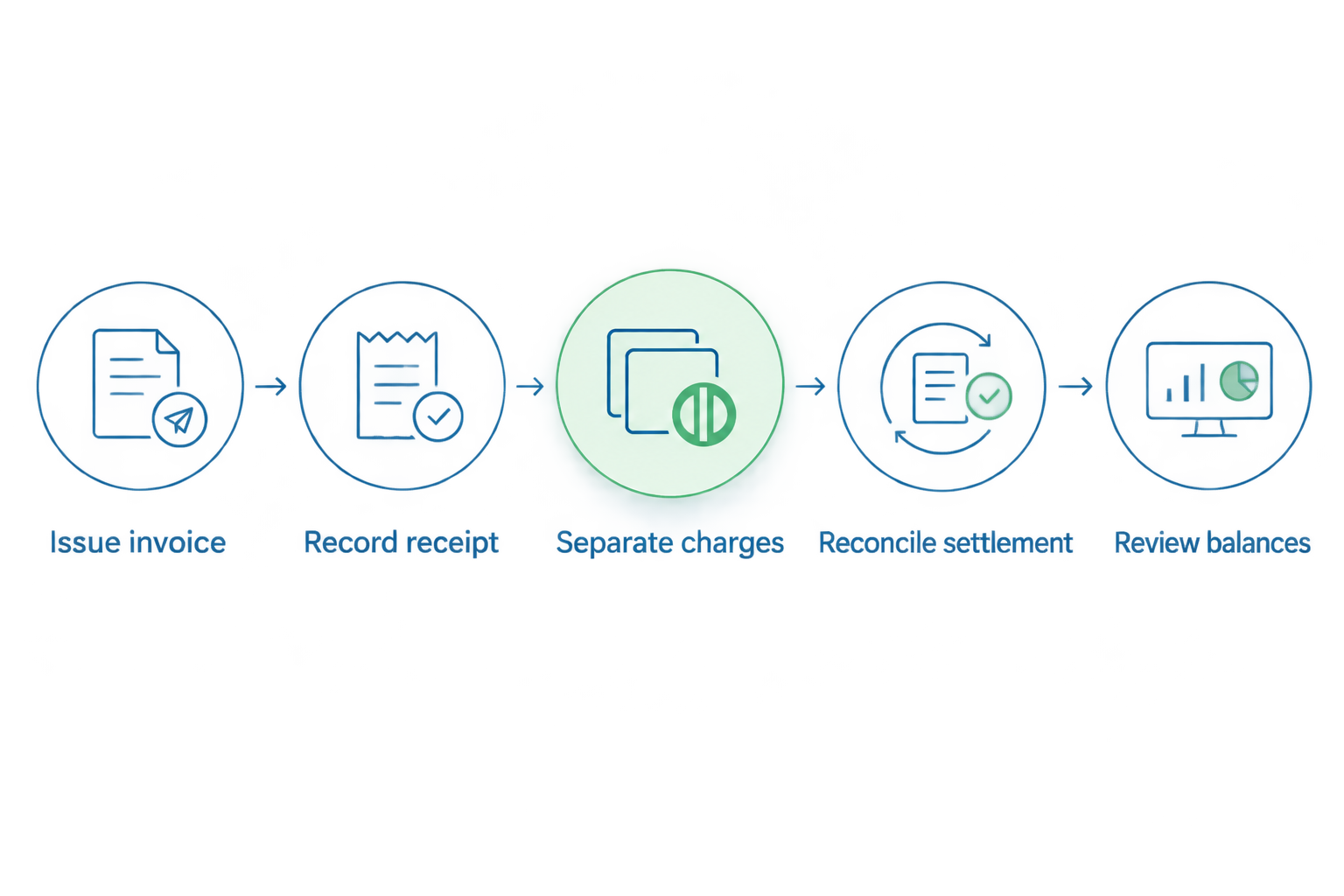
Use this sequence during a demonstration:
Issue invoice: Record the customer’s currency and the original receivable.
Record receipt: Apply the payment against the correct invoice.
Separate charges: Record processing and conversion charges distinctly.
Reconcile settlement: Match the money received to the bank statement.
Review balances: Explain remaining receivables and exchange differences.
Evaluate business FX conversion platforms separately from the accounting ledger: compare the exchange rate applied, explicit charges, settlement records and how each transaction reaches your books. An integration should preserve that detail rather than replace it with an unexplained net deposit.
Ask who investigates unmatched receipts and who approves exchange adjustments. Software selection is incomplete until those responsibilities are assigned.
Keep Australian tax treatment separate from currency conversion
Foreign currency does not determine GST treatment. Australia’s standard GST rate is 10%, but qualifying exports can be GST-free; the transaction must meet the relevant requirements.
For goods, the Australian Taxation Office’s export guidance generally requires export within 60 days of the earlier of receiving payment or issuing an invoice, subject to applicable exceptions or an allowed extension. Exported services have different tests, so an overseas customer address is not enough to establish treatment.
Most business tax records must generally be retained for 5 years under ATO record-keeping guidance, with exceptions requiring longer retention. Keep invoices, payment evidence and documents supporting export treatment accessible alongside the accounting records.
For 2026 transactions, ask your tax adviser to confirm the applicable treatment and Australian-dollar reporting basis. A currency setting does not replace a GST decision.
How the ranking works
This ranking prioritises accounting fit: transaction traceability, settlement reconciliation, Australian compliance requirements, reporting depth and implementation scope. It is a buying framework, not a claim that every edition or integration has been tested.
Xero takes the default position for straightforward export bookkeeping. QuickBooks Online and Zoho Books earn distinct places through existing-system fit, while NetSuite OneWorld addresses subsidiary consolidation rather than the same small-business use case.
Daintree Consulting’s accounting and advisory support is best suited to Australian businesses that need help connecting compliance, reporting and financial decisions.
Which export accounting software should you choose?
Start with Xero if your export business needs straightforward multi-currency bookkeeping. Keep QuickBooks Online on the shortlist when it already supports your business, and assess Zoho Books when connected Zoho workflows matter.
Choose NetSuite OneWorld only when subsidiary accounting and consolidation justify the wider implementation. Before signing, require a demonstration of your settlement process and agree who owns the accounting controls.
You can contact the team to discuss the accounting and advisory support your export business needs.
FAQ
What’s the best multi-currency accounting software for Australian exporters?
Xero is the default shortlist choice for straightforward export bookkeeping. QuickBooks Online suits existing users, Zoho Books suits connected Zoho workflows, and NetSuite OneWorld suits multi-subsidiary reporting.
Is Xero better than QuickBooks Online for overseas invoices?
Neither platform wins solely because you send overseas invoices. Compare the eligible subscriptions, currency settings, settlement reconciliation and the accounting processes your team already uses.
Do I need NetSuite just because I export?
No, exporting alone does not establish a need for NetSuite OneWorld. Its place on this shortlist is for businesses with subsidiary accounting and consolidated reporting requirements.
Can accounting software handle foreign-exchange gains and losses?
Multi-currency accounting systems can account for exchange differences. Confirm how your chosen configuration handles unpaid balances, settled transactions and reporting adjustments with your accountant.
Does an overseas customer mean my invoice is GST-free?
No, an overseas customer does not automatically make a sale GST-free. Exported goods and services have specific GST requirements that need to be assessed separately from invoice currency.
Should I choose my FX provider before my accounting software?
Assess the payment arrangement and accounting workflow together. You need settlement records that let your accounts distinguish the customer payment, charges and exchange differences.
Can Daintree Consulting help with export accounting?
Daintree Consulting provides accounting, bookkeeping, tax compliance and business advisory services to Australian businesses. Discuss your export transactions and reporting needs to establish the appropriate scope of support.
One last thing
Ask to see a transaction that does not reconcile immediately. A short payment, deducted charge or changed exchange rate reveals more about the accounting workflow than a demonstration where every amount matches.
Choose the system that leaves you able to explain the difference, not just clear the reconciliation screen.
Related guides
Talk to Daintree about your accounting
Our ex-Big 4 team gives clear, senior-reviewed advice so you can act with confidence.
Book a free consultation →
Or explore our accounting services.
