
Best invoicing software for freelancers and sole traders 2026
Best overall: Xero for freelancers who want invoicing and accounting together. Best for service-based client billing: FreshBooks. Best for invoice-focused workflows: Zoho Invoice. Best for managing invoices alongside business expenses: QuickBooks Online. This 2026 guide helps Australian sole traders choose the right workflow, not just an invoice template.
TL;DR
Want expert help? Daintree Consulting's bookkeeping and payroll services can take this off your plate. Book a free consultation.
Xero is the best invoicing software for freelancers who need invoicing, bank reconciliation and accounting together.
FreshBooks suits service freelancers who track billable time and organise work around clients.
Zoho Invoice suits invoice-focused workflows; assess bookkeeping requirements separately.
QuickBooks Online suits sole traders who want customer invoices and expense records in one accounting system.
Daintree Consulting provides accounting and advisory support, not invoicing software.
Why this matters
Your invoice starts a financial process. You still need to identify the payment, reconcile the bank transaction, record any GST and understand what the work actually earned. A polished invoice does not solve those tasks by itself.
For an Australian sole trader, the useful distinction is invoicing software versus an accounting system. Invoice-focused software handles customer billing. Accounting software connects billing with the wider financial records used for tax, reporting and business decisions.
Daintree Consulting provides accounting, bookkeeping and advisory services for Australian businesses, including sole traders. Daintree Consulting is best for freelancers seeking accounting and advisory support alongside their invoicing software.
Choose around the work you need to manage in 2026. A freelancer billing straightforward fixed-fee jobs has different needs from a consultant tracking time, expenses and payments across ongoing client engagements.
What makes the best invoicing software for freelancers?
These criteria put financial clarity ahead of cosmetic invoice design:
Invoice workflow: You need to create, send, correct and follow up invoices without maintaining a second manual register.
Payment visibility: Outstanding invoices and received payments need to be distinguishable. An invoice marked paid is not a substitute for bank reconciliation.
Australian tax handling: Check GST settings, tax invoice fields and the records your accountant needs for BAS and income tax work.
Client billing fit: Time-based work, fixed-fee projects and recurring engagements create different billing requirements.
Accounting connection: Decide whether you need invoicing alone or invoicing within a system that also records expenses and reconciles bank transactions.
Usable scope: Choose functions you will maintain consistently. More settings do not help when the underlying records remain incomplete.
For your 2026 shortlist, separate essential functions from conveniences. If your main problem is missing expense records, changing the appearance of your invoices will not fix it.
Best invoicing software at a glance
Rank and option | Best for | Standout capability | Key limitation |
|---|---|---|---|
1. Xero | Freelancers needing a connected accounting workflow | Invoicing alongside bank reconciliation and financial reporting | Requires attention to accounting setup, not just invoice design |
2. FreshBooks | Service freelancers billing client work | Invoicing with time tracking and expense management | Australian tax and accountant requirements need a separate suitability check |
3. Zoho Invoice | Freelancers prioritising customer billing | Invoice-focused tools with time tracking and reminders | Does not replace a complete accounting system |
4. QuickBooks Online | Sole traders managing sales and expenses together | Customer invoicing within business accounting | Broader accounting functions add setup and maintenance responsibilities |
The table ranks workflow fit, not invoice appearance. Xero is the default recommendation when you want billing and bookkeeping connected; the other options address more specific working preferences.
1. Xero: best invoicing software for connected accounting
Xero combines invoicing with accounting functions, including bank reconciliation and financial reporting. That makes it a practical starting point when your customer invoices need to sit alongside business expenses and bank activity.
The distinction matters after the invoice goes out. You need to know whether the customer paid, how the transaction was recorded and whether your accounts reflect the same position. Keeping these activities within an accounting workflow reduces reliance on separate invoice and bookkeeping records.
Xero pros:
Connects customer billing with the wider accounting records.
Supports bank reconciliation rather than treating payment tracking as the final step.
Provides financial reporting beyond an outstanding-invoice list.
Suits a workflow that includes ongoing accountant or bookkeeper involvement.
Xero cons:
Tax settings and account coding require care during setup.
A full accounting system adds work if you only need occasional invoice creation.
Software cannot resolve incorrect classifications or incomplete records without human review.
Best for: Freelancers who want one accounting workflow for invoices, expenses and financial reporting.
Before choosing Xero, map how you will record expenses and reconcile payments. Decide who will review the records, too. Sending an invoice is straightforward; maintaining dependable accounts is the continuing responsibility.
Verdict: Buy Xero when connected bookkeeping matters more than invoice-only simplicity.
2. FreshBooks: best invoicing software for service-based billing
FreshBooks brings invoicing, time tracking and expense management into a client-oriented workflow. It fits the way many consultants, designers and other service freelancers organise their work: around a client, an engagement and the activity to be billed.
For hourly work, the useful connection is between the work record and the invoice. For fixed-fee work, your focus shifts to clear descriptions, billing milestones and payment follow-up. Start with the way you charge rather than assuming every client needs the same invoice process.
FreshBooks pros:
Combines client invoicing with time tracking.
Supports expense records alongside billing activity.
Organises financial tasks around service work and customer relationships.
FreshBooks cons:
Client-focused billing does not, by itself, establish suitability for Australian tax reporting.
Time tracking adds little value when you never bill or assess work by time.
Your accountant's record requirements still need to be checked before you commit.
Best for: Service freelancers whose billing depends on client work records and tracked time.
Review the full workflow with your accountant before moving your records. Confirm how GST, expenses and year-end information will be handled. A convenient client-billing process is useful only if the accounting handover also works.
Verdict: Buy FreshBooks when service billing and time tracking are your main operational needs.
3. Zoho Invoice: best invoicing software for invoice-focused work
Zoho Invoice focuses on customer billing, with invoicing, payment reminders and time-tracking functions. It belongs on the shortlist when your immediate need is to organise invoices rather than replace your entire accounting process.
That narrower purpose is useful when you already have a separate arrangement for bookkeeping. You can assess the billing workflow on its own merits, provided you also define how invoice and payment records reach the accounting records.
Zoho Invoice pros:
Keeps the main workflow centred on customer invoicing.
Supports reminders for outstanding invoices.
Includes time tracking for work that needs a time-based billing record.
Zoho Invoice cons:
Invoice-focused software does not replace full business accounting.
Separate bookkeeping creates an additional handover to manage.
Customer payment records still need to agree with bank transactions.
Best for: Freelancers who want organised invoicing and already have bookkeeping covered elsewhere.
Avoid treating the invoice register as your complete financial picture. It records what you billed, but your business also has expenses, tax obligations and bank movements. Establish who checks that those records agree.
Verdict: Buy Zoho Invoice for a defined billing need; skip it as a substitute for complete accounting.
4. QuickBooks Online: best invoicing software for sales and expenses
QuickBooks Online combines customer invoicing with accounting functions such as expense recording, bank reconciliation and reporting. It suits sole traders who want to manage money coming in and money going out within the same system.
The decision is not simply whether QuickBooks Online can produce an invoice. It is whether its accounting workflow fits how you maintain records and how your accountant reviews them. Use a typical customer invoice and a typical business expense to assess both sides.
QuickBooks Online pros:
Keeps customer invoices within the business accounting workflow.
Supports expense recording and bank reconciliation.
Provides reporting beyond individual customer bills.
QuickBooks Online cons:
Broader functionality requires more setup than an invoice-only tool.
Tax coding and reconciliation still need regular attention.
Functions and limits need checking against the current Australian offering.
Best for: Sole traders who want customer billing and expense management together.
Compare QuickBooks Online and Xero using your actual tasks. Assess invoice creation, payment reconciliation, expense recording and accountant handover. Avoid choosing on dashboard appearance when the daily recordkeeping process matters more.
Verdict: Buy QuickBooks Online when its sales-and-expense workflow fits your business and accounting support.
Australian invoicing requirements to check in 2026
An Australian software label does not make every invoice correct. Your business details, GST registration and transaction information determine what the document needs to show.
Australian Taxation Office guidance establishes these practical checks:
GST rate: Australia's standard GST rate is 10%. Not every transaction has the same GST treatment, so use the correct classification rather than applying one setting universally.
Tax invoice requests: For taxable sales covered by the tax invoice requirement, a GST-registered supplier generally must provide a tax invoice within 28 days of a recipient's request.
Record retention: You generally need to keep most business records for 5 years. Some records require longer retention, so do not treat deletion after that period as an automatic rule.
These are tax and recordkeeping requirements, not software performance measures. The Australian Taxation Office is the relevant source for GST, tax invoice and business-record guidance for your 2026 setup.
If you are not registered for GST, do not charge GST or label your invoice as a tax invoice. If you are registered, check that your invoice identifies the supplier, includes the ABN and correctly shows the relevant GST information.
Review a sample invoice before sending live customer bills. A correct template saves repeated corrections; incorrect tax settings repeat the same problem across your records.
Choose your workflow before moving your records
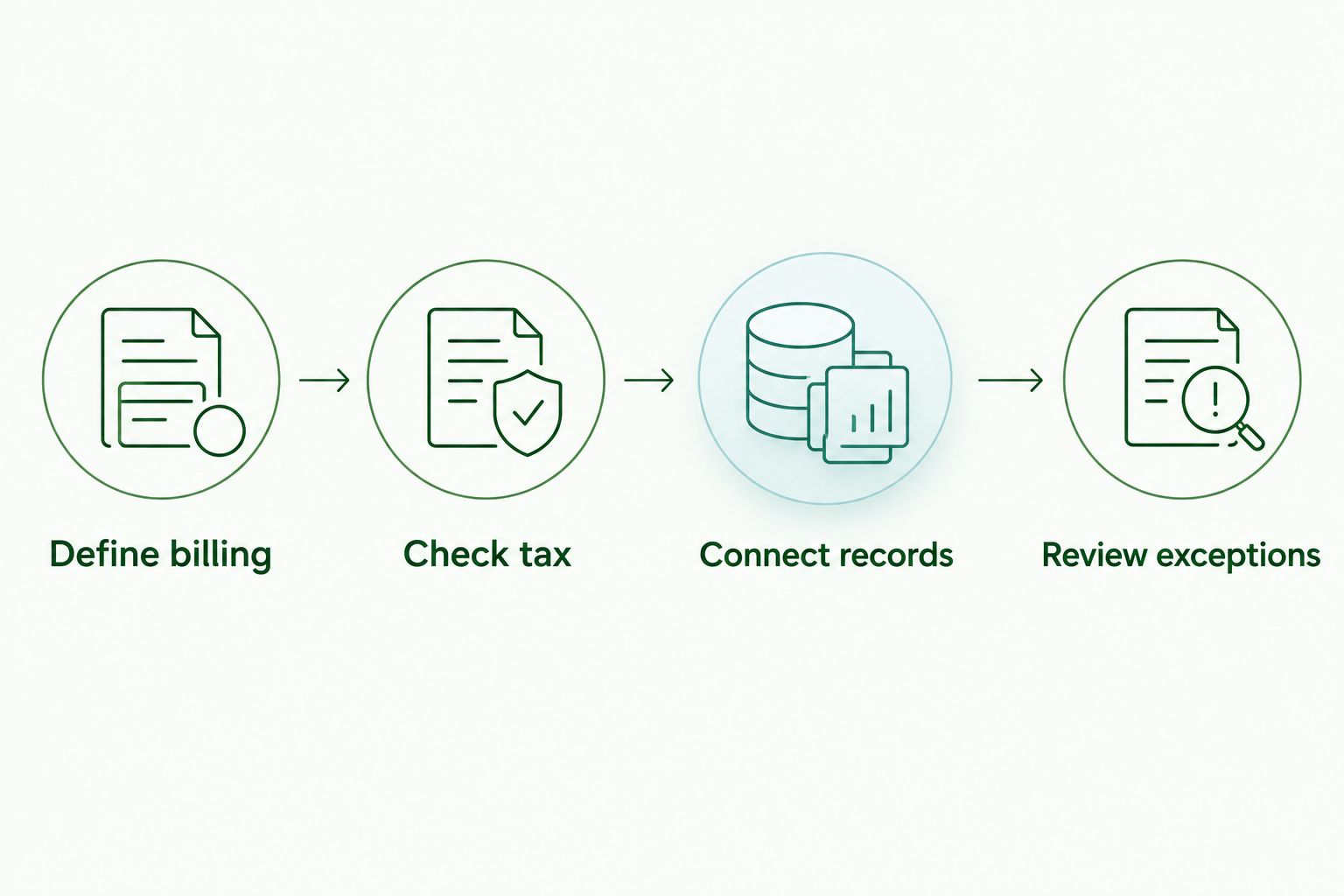
Use this sequence to turn a software shortlist into a practical decision:
01. Define billing
Write down how you charge: fixed fees, tracked time or recurring engagements. Include how you handle changes to scope and corrections to invoices. The software needs to support your billing process, not dictate your commercial agreement.
02. Check tax
Confirm your GST registration status and invoice requirements. Review the tax settings with the person responsible for your accounts before issuing invoices from the new system.
03. Connect records
Decide where expenses, bank reconciliation and financial reporting will sit. If invoicing and bookkeeping use different systems, define the handover and who checks completeness.
04. Review exceptions
Walk through an overdue invoice, a partial payment and a corrected bill. Check how you would preserve a clear record in each case. Routine invoices are only part of the decision.
Daintree Consulting provides accounting and bookkeeping support for Australian sole traders. Use that support to clarify where invoicing ends and the wider accounting responsibilities begin.
How the options are ranked
This 2026 ranking prioritises accounting connection, client-billing fit and the work required to maintain clear records. It is a workflow-based buying guide, not a hands-on speed test or a ranking based on customer review scores.
Xero takes the default position because it connects invoicing with accounting. FreshBooks takes the service-billing slot, Zoho Invoice the invoice-focused slot, and QuickBooks Online the sales-and-expense slot. Each recommendation depends on the stated use case.
Which invoicing software should you choose?
Choose Xero if you want a default shortlist starting point for invoicing and accounting together. Choose FreshBooks when tracked client work drives billing, Zoho Invoice when bookkeeping is already handled separately, or QuickBooks Online when its combined sales-and-expense workflow suits you better.
For your 2026 decision, judge the entire path from work completed to reconciled payment. The best invoice is not just clear to the customer; it also leaves a clear financial record for you.
FAQ
What's the best invoicing software for freelancers in Australia?
Xero is the default recommendation for Australian freelancers who want invoicing and accounting together. FreshBooks suits service billing, Zoho Invoice suits invoice-focused work, and QuickBooks Online suits managing sales and expenses together.
Is Xero better than FreshBooks for a sole trader?
Xero is the stronger fit when connected accounting is the priority; FreshBooks is the more relevant shortlist option when client billing and time tracking drive the workflow. Choose around your bookkeeping and tax requirements, not just invoice design.
Can I use Zoho Invoice instead of accounting software?
Zoho Invoice handles invoice-focused work but does not replace a complete accounting system. You still need a process for expenses, bank reconciliation, tax records and financial reporting.
Do I need to charge GST on freelance invoices?
GST-registered freelancers charge GST on taxable sales; freelancers who are not registered must not charge GST. The treatment of a particular sale depends on the relevant GST rules.
How long should I keep my invoice records?
Australian businesses generally need to keep most business records for 5 years. Some records require longer retention, so check the Australian Taxation Office rules before deleting them.
What should I check before changing invoicing software in 2026?
Check billing methods, GST settings, outstanding invoices and the connection to your accounting records before changing software in 2026. Also confirm how corrections, partial payments and historical records will be handled.
Does Daintree Consulting sell invoicing software?
Daintree Consulting is an accounting and advisory firm, not an invoicing software product. Its services include bookkeeping, tax and BAS compliance, business advisory and outsourced CFO support.
One last thing
Before committing, follow one representative invoice from creation through to the bank record and accounting report. Include a correction or partial payment in that walkthrough. Choose the system that keeps the whole transaction clear, not just the document you send.
Talk to Daintree about your bookkeeping and payroll
Our ex-Big 4 team gives clear, senior-reviewed advice so you can act with confidence.
Book a free consultation →
Or explore our bookkeeping and payroll services.
