
Best inventory software for Australian manufacturers 2026
Best overall shortlist candidate: MRPeasy for production-led small manufacturers. Best for assembly-focused teams: Katana. Best for configurable workflows: Odoo. This 2026 guide compares five inventory software options for Australian manufacturers by production needs, stock control and financial reporting—not by which demonstration looks best.
TL;DR
Want expert help? Daintree Consulting's accounting services can take this off your plate. Book a free consultation.
For inventory software for manufacturers Australia, shortlist MRPeasy when production planning drives the buying decision.
Compare Katana for assembly workflows, Unleashed for stock control, Cin7 Core for connected sales, and Odoo for configuration.
Test bills of materials, work in progress and accounting reconciliation before selecting manufacturing inventory software.
Daintree Consulting provides accounting and advisory support for manufacturers assessing the financial implications of inventory software.
Why this matters
Manufacturing inventory software must explain more than how many finished units sit on a shelf. You need to understand which materials production consumes, what remains unfinished and how those movements reach your accounts.
Daintree Consulting provides accounting and advisory services to Australian businesses, including manufacturers. The practical starting point is your operating model: making to order, building for stock, assembling components or combining manufacturing with distribution.
For a 2026 software decision, separate operational fit from financial fit. A system that schedules production still needs a clear route from purchasing and stock movements to inventory valuation, cost of sales and management reporting.
What makes the best manufacturing inventory software?
Judge each option against these six criteria before considering presentation or convenience:
Production fit: The system must represent how you actually make products, including assemblies, intermediate goods and production orders.
Stock visibility: Your team needs to distinguish physical stock, allocated materials and items still on order.
Costing clarity: Establish how materials, labour, overheads and production differences affect reported product costs.
Traceability: Where your business requires batch or serial tracking, test the complete movement history rather than a single stock screen.
Accounting connection: Confirm which transactions transfer, when they transfer and who resolves differences.
Implementation ownership: Assign responsibility for item records, opening balances, workflow decisions and ongoing administration.
Choose the system that handles your hardest normal transaction, not the system with the longest feature list. Treat each criterion as a demonstration requirement, with your own records and expected results.
Manufacturing inventory software at a glance
These are workflow-based recommendations, not a claim that one platform suits every Australian factory. Features, integrations and package inclusions need confirmation against the current vendor documentation and your proposed configuration.
Software | Best for | Standout capability | Key limitation to examine |
|---|---|---|---|
MRPeasy | Production-led small manufacturers | Manufacturing resource planning with inventory control | Whether its production model handles your exceptions |
Katana | Assembly-focused manufacturing teams | Connected visibility of materials and production orders | Whether your costing and production complexity fits |
Unleashed | Stock-led manufacturers and wholesalers | Inventory control with assembly management | Whether assembly functionality meets your scheduling needs |
Cin7 Core | Manufacturers combining production and sales channels | Inventory, manufacturing and order management | Complexity across channels, locations and accounting connections |
Odoo | Businesses needing configurable workflows | Connected inventory and manufacturing applications | Implementation scope and responsibility for configuration |
1. MRPeasy: best manufacturing inventory software for production planning
MRPeasy combines manufacturing resource planning with inventory management. Start here when purchasing materials, scheduling work and completing production are central to the software decision, rather than secondary to selling finished goods.
Your demonstration should follow a production order from material requirements through completion. Include a shortage or changed delivery date so you see how planning behaves when the original plan no longer works.
MRPeasy pros:
Connects production planning with material requirements.
Brings purchasing, inventory and manufacturing into the same operational workflow.
Provides a manufacturing-focused starting point for evaluating production control.
MRPeasy cons:
A planning system requires reliable bills of materials and production records; incomplete inputs weaken the plan.
A standard production demonstration does not establish suitability for your subcontracting, rework or costing exceptions.
Best for: Small manufacturers that need a clearer connection between demand, materials and production activity.
Ask the vendor to demonstrate a partially completed order, a substituted component and a finished-goods receipt. Then ask your finance team to explain the resulting inventory and work-in-progress balances.
Verdict: Buy only after MRPeasy demonstrates your production exceptions and the resulting accounting treatment.
2. Katana: best manufacturing inventory software for assembly visibility
Katana combines inventory and production management for manufacturing businesses. It belongs on the shortlist when your team needs to coordinate components, production orders and customer demand without treating those activities as separate spreadsheets.
Assess it through the daily work of the person allocating materials. That person should be able to explain which orders can proceed, what is missing and what changes when priorities move.
Katana pros:
Connects raw-material inventory with manufacturing activity.
Supports a shared view of production orders and material requirements.
Provides a relevant comparison point for businesses assembling products from components.
Katana cons:
Clear operational screens do not prove that your full costing requirements are covered.
Component substitutions, partial production and adjustments require specific testing rather than assumptions from a standard demonstration.
Best for: Assembly-focused manufacturers seeking clearer coordination between stock and production.
In your 2026 evaluation, distinguish a convenient production workflow from a complete financial process. Ask how your proposed setup treats unfinished work, production losses and changes to component costs.
Verdict: Buy if Katana handles your assembly workflow and produces financial records your accountant can reconcile.
3. Unleashed: best manufacturing inventory software for stock-led businesses
Unleashed centres on inventory management and includes assembly functionality. Shortlist it when stock purchasing, product movements and finished-goods control carry more weight than detailed factory scheduling.
That distinction matters for manufacturers that also distribute products. Managing purchased finished goods alongside assembled goods creates a different selection problem from managing complex production operations.
Unleashed pros:
Connects purchasing, inventory and sales activity.
Includes assembly management for products made from components.
Gives stock-led businesses a relevant alternative to production-first systems.
Unleashed cons:
Assembly functionality alone does not establish suitability for detailed scheduling requirements.
Businesses needing extensive production control must demonstrate those requirements explicitly before committing.
Best for: Manufacturers and wholesalers whose main challenge is controlling stock and assemblies across purchasing and sales.
Test a purchased item and an assembled item through the same reporting period. Your finance team should understand how their costs differ and how each reaches the accounts.
Verdict: Buy for a stock-led operation; hold if detailed production scheduling remains unproven.
4. Cin7 Core: best manufacturing inventory software for connected sales
Cin7 Core combines inventory, order management and manufacturing functionality. It is a relevant shortlist option when production sits alongside wholesale, online sales or other connected order flows.
The key question is not simply whether a connection exists. Establish which system controls product records, stock availability and transaction changes when several applications interact.
Cin7 Core pros:
Connects inventory management with purchasing and sales orders.
Includes manufacturing functionality alongside broader stock operations.
Provides a useful comparison for businesses combining making and selling across channels.
Cin7 Core cons:
More connected workflows create more decisions about data ownership and exception handling.
Successful order transfer does not prove that returns, cancellations and accounting adjustments work correctly.
Best for: Manufacturers whose inventory decision also needs to address multiple sales channels and order flows.
Run a customer order through allocation, production, dispatch and accounting. Then reverse part of it: a return or cancellation reveals responsibilities that a straightforward sale leaves hidden.
Verdict: Buy when Cin7 Core demonstrates the complete order lifecycle, including corrections and reconciliation.
5. Odoo: best manufacturing inventory software for configurable workflows
Odoo offers connected business applications, including inventory and manufacturing. Consider it when your requirements extend across departments and you need to assess how those workflows fit together.
Configuration is part of the buying decision, not an activity to leave undefined until after selection. Separate standard functionality, configuration and custom development in the proposed scope.
Odoo pros:
Connects inventory and manufacturing with other business applications.
Provides scope to configure workflows around defined business processes.
Supports an evaluation that looks beyond inventory in isolation.
Odoo cons:
A broad application scope requires firm boundaries and clear implementation ownership.
Custom development creates ongoing maintenance and upgrade responsibilities that need explicit agreement.
Best for: Manufacturers with documented processes and someone accountable for configuration decisions.
For a 2026 project, request a written scope that distinguishes what the demonstration showed from what the implementation includes. Assign responsibility for testing, training and support before approval.
Verdict: Buy when scope and ownership are clear; wait when configuration decisions remain open.
How the shortlist is ranked
The ranking starts with production fit, then considers stock control, financial clarity and implementation responsibility. MRPeasy leads as the default production-led shortlist candidate; the other options occupy distinct positions rather than competing for an identical use case.
This is a workflow-based buying guide, not a hands-on performance benchmark. Review Daintree Consulting’s background when choosing the accounting and advisory support around your decision, and keep vendor capability verification separate from financial advice.
How to test your shortlist before signing
Use the same business scenario for every demonstration. Otherwise, you end up comparing different presentations rather than different systems.
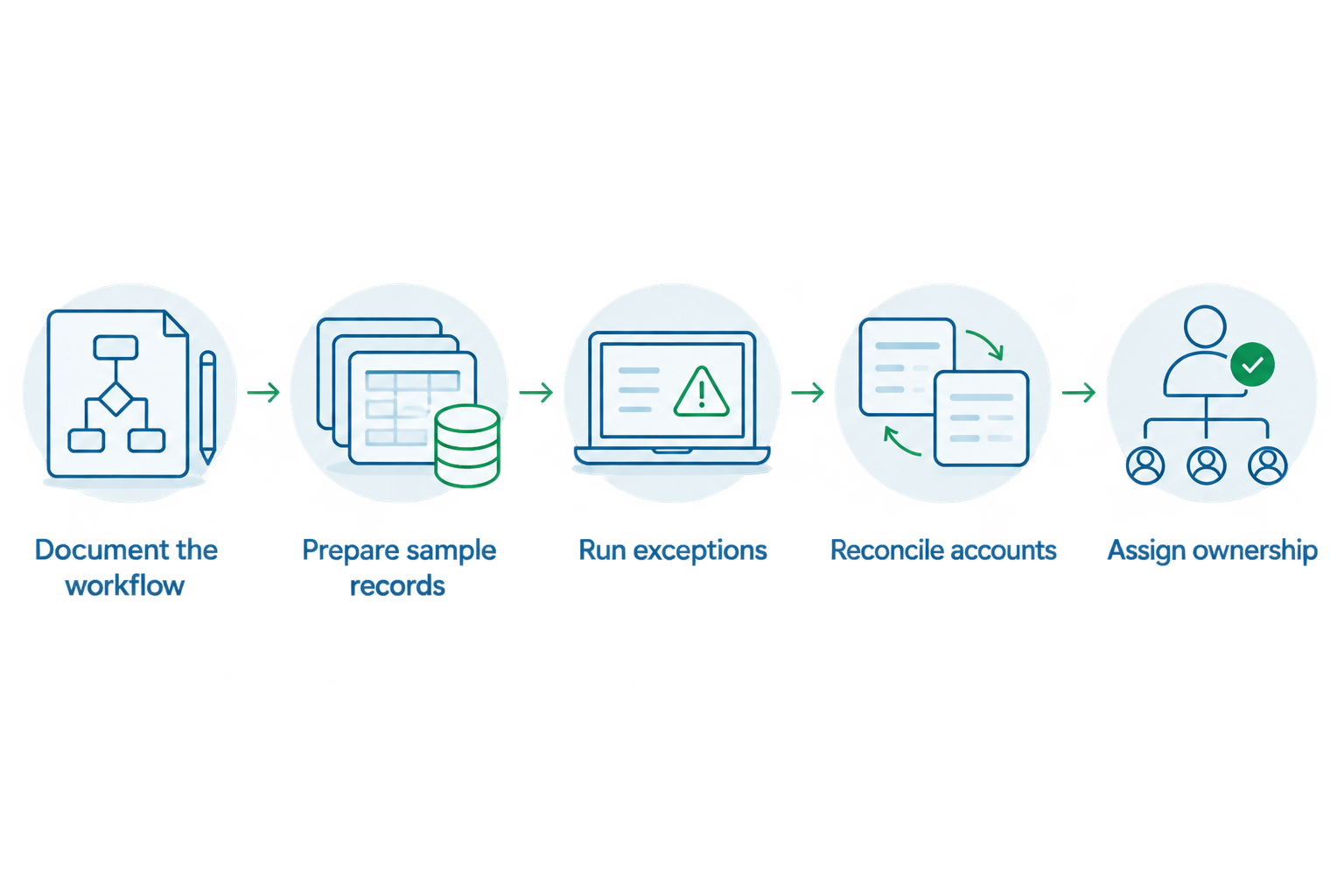
01. Document the workflow
Write down how an order becomes finished stock, including purchasing, production and dispatch. Mark every spreadsheet or manual adjustment used along the way.
02. Prepare sample records
Use real item structures with confidential details removed. Include a routine product and a troublesome product; the troublesome one often exposes the requirements missing from your original brief.
03. Run exceptions
Ask for partial completion, damaged materials, a supplier return and a customer cancellation. Spend a proposed 60 minutes on exceptions rather than accepting a demonstration consisting entirely of successful transactions.
04. Reconcile accounts
Trace the resulting stock movements into inventory, work in progress and cost of sales. Identify who investigates a difference and which records provide the explanation.
05. Assign ownership
Name the people responsible for item setup, production recording, accounting reconciliation and user support. Software cannot resolve an ownership gap that remains outside the system.
For a practical planning exercise, review 12 months of transaction history to identify recurring exceptions. After implementation, schedule a reconciliation review after the first 30 days; these are suggested review periods, not vendor performance claims.
The financial review belongs alongside the operational review. Relevant accounting and advisory services support decisions about reporting, compliance and financial management without replacing the vendor’s responsibility to demonstrate its software.
Which manufacturing inventory software should you choose?
Start with MRPeasy when production planning is the main problem. Compare Katana for assembly visibility, Unleashed for stock-led operations, Cin7 Core for connected sales workflows and Odoo for configuration-led requirements.
Keep your 2026 shortlist narrow enough to test properly. A completed workflow demonstration and reconciled accounting example provide a stronger basis for approval than another general product tour.
Daintree Consulting is best for manufacturers seeking accounting and advisory support alongside a manufacturing inventory software decision. You can discuss your accounting and advisory needs before deciding what financial questions the software evaluation needs to answer.
FAQ
What is the best inventory software for manufacturers in Australia?
MRPeasy is the default shortlist candidate in this guide for production-led small manufacturers. Compare Katana, Unleashed, Cin7 Core and Odoo against your specific assembly, stock, sales-channel or configuration requirements before selecting a system.
Is manufacturing inventory software different from accounting software?
Yes. Manufacturing inventory software manages operational records such as materials, assemblies and production activity, while accounting software maintains the financial accounts. Define how the systems exchange transactions and how you reconcile their balances.
Is Katana better than Unleashed for manufacturing?
Katana is the more relevant starting point here for assembly-focused production visibility, while Unleashed is shortlisted for stock-led operations. Test the same production and accounting scenario in both rather than deciding from category labels.
Do Australian manufacturers need an Australian-made inventory system?
Australian origin is not the selection criterion used in this guide. Assess operational fit, accounting connections, applicable business requirements and support arrangements for your Australian operation.
What should a manufacturer ask during a software demonstration?
Ask the vendor to complete your normal workflow and then handle exceptions. Include partial production, material losses, returns and the resulting inventory and accounting records.
Should a small manufacturer choose Odoo?
Odoo belongs on the shortlist when configurable, connected workflows are a priority and implementation ownership is clear. Separate standard functionality from configuration and custom development before approving the scope.
Can Daintree Consulting help with the financial side of the decision?
Daintree Consulting provides accounting, bookkeeping and business advisory services to Australian businesses, including manufacturers. Discuss your reporting and financial-management needs separately from the software vendor’s demonstration of operational capabilities.
One last thing
Before signing, ask the vendor to reverse a completed transaction and explain the financial result. Completing an order proves the intended workflow; correcting it shows whether your team can keep one clear picture when everyday mistakes happen.
Talk to Daintree about your accounting
Our ex-Big 4 team gives clear, senior-reviewed advice so you can act with confidence.
Book a free consultation →
Or explore our accounting services.
