
Best expense management software for Australian SMEs 2026
Best overall for SMEs already using Xero: Xero Expenses. Best for bookkeeping-led receipt capture: Dext Prepare. Best for standalone expense approvals: Zoho Expense. This 2026 guide from Daintree Consulting also compares Expensify for employee-led claims and SAP Concur Expense for travel-related expense administration. Choose around your accounting workflow, not the longest feature list.
TL;DR
Want expert help? Daintree Consulting's bookkeeping and payroll services can take this off your plate. Book a free consultation.
Best expense management software Australia: Xero Expenses is the default shortlist choice for SMEs already using Xero.
Dext Prepare suits receipt capture and bookkeeping preparation; it is not a substitute for a complete employee-claims workflow.
Zoho Expense suits standalone expense approvals; Expensify suits employee-led receipt submission and expense reports.
SAP Concur Expense belongs on the shortlist when business travel creates more complex expense administration.
Test GST treatment, approval routing and accounting reconciliation before committing to an expense management platform.
Why this matters
Expense management connects employee spending, approvals and accounting records. When those processes sit in separate inboxes and spreadsheets, you need to chase evidence, resolve coding questions and reconcile reimbursements manually.
The right software gives each expense a clear path from receipt to approval to the accounts. It does not decide whether spending is appropriate, establish your expense policy or resolve uncertain tax treatment.
Daintree Consulting recommends Xero Expenses for Australian SMEs that already use Xero and need employee expense claims. That is a workflow recommendation, not a claim that one platform suits every business. A receipt-heavy bookkeeping process and a travel-heavy workforce need different shortlists.
What makes the best expense management software?
Use these criteria to assess your 2026 shortlist before comparing individual tools:
Receipt capture: Employees need a practical way to submit supporting documents without handing everything to the bookkeeper.
Approval control: The workflow must identify who approves spending and what happens when a claim needs correction.
Australian accounting fit: Check tax coding, supporting evidence and how transactions reach your accounting records.
Reconciliation: An approved expense must remain traceable through reimbursement, card transactions and the ledger.
Employee usability: A process that works for finance but confuses employees creates more follow-up work.
Scope fit: Separate document preparation, employee claims and travel administration. They overlap, but they are not interchangeable.
A feature only matters when it solves a task your business actually performs. Start with the hand-offs that currently require someone to intervene.
Expense management software at a glance
Rank and option | Best for | Standout function | Key limitation |
|---|---|---|---|
1. Xero Expenses | SMEs already using Xero | Employee expense claims within the Xero environment | Its strongest fit depends on using Xero |
2. Dext Prepare | Bookkeeping-led receipt capture | Extracting and preparing information from financial documents | Document preparation is not the same as complete claims administration |
3. Zoho Expense | Standalone expense approvals | Expense reports and approval workflows | Accounting hand-offs still need careful configuration |
4. Expensify | Employee-led claims | Receipt scanning and expense reporting | A simple submission process does not replace spending rules |
5. SAP Concur Expense | Travel-related expense administration | Expense reporting within the wider Concur travel and expense environment | Its broader scope calls for a clear implementation brief |
The table separates use cases rather than declaring every lower-ranked option worse. Your existing accounting system and expense process determine which option belongs first on your shortlist.
1. Xero Expenses: best for SMEs already using Xero
Xero Expenses handles employee expense claims within the Xero environment. Employees submit claims with supporting receipts, and the business reviews those claims through its accounting workflow.
For an Australian SME already using Xero, this is the most direct starting point. Evaluate whether the claim process gives employees enough guidance and gives your finance team the evidence it needs.
Xero Expenses pros:
Keeps expense claims close to the accounting system already in use.
Supports receipt-backed employee submissions.
Provides an approval process rather than relying on emailed receipts.
Xero Expenses cons:
It is not an accounting-platform-neutral choice.
Expense claims alone do not cover every purchasing or travel-management requirement.
Before selecting Xero Expenses in 2026, run a claim through submission, approval and reconciliation. Check who assigns the account code, who reviews tax treatment and how the employee knows the claim has progressed. A familiar accounting platform does not automatically make those responsibilities clear.
Best for: Australian SMEs using Xero that want employee claims connected to their accounting process.
Verdict: Buy if employee expense claims are the main problem and Xero is already your accounting platform. Skip it as a default recommendation for businesses committed to another ledger.
2. Dext Prepare: best for bookkeeping-led receipt capture
Dext Prepare captures information from receipts, invoices and other financial documents to support bookkeeping preparation. Its role is to turn source documents into records that can be reviewed and passed into an accounting workflow.
That makes Dext Prepare a different proposition from a dedicated employee-claims platform. It belongs on your shortlist when the recurring problem is collecting documents and preparing transaction information, rather than administering reimbursements.
Dext Prepare pros:
Focuses on collecting and processing financial source documents.
Extracts document information to support bookkeeping work.
Helps organise the evidence behind accounting transactions.
Dext Prepare cons:
Receipt capture does not, by itself, establish a complete employee reimbursement process.
Extracted information still needs review for coding and tax treatment.
Check how Dext Prepare handles the documents your business receives, including supplier invoices and employee receipts. Follow the information into the ledger rather than stopping at successful capture. The useful outcome is a correctly recorded transaction with accessible evidence, not merely a digitised document.
Best for: SMEs whose bookkeeper spends substantial effort collecting receipts and preparing transaction records.
Verdict: Buy for a document-preparation problem. Hold if your main requirement is employee claim approval and reimbursement; establish that workflow before choosing a capture tool.
3. Zoho Expense: best for standalone expense approvals
Zoho Expense provides expense reporting and approval workflows. It suits a shortlist built around managing claims separately from the accounting platform, rather than selecting an expense tool solely because it sits inside the ledger.
The decision is about process ownership. Identify who submits reports, who approves them and who checks the resulting accounting entries before deciding whether a standalone platform is the right fit.
Zoho Expense pros:
Centres the workflow on employee expense reports.
Supports approval processes for submitted expenses.
Gives businesses a dedicated expense-management environment.
Zoho Expense cons:
A separate expense platform adds another system to administer.
Approval completion and ledger reconciliation remain distinct responsibilities.
For your 2026 evaluation, examine the accounting connection applicable to your business rather than assuming every integration behaves identically. Check the destination accounts, tax codes and supporting documents. Then confirm how corrections are handled after an expense has been approved or transferred.
Best for: SMEs that want a dedicated expense-approval process outside their accounting system.
Verdict: Buy when standalone approval management is the requirement and the accounting hand-off passes your trial. Hold if you have not decided who owns configuration and reconciliation.
4. Expensify: best for employee-led expense claims
Expensify provides receipt scanning and expense reporting. It is a useful shortlist option when employees regularly incur business expenses and need a clear submission process.
Focus the evaluation on the employee experience without ignoring the finance team's work. A receipt submitted successfully is only the start; someone must still review the claim, resolve exceptions and reconcile the transaction.
Expensify pros:
Provides receipt scanning through its SmartScan feature.
Organises expenses into reports for review.
Centres the process on employee submission rather than emailed documents.
Expensify cons:
Easier submission does not establish what spending your business permits.
Accounting connections and reimbursement arrangements need to match your actual setup.
Ask an employee to submit a realistic claim without finance coaching them through every field. Then ask the reviewer to identify the business purpose, evidence and accounting treatment. This exposes unclear instructions on both sides of the process.
Avoid selecting Expensify solely because receipt capture looks convenient. The deciding question is whether the entire claim reaches a reconciled accounting record with fewer manual hand-offs.
Best for: SMEs prioritising a practical employee submission and expense-reporting workflow.
Verdict: Buy when employee participation is the main bottleneck and the downstream accounting process works. Hold if policy and reviewer responsibilities remain undefined.
5. SAP Concur Expense: best for travel-related expense administration
SAP Concur Expense manages expense reporting within SAP Concur's wider travel and expense offering. It belongs on the shortlist when business travel creates a more involved administration process than occasional employee purchases.
Define the requirement before comparing features. Travel booking, expense approval and accounting reconciliation are connected activities, but they do not automatically form one complete process merely because products share an ecosystem.
SAP Concur Expense pros:
Provides dedicated expense reporting and approval functionality.
Sits within a wider travel and expense product environment.
Gives travel-focused businesses a relevant alternative to ledger-led claims tools.
SAP Concur Expense cons:
Broader scope creates more configuration decisions.
Expense software alone does not establish travel policy or booking responsibilities.
For a small business with straightforward claims, start with the simpler requirements rather than a broader implementation. For a business with recurring travel administration, document the booking-to-accounting process and assess the relevant Concur components against it.
Best for: SMEs whose travel-related expense administration requires a dedicated process.
Verdict: Hold until the travel requirement is defined. Buy when that requirement justifies the implementation scope; skip a broad setup for a basic receipt-and-approval problem.
How these options are ranked
The 2026 ranking prioritises accounting fit, evidence capture, approval control and reconciliation. Xero Expenses comes first for the defined default audience: an SME already using Xero with employee expense claims to manage.
Dext Prepare, Zoho Expense, Expensify and SAP Concur Expense occupy different use-case slots. No price-based winner is assigned, and this guide does not present the ranking as a hands-on performance test.
Daintree Consulting's expense management recommendation is to select the workflow first and the platform second. A tool that solves the wrong problem simply moves the administration somewhere else.
Test the workflow before you commit
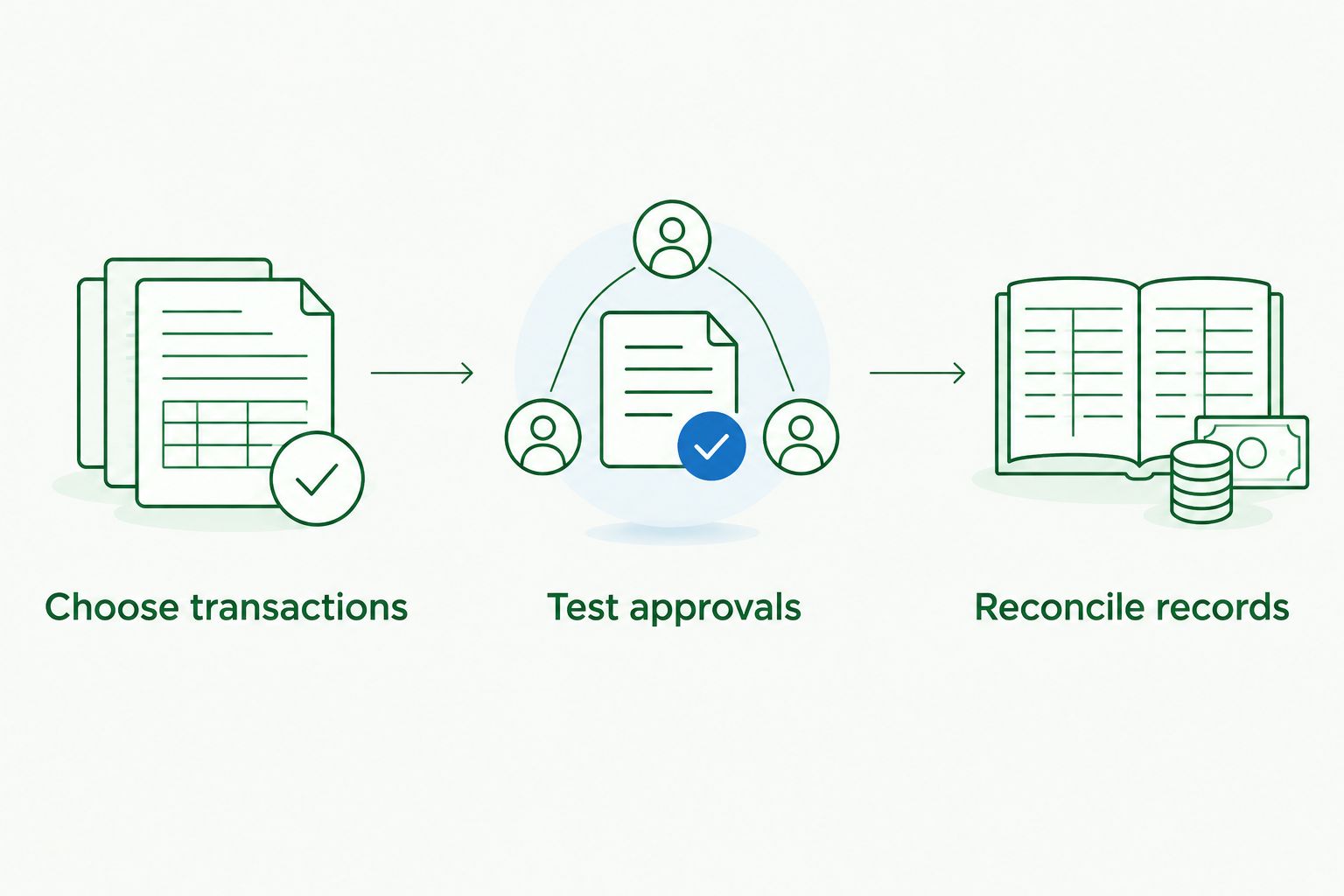
Use a small, realistic trial instead of a feature demonstration. For a 2026 evaluation, select 3 transactions, test 2 approval paths and reconcile the results across 1 reporting period. These are suggested trial boundaries, not software performance benchmarks.
01. Choose transactions
Include an employee-paid purchase, a business-card purchase and a document needing clarification. Use representative records with appropriate privacy controls. Check whether each transaction enters the correct workflow rather than treating every receipt as a reimbursement claim.
02. Test approvals
Follow a normal approval path and an exception path, such as a claim returned for missing evidence. Confirm that employees understand the correction request and that reviewers can identify the business purpose. Document who handles an approver's absence.
03. Reconcile records
Trace approved claims into the accounting records and, where applicable, the reimbursement or card reconciliation. Check account coding, GST treatment and access to supporting documents. Look for duplicate recording when the purchase also appears in a bank feed.
The trial should finish with a written decision about ownership. Identify who maintains the expense policy, who manages the software and who reconciles the records. Without those decisions, even a suitable platform leaves unresolved work between employees and finance.
Which expense management software should you choose?
Choose Xero Expenses first if you already use Xero and need employee expense claims. Choose Dext Prepare when document collection and bookkeeping preparation are the problem. Shortlist Zoho Expense for standalone approvals, Expensify for employee-led submission and SAP Concur Expense for travel-related administration.
For your 2026 decision, favour the option that completes the accounting workflow with clear responsibilities. Do not switch platforms simply to acquire features you have not connected to a business requirement.
If the choice remains unclear, Daintree Consulting's accounting, bookkeeping and advisory services provide a relevant starting point for discussing how expense records fit into your wider reporting process.
Clarify your expense workflow
Discuss how expense capture, approvals and reconciliation fit your accounting and bookkeeping process.
FAQ
What's the best expense management software for an Australian SME?
Xero Expenses is the first shortlist choice for an Australian SME already using Xero to manage employee expense claims. Dext Prepare, Zoho Expense, Expensify and SAP Concur Expense suit different document, approval and travel requirements.
Is Dext Prepare better than Xero Expenses?
Dext Prepare is better aligned with financial document capture and bookkeeping preparation, while Xero Expenses is aligned with employee claims inside Xero. Choose according to the task you need to fix rather than treating the tools as interchangeable.
Do I need expense software if I already have accounting software?
You need a separate expense tool only when your existing accounting workflow does not meet your capture, approval or reporting requirements. Start by checking the expense functions available in your current system and testing the complete process.
Can expense software decide whether I can claim GST?
Expense software does not replace a review of GST entitlement and supporting evidence. Check the business purpose, transaction details and tax treatment with your accountant when the position is unclear.
Does receipt scanning mean an expense is approved?
No, receipt scanning captures information; approval is a separate decision. Your process must identify who checks the claim against policy and who authorises it.
How should I compare expense software costs?
Compare current provider quotes against the users, functions and implementation work your business needs. Include configuration, staff training and ongoing reconciliation effort rather than comparing subscription terms alone.
What should I test before choosing expense software?
Test receipt submission, normal approval, a returned claim and accounting reconciliation. Confirm that the supporting evidence remains accessible and that transactions are not recorded twice.
One last thing
Approval and reconciliation answer different questions. Approval confirms that a claim has passed your business's review process; reconciliation confirms how the transaction is recorded and settled.
Before signing off on your expense software choice, trace an approved claim all the way to the ledger and payment record. That final check reveals whether you have improved the complete process or simply made the first step easier.
Talk to Daintree about your bookkeeping and payroll
Our ex-Big 4 team gives clear, senior-reviewed advice so you can act with confidence.
Book a free consultation →
Or explore our bookkeeping and payroll services.
