
Best cloud bookkeeping software for consulting firms 2026
Best overall: Xero. Best for project reporting: QuickBooks Online. Best for Australian payroll-led bookkeeping: MYOB Business. Best for Zoho-connected workflows: Zoho Books. This 2026 guide compares the best cloud bookkeeping software for consulting firms by how well it supports invoicing, financial reporting and the work around your accounts.
TL;DR
Want expert help? Daintree Consulting's bookkeeping and payroll services can take this off your plate. Book a free consultation.
Xero is the best cloud bookkeeping software for consulting firms seeking connected bookkeeping and accountant collaboration.
QuickBooks Online suits project reporting; MYOB Business suits payroll-led bookkeeping; Zoho Books suits Zoho-connected workflows.
Choose software around Australian compliance, project profitability and reporting needs—not the longest feature list.
Daintree Consulting provides bookkeeping and advisory services when your firm needs support beyond software.
Why this matters
Consulting firms sell expertise, but their accounts need to explain more than revenue. You need to see which engagements earn a margin, which invoices remain unpaid and whether incoming cash covers wages and other commitments.
Software records transactions. It does not decide whether an expense belongs to a client engagement, whether your project budgets are realistic or which overdue account needs attention first.
Daintree Consulting is best for Australian consulting firms seeking bookkeeping and advisory support alongside their accounting software. Daintree Consulting provides accounting, bookkeeping, payroll and outsourced CFO services; it is a service provider, not one of the software products ranked below.
For your 2026 shortlist, separate the software decision from the support decision. Choose a system your team can maintain, then assign responsibility for keeping its records useful.
What makes the best cloud bookkeeping software for consulting firms?
Judge each system against these six criteria before comparing individual features:
Australian compliance: Check GST, BAS reporting and any payroll requirements against the exact Australian product and subscription you are considering.
Engagement profitability: Decide whether you need income and expenses by client, individual project or service line. Those are different reporting requirements.
Billing workflow: Match invoicing to retainers, milestones or time-based work. Your billing process should not depend on rebuilding the same spreadsheet each month.
Cash visibility: Look for clear receivables, reconciled bank accounts and reports that help explain the difference between profit and cash.
Accountant collaboration: Your bookkeeper and accountant need appropriate access, a clear audit trail and a workable review process.
Operational fit: Assess connections with timesheets, expense capture, payroll and client-management systems. More connections also mean more processes to maintain.
Choose the simplest system that answers your recurring management questions. An elaborate setup is not an advantage when nobody consistently enters the information it requires.
Cloud bookkeeping software at a glance
These are use-case recommendations, not a claim that one product wins every feature comparison. Product editions and subscriptions differ, so confirm the functions required for your workflow before committing.
Software | Best for | Standout capability | Key limitation |
|---|---|---|---|
Xero | Connected bookkeeping and accountant collaboration | Bank reconciliation, invoicing and connections with other business applications | Detailed consulting operations can require additional applications |
QuickBooks Online | Project income and expense reporting | Project tracking in supported subscriptions | Project results depend on consistent transaction and time allocation |
MYOB Business | Australian payroll-led bookkeeping | Accounting and payroll within the MYOB product range | Payroll scope and reporting differ between product editions |
Zoho Books | Firms using other Zoho applications | Accounting workflows connected with the Zoho ecosystem | You must assess Australian payroll separately from bookkeeping |
1. Xero: best cloud bookkeeping software for connected bookkeeping
Xero combines cloud accounting, invoicing, bank reconciliation and financial reporting. Its application ecosystem lets you connect accounting with other parts of a consulting firm's workflow rather than expecting the accounting ledger to handle everything.
That makes Xero the default recommendation for a firm that wants a shared accounting foundation. You can keep core bookkeeping in one system while choosing separate tools for more specialised work.
Best for: Consulting firms that prioritise accountant collaboration and connected bookkeeping.
Xero pros
Bank reconciliation supports a repeatable bookkeeping routine.
Invoicing and receivables reporting keep billing and outstanding accounts connected.
Third-party applications provide options beyond the accounting system's core functions.
Shared access supports collaboration between business owners and their accounting advisers.
Xero cons
Accounting reports alone do not provide a complete view of consultant utilisation or delivery capacity.
A collection of connected applications creates extra setup, permissions and reconciliation work.
For consulting, the important design choice is how you identify work. Agree whether your reporting follows clients, engagements or service lines before importing historical transactions. Changing that structure after inconsistent coding creates avoidable cleanup.
In 2026, assess Xero using an actual engagement: issue an invoice, allocate an expense, reconcile the receipt and review the result. Verdict: Buy Xero for a connected accounting foundation; keep delivery management as a separate requirement.
2. QuickBooks Online: best cloud bookkeeping software for project reporting
QuickBooks Online provides cloud bookkeeping, invoicing and financial reporting. Its project functionality, available in supported subscriptions, organises project-related income and costs so you can review individual engagements rather than relying only on company-wide results.
This makes QuickBooks Online a useful shortlist option when project reporting drives your decision. The benefit depends on recording the relevant transactions against the right project.
Best for: Consulting firms that want project income and expense reporting within their accounting workflow.
QuickBooks Online pros
Project tracking connects engagement reporting with accounting transactions.
Invoicing and expense recording sit within the same accounting environment.
Financial reports support review of overall business performance alongside individual work.
QuickBooks Online cons
Project functionality is subscription-dependent, so the product name alone does not establish suitability.
Unallocated expenses and incomplete labour records leave project profitability incomplete.
Before choosing QuickBooks Online, define what your firm means by project profit. Revenue less supplier expenses is not the same as a margin that includes employee delivery time and an agreed treatment of overheads.
Ask the person reviewing your accounts to explain exactly what the project report includes. Verdict: Buy QuickBooks Online when project reporting is central and your team will maintain project allocations.
3. MYOB Business: best cloud bookkeeping software for payroll-led firms
MYOB Business provides accounting functions for Australian businesses, with payroll capabilities across relevant product options. It belongs on your shortlist when employee administration and bookkeeping need to work closely together.
For a consulting firm with employees, wages affect both cash commitments and engagement margins. Keeping payroll records and accounting entries aligned matters more than selecting software on its invoicing screen alone.
Best for: Australian consulting firms that make payroll coordination a primary bookkeeping requirement.
MYOB Business pros
The product range addresses Australian accounting and payroll requirements.
Invoicing, expense recording and reporting support routine bookkeeping.
Payroll-linked accounting helps connect employee payments with financial records.
MYOB Business cons
MYOB editions differ, so a recommendation must identify the exact product rather than treating the whole range as interchangeable.
Payroll processing does not, by itself, allocate employee effort accurately across consulting engagements.
Check employee requirements, reporting access and the workflow between payroll preparation and approval. Also decide who will maintain employee details and review payroll exceptions.
Do not confuse a successful pay run with a complete labour-cost analysis. Your management reporting still needs a consistent method for assigning delivery effort. Verdict: Buy MYOB Business when its specific payroll and accounting workflow matches your firm.
4. Zoho Books: best cloud bookkeeping software for Zoho-connected firms
Zoho Books handles cloud accounting, invoicing, expenses and financial reporting. Its strongest reason for inclusion here is its relationship with other Zoho business applications.
For a consultancy already using the Zoho ecosystem, accounting deserves assessment as part of the wider workflow. Start with the handover between sales, delivery and billing rather than assuming every application needs replacing.
Best for: Consulting firms that want bookkeeping connected with existing Zoho workflows.
Zoho Books pros
Accounting and invoicing provide a central financial record.
Connections with other Zoho applications support coordinated business workflows.
Workflow automation can reduce repeated administrative actions when configured correctly.
Zoho Books cons
Australian payroll needs a separate assessment; bookkeeping functionality does not establish payroll suitability.
Connections still require decisions about ownership, synchronisation and error handling.
Identify where a client record begins, who approves billable work and which system creates the invoice. Without those rules, connected applications can repeat inconsistent information rather than remove it.
Verdict: Buy Zoho Books when an existing Zoho workflow is the deciding advantage; otherwise, keep it on hold until the Australian accounting requirements are checked.
How the recommendations are ranked
The ranking prioritises routine bookkeeping, reporting usefulness, Australian requirements and collaboration. Xero takes the default position for connected bookkeeping; the other recommendations address distinct operating needs rather than acting as interchangeable runners-up.
This is a workflow-based comparison, not a timed product test or a feature-count competition. For your 2026 decision, assess the current Australian subscription against your actual work, including any separate applications it needs.
Put your shortlist through a consulting workflow
Use the same practical sequence for every shortlisted system. A polished demonstration is less useful than seeing your ordinary work move from agreement to reporting.
01. Set up
Create a sample client and engagement. Decide which information belongs in the accounting system and which belongs in your delivery or client-management system.
Use an illustrative 30-day payment term to check how the invoice due date and receivables report behave. This is a workflow test, not a recommendation to change your client contracts.
02. Bill work
Prepare an invoice that reflects how you actually charge: a retainer, completed milestone or approved time. Check who prepares it, who approves it and how corrections are handled.
For a time-based engagement, confirm how approved time becomes an invoice. For a retainer, check how you distinguish recurring billing from work outside scope.
03. Record costs
Assign a supplier expense and review how employee delivery costs will be treated. If your report excludes labour, label that limitation clearly rather than presenting the result as a complete engagement margin.
04. Collect cash
Record a receipt and reconcile it against the bank transaction. Then review an illustrative invoice that remains unpaid after 60 days to confirm that responsibility for follow-up is clear.
05. Review results
Read the profit and loss statement, receivables and project report together. For cash planning, consider a 13-week forecast alongside the accounting records; a forecast requires assumptions about future receipts and payments, not just historical transactions.
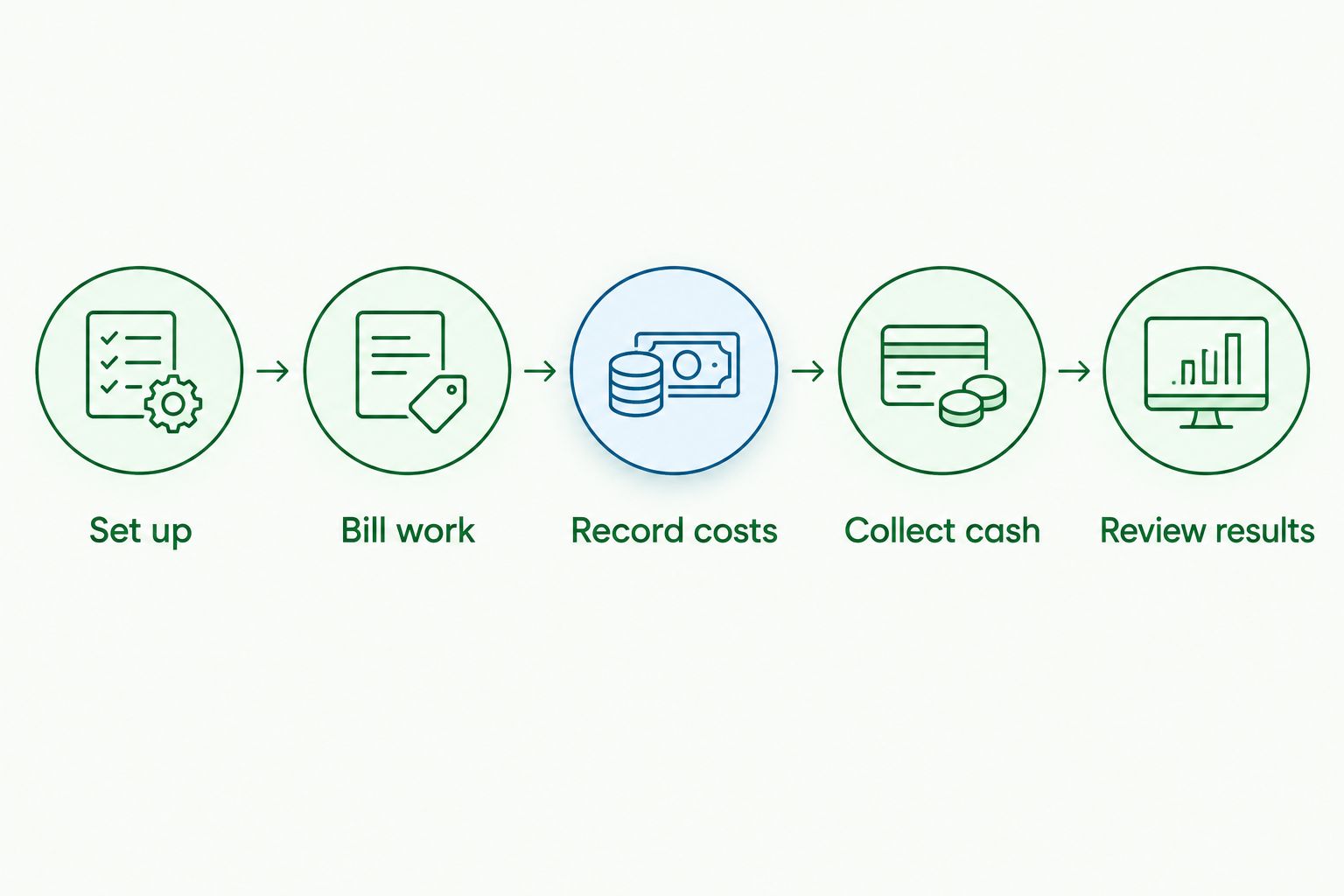
The strongest choice is the system your team can maintain through this entire sequence. Record any spreadsheet workarounds during the assessment so they remain visible in the decision.
Which cloud bookkeeping software should you choose?
Choose Xero if you need a default shortlist choice for connected bookkeeping. Choose QuickBooks Online when project reporting is the deciding requirement, MYOB Business when payroll coordination leads the decision, or Zoho Books when existing Zoho workflows provide the clearest fit.
Do not migrate solely because another system has more features. First identify whether your current problem is missing functionality, inconsistent coding or an unclear monthly review process.
Daintree Consulting's bookkeeping and advisory services address the support side of that decision. Software gives you records; clear ownership and regular interpretation make those records useful.
Clarify your bookkeeping requirements
Discuss bookkeeping, payroll and reporting needs before choosing your accounting setup.
FAQ
What's the best cloud bookkeeping software for consulting firms in 2026?
Xero is the default recommendation for connected bookkeeping and accountant collaboration. QuickBooks Online, MYOB Business and Zoho Books each suit different priorities: project reporting, payroll coordination and Zoho-connected workflows respectively.
Is Xero better than QuickBooks Online for consultants?
Xero is the recommendation here for connected bookkeeping, while QuickBooks Online suits firms prioritising project reporting within accounting. Assess the relevant subscriptions using the same client engagement before choosing.
Can bookkeeping software show profit by consulting project?
Project reporting can show allocated income and costs, but its accuracy depends on what you record. Confirm whether the report includes employee delivery time, subcontractor expenses and your chosen treatment of overheads.
Do Australian consulting firms need payroll in their bookkeeping software?
Consulting firms with employees need a payroll process, but it does not have to sit inside the bookkeeping application. Assess Australian reporting requirements, approvals and reconciliation between payroll and accounting.
Can cloud bookkeeping software replace a bookkeeper?
Cloud bookkeeping software does not replace responsibility for accurate records. Someone still needs to review coding, reconcile accounts, resolve exceptions and prepare reliable information for reporting and compliance.
Should a small consultancy change accounting software in 2026?
Change systems when a documented requirement cannot be met sensibly in your existing setup. Resolve inconsistent records or unclear responsibilities first, because those problems can follow you into a new system.
What should a consultancy check before migrating its accounts?
Check opening balances, outstanding invoices, supplier bills, payroll records and reporting requirements before migration. Assign responsibility for checking the transferred information and reconciling the new system.
One last thing
An overdue invoice is not automatically a software problem. Before replacing your system, check whether the invoice had the right purchase-order reference, reached the correct approver and matched the agreed billing milestone.
For your 2026 setup, assign one person to own the path from completed work to collected cash. That responsibility matters whichever platform you choose.
Talk to Daintree about your bookkeeping and payroll
Our ex-Big 4 team gives clear, senior-reviewed advice so you can act with confidence.
Book a free consultation →
Or explore our bookkeeping and payroll services.
