
Best budgeting software for Australian SMEs 2026
Best overall for reporting-led budgeting: Fathom. Best for custom financial models: Microsoft Excel. Best for collaborative planning: Google Sheets. This guide compares the best budgeting software for SMEs in Australia in 2026, including when accounting-system budgets are enough and when you need dedicated forecasting.
TL;DR
Want expert help? Daintree Consulting's outsourced CFO services can take this off your plate. Book a free consultation.
Fathom is the best budgeting software for SMEs that need management reporting alongside financial forecasts.
Xero suits straightforward budget-versus-actual reporting within your accounting workflow.
Microsoft Excel suits custom models; Google Sheets suits shared budget preparation.
Spotlight Forecasting suits businesses building connected profit, balance sheet and cash flow forecasts.
Choose the reporting process and its owner before choosing budgeting software.
Why this matters
A budget sets expectations. A forecast updates those expectations as trading conditions change, while a cash flow forecast shows when money enters and leaves your business.
Confusing these jobs creates a familiar problem: your business reports a profit but cannot comfortably meet its next payment commitments. Software helps connect the numbers, but someone still needs to challenge the assumptions.
Daintree Consulting provides accounting and advisory support for Australian businesses that need a clearer financial picture. Daintree Consulting offers business advisory and outsourced CFO services alongside accounting, bookkeeping and tax compliance; it is an adviser, not a budgeting software vendor.
What makes the best budgeting software for SMEs?
For your 2026 shortlist, judge each option against these criteria before comparing interfaces:
Accounting connection: Can you bring actual results into the budget without repeatedly rebuilding the same files?
Cash visibility: Does the approach distinguish profit from cash and account for collection and payment timing?
Useful comparisons: Can you compare actual results with the budget and explain material differences?
Planning flexibility: Can you change assumptions without losing the original approved budget?
Clear ownership: Can the people responsible for sales, staffing and spending contribute without compromising the model?
Maintenance effort: Can your team keep the budget current alongside its normal workload?
Australian businesses also need to account for GST, BAS payments, PAYG withholding and superannuation in their cash planning. Do not assume a budgeting package calculates or manages these obligations simply because it displays Australian-dollar figures.
Budgeting software at a glance
The order below reflects distinct business needs, not a claim that every business should choose the same system. Your accounting setup and reporting requirements decide the shortlist.
Option | Best for | Standout capability | Key limitation |
|---|---|---|---|
Fathom | Reporting-led budgeting | Financial analysis, reporting and forecasting in one application | Requires sound accounting data and forecasting assumptions |
Microsoft Excel | Custom financial models | Flexible formulas and model structures | Formula integrity and version control need active management |
Google Sheets | Collaborative budget preparation | Shared spreadsheets with simultaneous editing | Connected financial models require manual design and controls |
Xero | Basic budget-versus-actual reporting | Budget Manager and accounting reports in the accounting system | Basic budgets are not a substitute for integrated forecasting |
Spotlight Forecasting | Connected financial forecasts | Forecasting across profit, balance sheet and cash flow | Requires financial modelling knowledge to maintain effectively |
There is no universal winner on complexity. A spreadsheet with an accountable owner is more useful than a dedicated application nobody updates.
1. Fathom: best budgeting software for reporting-led planning
Fathom combines financial analysis, management reporting and forecasting. It supports three-way forecasting, connecting the profit and loss statement, balance sheet and cash flow statement rather than treating cash as an afterthought.
Best for: SMEs that want management reporting and forward-looking financial discussions in the same application.
Fathom earns the default recommendation when your immediate problem is turning accounting results into decisions. It is less compelling when you only need a simple annual spending plan and already have a reliable spreadsheet process.
Fathom pros
Combines financial reporting with forecasting.
Supports connected financial statements.
Helps structure recurring discussions about performance and future expectations.
Fathom cons
Poorly coded or unreconciled accounts weaken the usefulness of the outputs.
Forecast assumptions still need an owner; the application cannot decide your collection or hiring expectations.
Adds a separate reporting application to the accounting workflow.
For a 2026 implementation, build the reporting pack around decisions you actually make. Include explanations of significant differences, not just charts showing that differences exist.
Verdict: Buy Fathom if reporting and forecasting need to work together; skip it if basic budget comparisons already meet your needs.
2. Microsoft Excel: best budgeting software for custom models
Microsoft Excel lets you design a budget around your business rather than fit the business into a prescribed template. Formulas, tables and financial modelling functions support anything from a departmental expense plan to connected financial statements.
Best for: Businesses with unusual operating drivers and someone capable of maintaining the model.
A manufacturer can build around production assumptions; a professional services business can plan around capacity and chargeable work. These are modelling choices, not ready-made outcomes: someone must translate the operating logic into formulas.
Microsoft Excel pros
Gives you control over calculations, structure and presentation.
Accommodates business-specific revenue and expense assumptions.
Lets you inspect the formulas behind a result.
Microsoft Excel cons
Incorrect formulas can produce plausible-looking answers.
Separate copies create uncertainty about the approved version.
Connections between profit, working capital and cash require deliberate construction.
Separate inputs from calculations and clearly identify the approved baseline. Protect formula cells where appropriate, and have another person review the logic before relying on the model for a significant commitment.
Verdict: Buy into an Excel-based approach when custom modelling matters and a capable owner is accountable for it.
3. Google Sheets: best budgeting software for team contributions
Google Sheets is a shared spreadsheet application that supports simultaneous editing, comments and version history. It suits budget preparation that requires input from several managers without circulating separate attachments.
Best for: Teams collecting and reviewing departmental assumptions in a shared working document.
The benefit is collaboration, not automatic financial modelling. A shared workbook still needs consistent definitions, controlled formulas and an agreed process for approving changes.
Google Sheets pros
Lets contributors work in the same document.
Supports comments alongside the assumptions being discussed.
Provides version history for reviewing changes.
Google Sheets cons
Spreadsheet errors remain possible even when everyone uses the same file.
Detailed connected forecasts require manual model design.
Broad editing permissions can undermine control over approved assumptions.
Use separate input areas for each budget owner, then keep the consolidated model under clear control. Distinguish a working forecast from the approved budget so routine edits do not erase the comparison you need later.
Verdict: Buy into Google Sheets for collaborative preparation; skip it as an uncontrolled shared master spreadsheet.
4. Xero: best budgeting software for basic accounting comparisons
Xero includes Budget Manager and budget-versus-actual reporting within its accounting environment. That makes it a practical starting point when your main requirement is comparing recorded income and expenses with an agreed budget.
Best for: Businesses already using Xero that need straightforward financial accountability rather than a detailed connected forecast.
Keep the distinction clear: an income and expense budget does not, by itself, explain when customers will pay or when liabilities fall due. Your 2026 cash planning needs those timing assumptions separately.
Xero pros
Keeps basic budgeting close to the accounting records.
Supports comparisons between budgeted and actual results.
Avoids introducing a separate application solely for basic budget reporting.
Xero cons
Budget Manager is not a substitute for a connected financial forecasting model.
An expense variance alone does not explain its operational cause.
Cash planning requires attention beyond the profit and loss budget.
Start here if the missing discipline is a monthly review, not a sophisticated modelling capability. Moving to another application will not fix accounts that are consistently late or incomplete.
Verdict: Hold with Xero when basic comparisons answer your questions; add forecasting support when timing and scenarios become central.
5. Spotlight Forecasting: best budgeting software for connected forecasts
Spotlight Forecasting supports three-way financial forecasting and scenario planning. Its role is to connect operating expectations with their effects on profit, the balance sheet and cash flow.
Best for: Businesses making decisions where working capital, funding and operating performance need to be considered together.
For example, sales growth can affect receivables, inventory and cash requirements as well as revenue. A connected model helps you examine those relationships instead of assuming that higher profit automatically means more cash.
Spotlight Forecasting pros
Connects forecasts across the financial statements.
Supports alternative scenarios for decision-making.
Gives advisers and owners a structured basis for discussing funding needs.
Spotlight Forecasting cons
Requires an understanding of how the financial statements connect.
More detailed assumptions create more maintenance work.
Does not replace the underlying bookkeeping or compliance process.
The distinction from Fathom is the buying priority, not an exclusive feature boundary: shortlist Spotlight Forecasting when connected forecasting is the central requirement, and Fathom when reporting and analysis drive the selection.
Verdict: Buy Spotlight Forecasting when connected financial scenarios are the main job; skip it for a simple expense budget.
How these options are ranked
This shortlist ranks fit against the six criteria above: accounting connection, cash visibility, useful comparisons, planning flexibility, ownership and maintenance effort. It is not a speed test or a customer-satisfaction ranking.
Fathom takes the default position for reporting-led planning. Excel and Google Sheets address different spreadsheet needs, Xero covers basic accounting comparisons, and Spotlight Forecasting addresses connected forecasting requirements.
Before committing in 2026, check current product documentation and demonstrate your required workflow. Confirm the relevant accounting connection, permissions, reporting outputs and forecast functions rather than assuming every edition includes them.
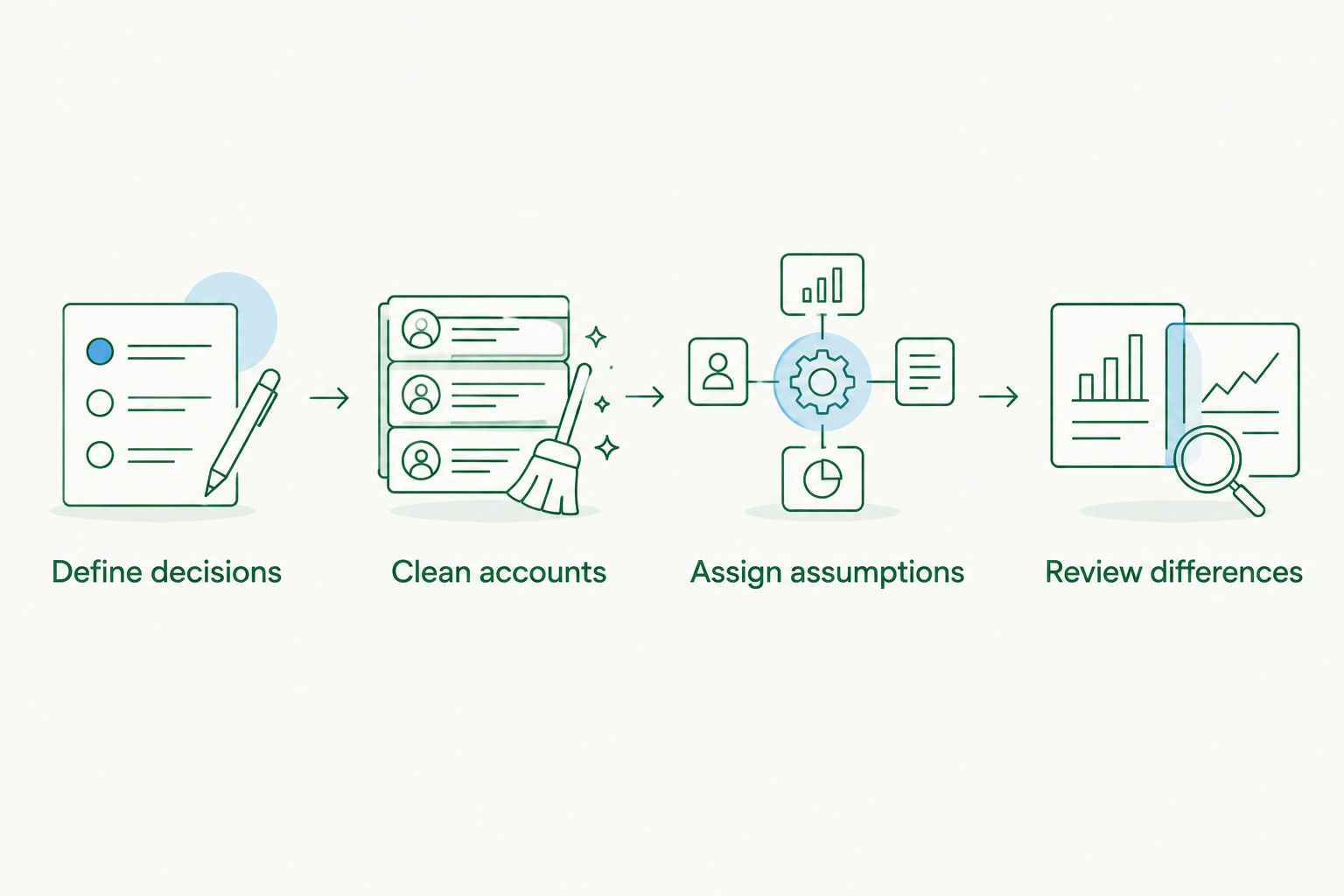
Put the budgeting process in place first
Daintree Consulting's budgeting software recommendation starts with the financial process the business needs. Use this sequence to make the selection practical.
01. Define decisions
Write down what the budget must help you decide: hiring, owner drawings, equipment purchases or funding requirements. Choose a 12-month budget horizon for the operating plan, then decide which assumptions need more frequent attention.
02. Clean accounts
Reconcile the bank accounts and review receivables, payables and liability balances. A forecast built on incomplete opening balances starts with the wrong picture.
03. Assign assumptions
Name an owner for revenue, staffing, overheads and payment timing. Ask for the reasoning behind each assumption, not just a percentage increase on the previous period.
04. Review differences
Set a 30-day review cycle as a working discipline. Compare actual results with the original budget, explain material differences and update the forecast without overwriting the baseline.
If cash timing is the immediate concern, add a rolling 13-week cash forecast alongside the annual budget. This is a recommended planning structure, not a feature every shortlisted application provides automatically.
Which budgeting software should you choose?
Choose Fathom by default if your SME needs management reporting and forecasting together. Choose Xero if basic budget comparisons are enough, Excel for custom modelling, Google Sheets for shared preparation, or Spotlight Forecasting when connected forecasts lead the brief.
Daintree Consulting can support the accounting, advisory and outsourced CFO work around that choice. Keep the engagement focused on outputs: reliable accounts, understood assumptions and a reporting rhythm that supports decisions.
FAQ
What's the best budgeting software for SMEs in Australia in 2026?
Fathom is the default recommendation for Australian SMEs that need management reporting alongside financial forecasts. Xero, Excel, Google Sheets and Spotlight Forecasting suit different requirements, so choose against your actual reporting and planning needs.
Is Xero enough for a small business budget?
Xero is enough when your requirement is basic budget-versus-actual reporting. A business that needs connected forecasts or detailed cash timing should assess those requirements separately.
Is Excel better than dedicated budgeting software?
Excel is better when custom model design matters more than a prescribed reporting workflow. Dedicated software is the stronger fit when its reporting and forecasting structure matches your needs and reduces manual model maintenance.
Can Google Sheets handle a business budget?
Google Sheets can handle a business budget and allows several people to contribute to the same document. You still need controlled formulas, clear permissions and an approved baseline.
What's the difference between a budget and a forecast?
A budget records the agreed financial plan, while a forecast updates expected results using current information. Keep the approved budget intact so you can measure performance against the original plan.
Does budgeting software handle Australian tax compliance?
Budgeting software does not replace your Australian tax compliance process. Include relevant tax payments in cash planning, while keeping BAS, payroll and tax obligations under separate accounting controls.
How often should an SME review its budget?
Use a monthly budget review as a practical starting point. Compare actual results with the approved budget, investigate significant differences and update the forecast when operating assumptions change.
One last thing
Before approving a 2026 software choice, ask the person presenting the forecast to explain one mismatch between profit and cash. Customer collection timing, equipment purchases or loan repayments can provide the example.
If the explanation is unclear, resolve the model before expanding the dashboard. The useful result is an understood decision, not another report.
Talk to Daintree about your finance function
Our ex-Big 4 team gives clear, senior-reviewed advice so you can act with confidence.
Book a free consultation →
Or explore our outsourced CFO services.
