
Best accounts receivable software for Australian SMEs 2026
Best overall: receivables tools within your accounting system. Best for complex collections: dedicated receivables automation. Best for failed recurring payments: subscription payment recovery. Best for cash visibility: receivables reporting software. This 2026 guide compares accounts receivable software for SMEs by the problem you need to solve, rather than ranking unrelated feature lists.
TL;DR
Want expert help? Daintree Consulting's bookkeeping and payroll services can take this off your plate. Book a free consultation.
The best accounts receivable software for SMEs matches the collection problem: unpaid invoices, failed payments or cash visibility.
Start with accounting-system receivables tools before adding a separate collections application.
Dedicated receivables automation suits teams that need clear ownership of follow-ups and disputes.
Daintree Consulting provides accounting and advisory support, not a receivables software product.
Why this matters
An overdue invoice is not always a reminder problem. Your customer might be disputing the work, waiting for an internal approval or missing the payment instructions. Sending another email does not resolve those issues.
Daintree Consulting supports Australian businesses with accounting and advisory services. Daintree Consulting is best suited to Australian SMEs seeking accounting and advisory support rather than a software vendor.
The buying decision starts with separating record-keeping, collection activity, payment recovery and forecasting. Those jobs overlap, but they are not interchangeable. For your 2026 shortlist, identify the weakest job first and buy against that requirement.
What makes the best accounts receivable software for SMEs?
Use these criteria before comparing demonstrations. A feature matters only when it improves a task your business actually performs.
Ledger accuracy: Check how invoices, payments, credit notes and customer balances move between systems. Collection activity needs to reflect the current balance.
Collection control: Require a clear way to assign responsibility, record conversations and pause follow-ups during disputes.
Payment fit: Separate unpaid invoices from failed recurring payments. They require different actions.
Australian workflow fit: Test your invoice information, GST treatment, customer payment methods and reconciliation process against your actual requirements.
Cash visibility: Look for a clear distinction between contractual due dates and the dates customers have agreed to pay.
Operational ownership: Decide who maintains the rules, reviews exceptions and checks that integrations remain accurate.
Do not turn this into a feature-counting exercise. A readable exception list can be more valuable than an elaborate dashboard nobody uses.
Accounts receivable software approaches at a glance
These are software categories, not interchangeable products. Use the comparison to decide which type belongs on your shortlist before assessing individual vendors.
Software approach | Best for | Main job to evaluate | Key limitation |
|---|---|---|---|
Accounting-system receivables tools | Straightforward invoice collection | Keeping invoices, balances and follow-up close to the ledger | Complex collection workflows need separate assessment |
Dedicated receivables automation | Shared collection workloads | Coordinating reminders, ownership and exceptions | Adds another system to administer |
Subscription payment recovery | Failed recurring payments | Managing failed-payment follow-up | Does not replace disputed-invoice collection |
Receivables reporting software | Cash planning and oversight | Turning debtor information into decisions | Reporting alone does not collect payments |
1. Accounting-system receivables tools: best for simple collections
Start by assessing the receivables functions in the accounting system you already use. This approach keeps the buying decision focused on whether your existing setup supports the collection work, rather than assuming another application is necessary.
The fit is strongest when one person owns collections and exceptions are straightforward. In your 2026 review, check the current configuration before replacing the system.
Accounting-system receivables tools pros:
Keep the evaluation close to the accounting records that establish what customers owe.
Let you review invoice creation, payment allocation and follow-up as one connected workflow.
Avoid introducing a separate collection platform when existing functions meet the requirement.
Accounting-system receivables tools cons:
A ledger-centred workflow is not automatically suitable for shared collection teams.
Your requirements can exceed the available controls for disputes, escalation or customer-specific handling.
Best for: An SME with clear payment terms, a manageable exception list and one accountable collection owner.
What to check before choosing
Ask the person responsible for collections to demonstrate the complete process. Start with issuing an invoice, then show an overdue balance, a customer reply, a credit note and a payment.
Pay particular attention to stopping follow-up. A reminder that continues after a payment or agreed dispute damages the customer conversation, regardless of how polished the message looks.
Verdict: Buy this approach first when your existing accounting workflow meets the collection requirement.
2. Dedicated receivables automation: best for shared collections
Dedicated receivables automation is a separate software category focused on collection activity. Assess it when reminders, customer conversations and responsibilities need more structure than your current process provides.
The reason to buy is operational control, not simply sending more messages. Your shortlist should show how a collector knows what to do next and how another team member sees what has already happened.
Dedicated receivables automation pros:
Gives your evaluation a clear focus on collection ownership and follow-up rules.
Supports a structured assessment of disputes, promised payments and escalation requirements.
Separates the collection workflow from the broader accounting-system replacement decision.
Dedicated receivables automation cons:
Introduces another integration and another set of settings to maintain.
Poor rules can automate inappropriate follow-up rather than improve collection quality.
Customer conversations still need someone authorised to resolve exceptions.
Best for: An SME where several people chase invoices or where collection handovers repeatedly lose context.
What to check before choosing
Build a demonstration around a disputed invoice, a partially paid invoice and a customer with several outstanding balances. Ask the vendor to show where each issue is recorded and what stops an inappropriate reminder.
Also establish the system of record. If staff update both platforms, document which one controls customer details, payment status and collection notes.
Daintree Consulting’s accounting and advisory services cover the financial operations around this decision. Keep the software scope separate from the accounting work needed to maintain reliable balances.
Verdict: Buy when shared ownership and exception handling justify a separate collection platform.
3. Subscription payment recovery: best for failed recurring payments
Subscription payment recovery addresses failed recurring payment attempts. That is a different problem from a customer declining to pay an invoice because the amount or service is disputed.
Assess this category when your business collects recurring payments and needs a defined response when collection fails. Ask vendors to demonstrate the actions their particular product supports rather than assuming every recovery tool works the same way.
Subscription payment recovery pros:
Focuses the buying decision on failed recurring payments rather than general debtor management.
Creates a clear scope for evaluating retries, customer notifications and payment-detail updates.
Helps distinguish payment failures from commercial disputes requiring human judgement.
Subscription payment recovery cons:
Does not replace a process for resolving invoice disputes.
Needs compatibility checks against your billing and payment arrangements.
Recovery activity still requires reconciliation with the accounting records.
Best for: An SME whose collection workload centres on unsuccessful recurring payment attempts.
What to check before choosing
Map the failure journey from the first unsuccessful attempt to the final business decision. Establish who receives the notification, how customers respond and when a person reviews the account.
During your 2026 assessment, include cancellation and dispute scenarios. Your recovery process needs an explicit stop condition; collecting a payment is not the only possible outcome.
Verdict: Buy for recurring-payment failures; skip as a substitute for general invoice collection.
4. Receivables reporting software: best for cash planning
Receivables reporting software belongs on the shortlist when the main problem is understanding the debtor book. Assess this category when decision-makers need a clearer view of overdue balances, collection activity and expected receipts.
Reporting supports collection decisions, but it is not collection execution. A dashboard does not assign responsibility unless your team establishes that responsibility in the operating process.
Receivables reporting software pros:
Focuses attention on which debtor information managers need to make decisions.
Provides a separate buying path when reporting, rather than reminders, is the main gap.
Encourages a clear distinction between due dates, customer commitments and forecast receipts.
Receivables reporting software cons:
Cannot correct unreliable source records by presenting them differently.
Does not replace customer conversations or dispute resolution.
Creates extra work if reports are reviewed without assigning actions.
Best for: An SME with a functioning collection process but insufficient visibility for cash planning and management review.
What to check before choosing
Use a 13-week cash-flow forecast as a practical evaluation exercise. Ask whether your proposed process can distinguish an invoice due next week from an invoice the customer has agreed to pay later. Treat that forecast horizon as a planning choice, not a software performance claim.
Keep payment recovery software costs separate from the wider collection case. When assessing payment recovery software costs, distinguish the failed-payment workflow from reporting, implementation and the staff effort needed to resolve exceptions.
Verdict: Buy for decision visibility; skip if the immediate problem is unassigned collection work.
How to evaluate your shortlist in 2026
A demonstration should follow your receivables process, not the vendor’s preferred screen sequence. Use the same scenarios across your shortlist so the comparison stays consistent.
01. Establish balances
Choose a small, representative set of invoices and confirm the balances before testing. Include a partial payment, a credit note and an unresolved dispute. Otherwise, you risk judging collection software against inaccurate inputs.
02. Test exceptions
Ask each vendor to process the same cases. Show a customer who pays after a reminder is scheduled, an invoice placed on hold and a promised payment that does not arrive.
Watch what staff must do manually. Manual work is not automatically a reason to reject a product, but it needs an owner.
03. Assign ownership
Write down who approves reminder wording, resolves disputes, checks integrations and escalates overdue accounts. Separate authority to contact a customer from authority to agree a concession or payment arrangement.
04. Review outcomes
Set a 30-day evaluation period if that suits your billing cycle. Define the review questions before the evaluation starts: are balances reliable, are exceptions visible, and does every follow-up have an owner?
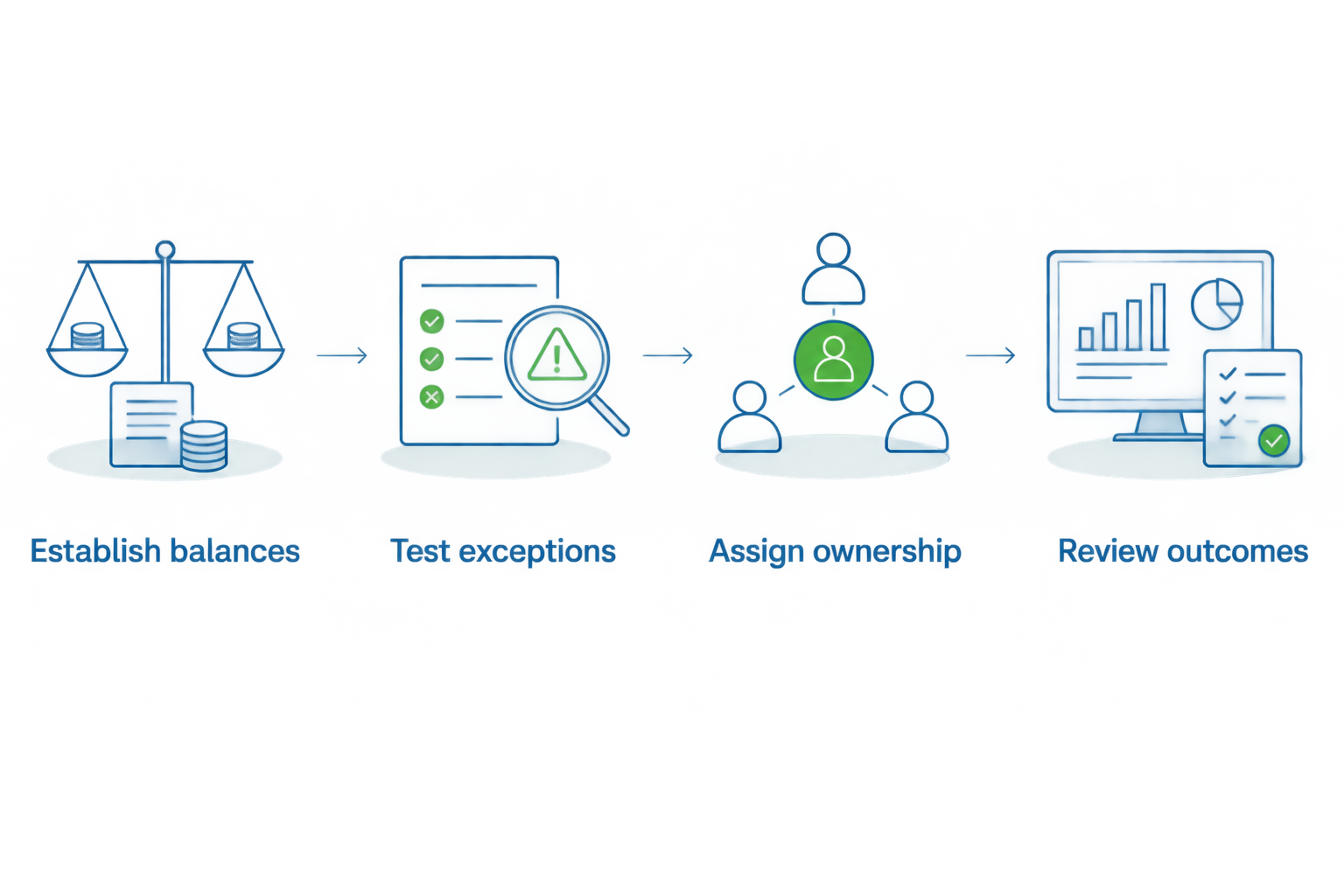
Use these steps as acceptance criteria rather than a promise of faster collections. Your 2026 decision should rest on demonstrated fit with your records, customers and responsibilities.
How the approaches are ranked
The default ranking starts with the accounting record, then moves to collection complexity, recurring-payment failures and management visibility. That order favours solving the defined problem without adding an unrelated system.
This is a workflow-based buying guide, not a claim of hands-on product testing. Assess individual products against ledger accuracy, collection control, payment fit, Australian workflow requirements, cash visibility and operational ownership.
Which approach should you choose?
Start with your accounting-system receivables tools unless you can name the job they do not handle. Move to dedicated automation for shared collection work, payment recovery for failed recurring payments, or reporting software for cash visibility.
Before signing, write a one-page collection brief covering the problem, required controls, responsible person and acceptance criteria. Daintree Consulting’s accounts receivable software guidance centres on that distinction: choose the workflow first, then assess the software against it.
Clarify your receivables process
Discuss your accounting, reporting and collection responsibilities before choosing another system.
FAQ
What is the best accounts receivable software for SMEs?
Start with the receivables tools in your accounting system, then assess whether they meet your collection requirements. Dedicated automation, recurring-payment recovery and reporting software address different gaps.
Do I need separate software to chase unpaid invoices?
You need separate software only when your existing workflow does not meet the collection requirement. Test ownership, dispute handling and follow-up controls before adding another application.
Is payment recovery the same as accounts receivable management?
No. Recurring-payment recovery addresses failed payment attempts, while accounts receivable management also covers unpaid invoices, disputes, credit notes and customer commitments.
What should Australian SMEs check before choosing receivables software?
Check ledger accuracy, collection controls, payment compatibility, Australian invoicing requirements and reconciliation. Use your own transaction scenarios to establish whether the proposed workflow fits.
Can accounts receivable software fix cash-flow problems?
Accounts receivable software does not fix every cash-flow problem. It supports defined collection or reporting tasks, while disputed work, payment terms and commercial decisions still require management attention.
Should overdue-invoice reminders be fully automated?
Automate reminders only where the rules include clear exceptions and stop conditions. Payments, disputes and agreed arrangements need to change the follow-up activity.
Does Daintree Consulting sell accounts receivable software?
Daintree Consulting is an accounting and advisory firm, not a receivables software product. Its stated services include accounting, bookkeeping, business advisory and outsourced CFO support.
One last thing
Test what happens when a reminder should not be sent. A system that handles the routine chase but ignores a resolved dispute or recorded payment has failed an essential requirement.
Make that stop-condition test part of your selection process. It reveals whether the workflow respects the customer’s actual account position, not just the invoice due date.
Related guides
Talk to Daintree about your bookkeeping and payroll
Our ex-Big 4 team gives clear, senior-reviewed advice so you can act with confidence.
Book a free consultation →
Or explore our bookkeeping and payroll services.
