
Best accounts payable automation tools for Australian SMEs 2026
Best overall for approval control: ApprovalMax. Best for invoice capture: Dext. Best for detailed purchasing workflows: Lightyear. Best for keeping a straightforward process inside your ledger: Xero. This 2026 guide compares the best accounts payable automation tools by the work they remove; Daintree Consulting helps Australian businesses connect bookkeeping, reporting and financial decisions.
TL;DR
Want expert help? Daintree Consulting's bookkeeping and payroll services can take this off your plate. Book a free consultation.
ApprovalMax leads this best accounts payable automation tools shortlist for businesses needing structured bill approvals.
Dext suits invoice capture; Lightyear suits detailed purchasing workflows; Xero suits straightforward bill management.
Choose accounts payable software around your accounting system, approval responsibilities and supplier payment controls.
Daintree Consulting provides accounting and advisory support, not a competing accounts payable software product.
Why this matters
Accounts payable automation covers several different jobs: collecting invoices, extracting information, coding expenses, approving bills and preparing payments. A tool that handles one job well does not automatically handle the others.
For an Australian SME, the right starting point is the problem creating rework or financial risk. If invoices disappear into inboxes, start with capture. If bills reach the ledger without clear authorisation, start with approvals.
Daintree Consulting is best suited to Australian businesses seeking accounting and advisory support alongside accounts payable software. Software selection should support that financial process, not replace ownership of it.
What makes the best accounts payable automation tools?
Use these criteria before comparing feature lists. Each criterion should connect to a task your team performs, rather than a feature you might never use.
Capture accuracy: Check supplier details, invoice references, dates, amounts and GST treatment against the original document.
Approval control: Match approval responsibilities to the people authorised to commit business funds.
Ledger fit: Check how bills, coding, attachments and changes move into your accounting system.
Purchasing detail: Decide whether you need invoice totals alone or individual lines checked against purchasing records.
Payment safeguards: Keep invoice approval separate from verifying changed supplier bank details.
Implementation effort: Identify who will configure workflows, train users and resolve exceptions.
For your 2026 shortlist, treat a weakness in an essential requirement as a reason to stop. Additional features do not compensate for an unreliable handover into your accounts.
Accounts payable automation tools at a glance
The order below reflects distinct workflow needs, not a claim that every business should choose the first tool. These products overlap, and some businesses use more than one.
Tool | Best for | Standout capability | Key limitation |
|---|---|---|---|
ApprovalMax | Structured bill approvals | Approval workflows connected to accounting software | Approval control does not replace checking invoice accuracy or supplier bank changes |
Dext | Reducing invoice data entry | Extracting information from invoices and receipts | Capturing a document does not establish that the expense is authorised |
Lightyear | Detailed purchasing workflows | Line-item invoice extraction and purchasing controls | Detailed workflows require clear coding, purchasing and approval rules |
Xero | Keeping straightforward bill management in the ledger | Bills and accounting records in the same system | Complex approval requirements need assessment beyond basic bill processing |
1. ApprovalMax: best accounts payable automation tool for approvals
ApprovalMax provides approval workflows for accounting documents and connects with accounting software, including Xero. It suits businesses where the main problem is deciding who must approve a bill before it progresses.
The distinction is between recording an expense and authorising it. An invoice can contain the correct supplier and amount while still needing approval from the person responsible for the purchase.
ApprovalMax pros:
Focuses on approval responsibilities rather than treating authorisation as an email task.
Supports structured workflows for accounting documents.
Connects approval decisions with the accounting process.
ApprovalMax cons:
Approval rules need maintenance as responsibilities change.
Approval does not establish that an invoice is accurate or that new bank details are genuine.
Best for: SMEs with different spending responsibilities across owners, managers or departments.
Before choosing ApprovalMax, map a routine bill and an exception. Check what happens when an approver is absent, an invoice changes after review, or responsibility sits across departments. Ask the supplier to demonstrate your actual approval scenario rather than a generic workflow.
Verdict: Buy ApprovalMax when unclear or inconsistent authorisation is your main accounts payable problem.
2. Dext: best accounts payable automation tool for invoice capture
Dext captures information from invoices and receipts and supports transferring accounting information into connected accounting software. It suits teams spending too much time collecting documents and entering their details.
Capture is the entry point, not the entire accounts payable process. You still need someone to check exceptions, confirm the accounting treatment and establish whether the business should pay the bill.
Dext pros:
Gives invoice and receipt collection a dedicated process.
Extracts document information to reduce manual rekeying.
Supports the handover from source documents to accounting records.
Dext cons:
Extracted information still requires checking, particularly where documents are unclear or unusual.
Document capture alone does not provide the full purchasing, authorisation and payment-control process.
Best for: SMEs whose bookkeeping workload starts with scattered invoices and repeated data entry.
For a useful demonstration, include a clear invoice, a credit note and a document with unusual GST treatment. Inspect the resulting accounting record, not just the extraction screen. The useful outcome is a checked bill with its supporting document, not merely text copied from a PDF.
Verdict: Buy Dext when document collection and invoice entry are the bottleneck; do not treat capture as payment authorisation.
3. Lightyear: best accounts payable automation tool for purchasing detail
Lightyear combines invoice data extraction with approval and purchasing workflows. Its line-item focus makes it relevant when reviewing the individual components of an invoice matters more than checking the total alone.
That distinction matters when a supplier invoice covers several purchases, expense categories or purchasing records. Your evaluation should follow those details through to the accounting system.
Lightyear pros:
Extracts invoice information at line-item level.
Combines document processing with approval workflows.
Supports purchasing controls alongside accounts payable processing.
Lightyear cons:
Detailed processing requires clear rules for coding and handling differences.
Purchasing controls cannot compensate for missing or inaccurate purchasing records.
Best for: SMEs that need to review invoice lines against what was ordered or received.
Ask for a demonstration using an invoice that does not match the purchasing record. Check who investigates the difference, how the decision is recorded and what reaches the ledger. A clean demonstration invoice tells you little about how your team will handle exceptions.
Verdict: Buy Lightyear when line-item review and purchasing controls are essential; skip that complexity when invoice totals are sufficient.
4. Xero: best accounts payable option for a straightforward workflow
Xero includes bill management within its accounting platform. For an SME already using Xero, reviewing that existing workflow is a sensible first step before adding another application.
Keeping bills in the ledger reduces the number of systems your team must manage. The decision changes when your approval, capture or purchasing requirements extend beyond that straightforward process.
Xero pros:
Keeps bill records within the accounting system.
Connects accounts payable work with the wider bookkeeping process.
Provides a starting point for assessing whether another application is necessary.
Xero cons:
Complex approval responsibilities require assessment beyond basic bill processing.
Keeping everything in one system does not remove the need for document checks and supplier payment controls.
Best for: SMEs already using Xero with straightforward bills and clear approval responsibilities.
Review the existing configuration before assuming a new tool is the answer. Check how invoices arrive, who reviews them and how unpaid bills are monitored. A poorly defined process remains poorly defined when moved into another application.
Verdict: Hold off on an additional tool when Xero already meets your bill-processing and control requirements.
How to test your shortlist before committing
Use the same sample documents and scenarios for every shortlisted tool. For a practical 2026 evaluation, prepare 10 invoices, include documents from 3 suppliers, and involve 2 approvers where your business has separate approval responsibilities. These are suggested test conditions, not performance benchmarks.
Capture check
Compare the extracted information with the original documents. Include a credit note, a possible duplicate and a supplier invoice with several lines. Record every correction your bookkeeper must make.
Approval check
Send a bill through the actual approval responsibilities your business uses. Include an absent approver and a disputed expense. Confirm that the process makes responsibility clear rather than simply moving the bill elsewhere.
Ledger check
Inspect the final bill in your accounting system. Check the supplier, account coding, GST treatment, attachment and payment status. Resolve differences before treating the workflow as ready.
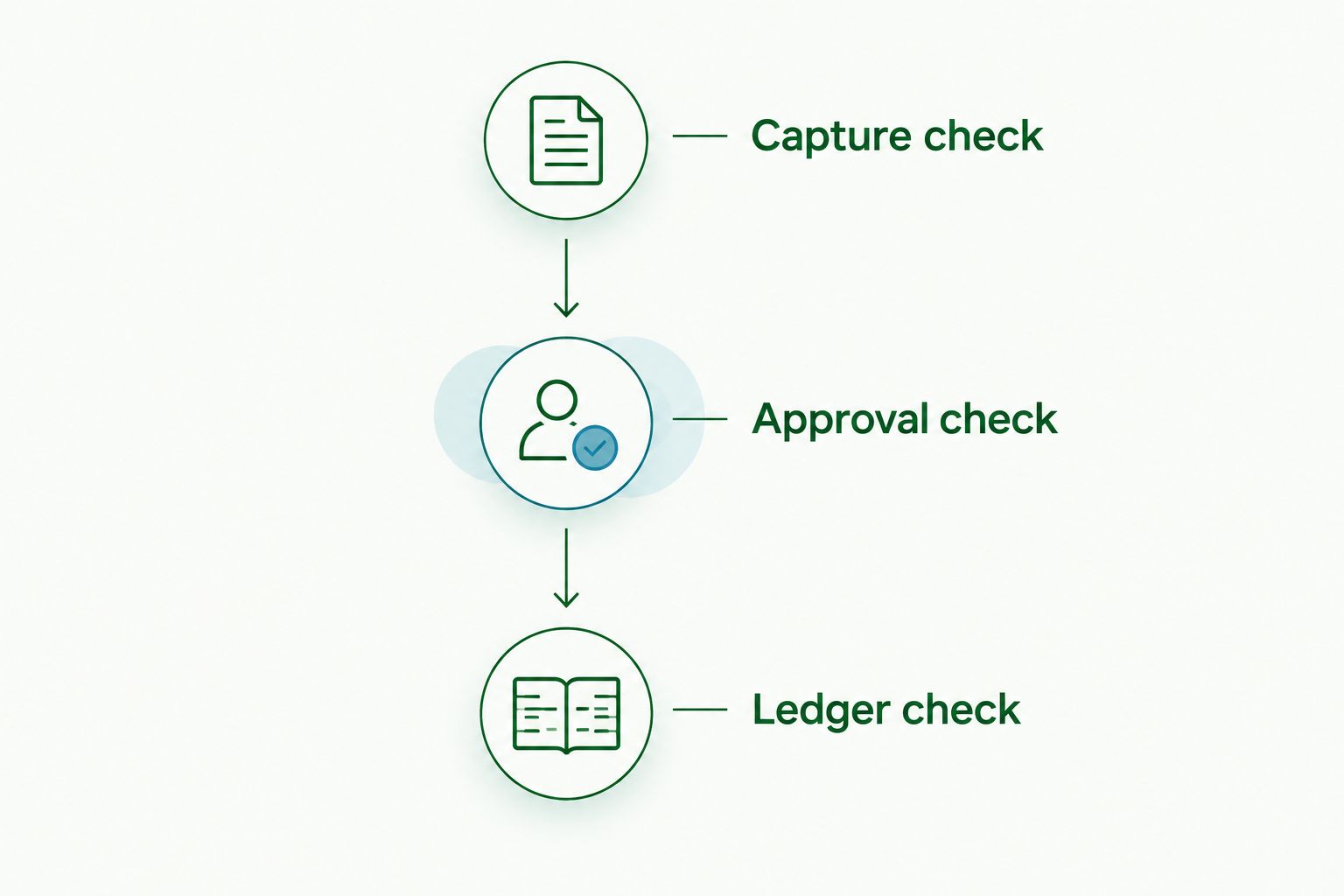
A successful demonstration ends with a correct accounting record and clear responsibility for payment. Fast extraction alone is not enough.
Keep payment controls outside the feature checklist
An approved invoice and a verified payment destination are different things. Australian SMEs should maintain a separate process for confirming supplier bank-detail changes through a known contact channel, rather than relying on the change request itself.
For your 2026 process review, separate responsibility for creating or changing supplier details from payment release wherever practical. Where a small team cannot separate those duties, establish an independent review by the owner or another authorised person.
Also decide who owns failed transfers between systems, duplicate records and unresolved invoices. Automation needs an exception owner; otherwise, the work simply moves out of sight.
How this shortlist is ranked
ApprovalMax leads for approval control, Dext for capture, Lightyear for purchasing detail and Xero for a straightforward ledger-based workflow. The ranking follows the criteria above: capture accuracy, approval control, ledger fit, purchasing detail, payment safeguards and implementation effort.
This is a workflow-fit ranking, not a measured speed or accuracy comparison. Your demonstration should establish how each tool handles your documents, responsibilities and accounting configuration.
Which accounts payable automation tool should you choose?
Start with ApprovalMax if your bills reach the accounts without clear authorisation. Choose Dext when collecting and entering invoices consumes the workday. Assess Lightyear when individual invoice lines need purchasing checks.
If your process is straightforward and already sits in Xero, review that setup before adding software. The default decision is to fix the main failure point, not buy the longest feature list.
Daintree Consulting can support the accounting and advisory work around that decision. Keep the software discussion connected to reporting, cash flow and who owns each task.
FAQ
What's the best accounts payable automation tool for an Australian SME?
ApprovalMax is the first choice on this shortlist for structured bill approvals. Dext suits invoice capture, Lightyear suits detailed purchasing workflows, and Xero suits straightforward bill management within the ledger.
Is Dext better than ApprovalMax?
Dext is the better fit when invoice capture is the main problem; ApprovalMax is the better fit when authorisation is the main problem. Compare the workflow you need to improve rather than treating the products as interchangeable.
Do I need another accounts payable tool if I use Xero?
You do not need another tool if Xero meets your bill-processing and control requirements. Assess additional software when capture, approvals or purchasing checks require a different workflow.
Does invoice automation check GST correctly?
Invoice automation does not remove your responsibility to check GST treatment. Compare the resulting accounting record with the source document and investigate unusual transactions before finalising them.
Can accounts payable automation prevent supplier payment fraud?
Accounts payable automation does not replace independent verification of supplier bank-detail changes. Maintain a separate confirmation process using a known contact channel and appropriate payment authorisation.
What should I test before choosing accounts payable software in 2026?
Test invoice capture, approval responsibilities and the resulting ledger records. Include exceptions such as a credit note, a possible duplicate, an absent approver and a purchasing discrepancy.
Can Daintree Consulting help with accounts payable processes?
Daintree Consulting provides bookkeeping, accounting, business advisory and outsourced CFO services. Connect the software decision with clear accounting responsibilities, reporting requirements and cash-flow management.
One last thing
Do not accept a demonstration that stops at the approval screen. Ask to see the final accounting record and the supporting invoice together.
For your 2026 decision, that handover is the most useful final check: it shows whether the proposed process produces records your business can actually use.
Talk to Daintree about your bookkeeping and payroll
Our ex-Big 4 team gives clear, senior-reviewed advice so you can act with confidence.
Book a free consultation →
Or explore our bookkeeping and payroll services.
