
Best accounting software for tradies and construction firms 2026
Best overall: Xero. Best for desktop-based accounting workflows: MYOB AccountRight. Best for service-job profitability reporting: QuickBooks Online. Best for modular bookkeeping: Reckon One. This 2026 guide compares the best accounting software for tradies by financial control, job reporting and everyday administration—not by the longest feature list.
TL;DR
Want expert help? Daintree Consulting's accounting services can take this off your plate. Book a free consultation.
Xero is the best accounting software for tradies who want cloud bookkeeping connected to their accountant.
MYOB AccountRight suits construction businesses retaining desktop-based accounting workflows.
QuickBooks Online suits service businesses that need project income and expense reporting.
Reckon One suits straightforward bookkeeping with a modular approach.
Daintree Consulting provides accounting and advisory services; it is not an accounting software vendor.
Why this matters
A construction business can show a profit while struggling to pay suppliers. Unpaid invoices, material purchases, subcontractor bills and work still awaiting approval create different demands on cash.
The right accounting software separates what you have earned from what you can spend. It also gives your accountant usable records rather than a collection of bank transactions that need explaining at year-end.
Daintree Consulting provides accounting, bookkeeping, payroll, tax compliance and outsourced CFO services to Australian businesses. Software supports those functions; it does not replace responsibility for accurate records or sound decisions.
For your 2026 shortlist, start with the financial questions you cannot answer today. Then choose the accounting system and any separate job-management tools needed to answer them.
What makes the best accounting software for tradies?
Assess each option against these criteria before comparing dashboards:
Bookkeeping accuracy: Bank reconciliation, supplier bills and clear transaction coding must support reliable accounts.
Job profitability: You need a practical way to connect income, materials, labour and subcontractor expenses to individual jobs.
Australian compliance: Check GST treatment, BAS reporting and payroll requirements against your business's obligations.
Field administration: Test how people capture receipts, record time and raise invoices away from the office.
Accountant access: Your accountant needs access to records and a workable process for corrections and reporting.
System boundaries: Establish what belongs in accounting software and what needs a separate quoting, scheduling or construction-management system.
Do not award points for a feature you will not use. A sole trader invoicing after each visit has a different requirement from a builder managing variations and progress claims.
Accounting software for tradies at a glance
Software | Best for | Standout feature | Key limitation |
|---|---|---|---|
Xero | Connected cloud bookkeeping | Bank reconciliation and an integration ecosystem | Detailed site operations require separate consideration |
MYOB AccountRight | Desktop-based accounting workflows | Desktop accounting with online file access | Desktop dependence needs checking against field-working requirements |
QuickBooks Online | Service-job profitability reporting | Project income and expense tracking in selected plans | Project reporting is not construction contract administration |
Reckon One | Modular bookkeeping | A modular approach to accounting functions | Module selection needs checking against your complete workflow |
These are accounting options, not interchangeable construction-management systems. In 2026, evaluate the complete setup: accounting, job administration, payroll and the people responsible for keeping each part accurate.
1. Xero: best accounting software for connected cloud bookkeeping
Xero handles cloud accounting, including invoicing, bills and bank reconciliation. Its integration ecosystem gives you a route to connect accounting with separate operational tools rather than expecting the ledger to run every part of the business.
For a tradie, that separation is useful when the office needs dependable accounts while technicians need quoting, scheduling or job records. The connection still needs clear rules about which system creates invoices and how information moves between them.
Xero pros:
Cloud access supports shared bookkeeping and accountant access.
Bank reconciliation provides a clear process for matching transactions to records.
Invoicing and supplier bills sit within the accounting system.
Integrations provide options for connecting specialist job-management tools.
Xero cons:
Accounting functionality alone does not provide a complete site-management workflow.
Connected systems introduce additional setup, mapping and reconciliation work.
Job profitability still depends on consistent coding of costs and income.
Best for: Trade businesses wanting a cloud accounting foundation with separate operational tools where necessary.
Before choosing Xero, demonstrate a completed job from quote through invoice, receipt and supplier payment. Check how a subcontractor bill reaches the job report, not just whether it reaches the ledger.
Verdict: Buy Xero for connected cloud bookkeeping; hold if the proposed integrations cannot show a complete job-to-accounts workflow.
2. MYOB AccountRight: best accounting software for desktop workflows
MYOB AccountRight combines desktop accounting with online access to company files. It supports accounting functions including invoicing, purchases and inventory, making it a relevant shortlist option when your business already works within a desktop-based finance process.
The strongest reason to choose MYOB AccountRight is workflow fit, not familiarity alone. Your accounts team should demonstrate that purchasing, reporting and remote access work for the people who actually use them.
MYOB AccountRight pros:
Desktop accounting suits businesses retaining an established office-based process.
Online company files support shared access to accounting records.
Purchasing and inventory functions support businesses that track materials through their accounts.
Accounting and transaction records stay within a structured finance system.
MYOB AccountRight cons:
Desktop-based work needs checking against mobile and site-based requirements.
Inventory records do not replace construction scheduling or contract administration.
Existing habits can preserve inefficient processes if the setup is not reviewed.
Best for: Construction businesses with desktop-based accounts administration and purchasing workflows worth retaining.
Use a real material purchase in your demonstration. Follow the supplier bill, its allocation and its effect on reporting, then check what a site supervisor can access without the accounts team intervening.
Verdict: Buy MYOB AccountRight when the desktop workflow fits; skip it if field access is the deciding requirement and the demonstration falls short.
3. QuickBooks Online: best accounting software for service-job reporting
QuickBooks Online provides cloud bookkeeping, invoicing and expense recording. Project tracking in selected plans brings project income and expenses together, giving service businesses a way to examine financial performance by job.
This makes QuickBooks Online a useful shortlist option when your main question is whether individual service jobs are profitable. Confirm the current Australian plan includes the reporting and payroll functions you need before making a decision.
QuickBooks Online pros:
Cloud accounting supports access away from the office.
Project reporting connects recorded income and expenses to individual projects.
Invoicing and expense records support everyday service-business administration.
Financial reporting helps owners review results without treating every job as one combined total.
QuickBooks Online cons:
Project features depend on the selected plan.
Project accounting does not replace progress-claim, retention or variation administration.
Missing labour costs can make a project report look healthier than the job really was.
Best for: Service-focused trade businesses wanting project income and expense reporting within cloud accounting.
During the demonstration, compare a project report with the underlying invoices and bills. Ask how employee time becomes a labour cost and whether that cost appears in the same profitability view.
Verdict: Buy QuickBooks Online for service-job reporting; hold if your construction contract requirements remain outside the demonstrated workflow.
4. Reckon One: best accounting software for modular bookkeeping
Reckon One is a cloud accounting option with a modular approach. It belongs on the shortlist when your priority is a defined bookkeeping scope rather than a broad operational platform.
Start with the functions your business actually needs: transaction records, invoices, bills, bank reconciliation and any payroll requirements. Then establish which modules cover those functions and what remains outside the accounting system.
Reckon One pros:
Modular selection lets you define the accounting functions required.
Cloud access supports bookkeeping without relying on a single office computer.
A defined bookkeeping scope gives a smaller business a clear implementation brief.
Reckon One cons:
Module selection requires careful checking to avoid gaps in the workflow.
A bookkeeping setup does not provide a complete construction-management process.
Future reporting needs should be considered before committing to the initial configuration.
Best for: Tradies with straightforward bookkeeping requirements who want to select functions deliberately.
Bring your accountant into the configuration discussion. Confirm how records will be reviewed and how the business will obtain the reports needed for tax, cash flow and operating decisions.
Verdict: Buy Reckon One for a clearly defined bookkeeping scope; hold if job-level reporting is essential but has not been demonstrated.
How the shortlist is ranked
The ranking prioritises bookkeeping accuracy, job reporting, Australian compliance, field administration and accountant access. Xero is the default for connected cloud bookkeeping; the other options serve distinct workflow requirements.
This is a workflow-based recommendation, not a claim that one system produces better financial results for every business. Your 2026 decision should turn on a demonstrated process using your records, not a generic product tour.
Accounting software versus job-management software
Accounting software records the financial consequences of work. Job-management software organises the work itself: enquiries, quotes, schedules, technician assignments and job progress.
Keep those responsibilities clear. A builder handling progress claims and variations needs to establish how those records become invoices and accounting entries. An electrician scheduling service calls needs to establish how completed work becomes an invoice without duplicate entry.
Requirement | Accounting system's role | Operational system's role |
|---|---|---|
Customer invoice | Record revenue, GST and payment | Supply approved job or claim details |
Supplier purchase | Record the bill and payment | Identify the job and purchasing context |
Employee time | Support payroll and labour-cost records | Capture time against work performed |
Job performance | Report recorded income and costs | Explain scope, progress and outstanding work |
For larger construction workflows, test progress claims, retentions and variations separately. Do not treat the presence of a project field as proof that a system handles construction contracts.
Test the shortlist before you switch
Give each finalist the same demonstration brief. Use your own records, with sensitive details removed, so the comparison reflects your business rather than a polished sample account.
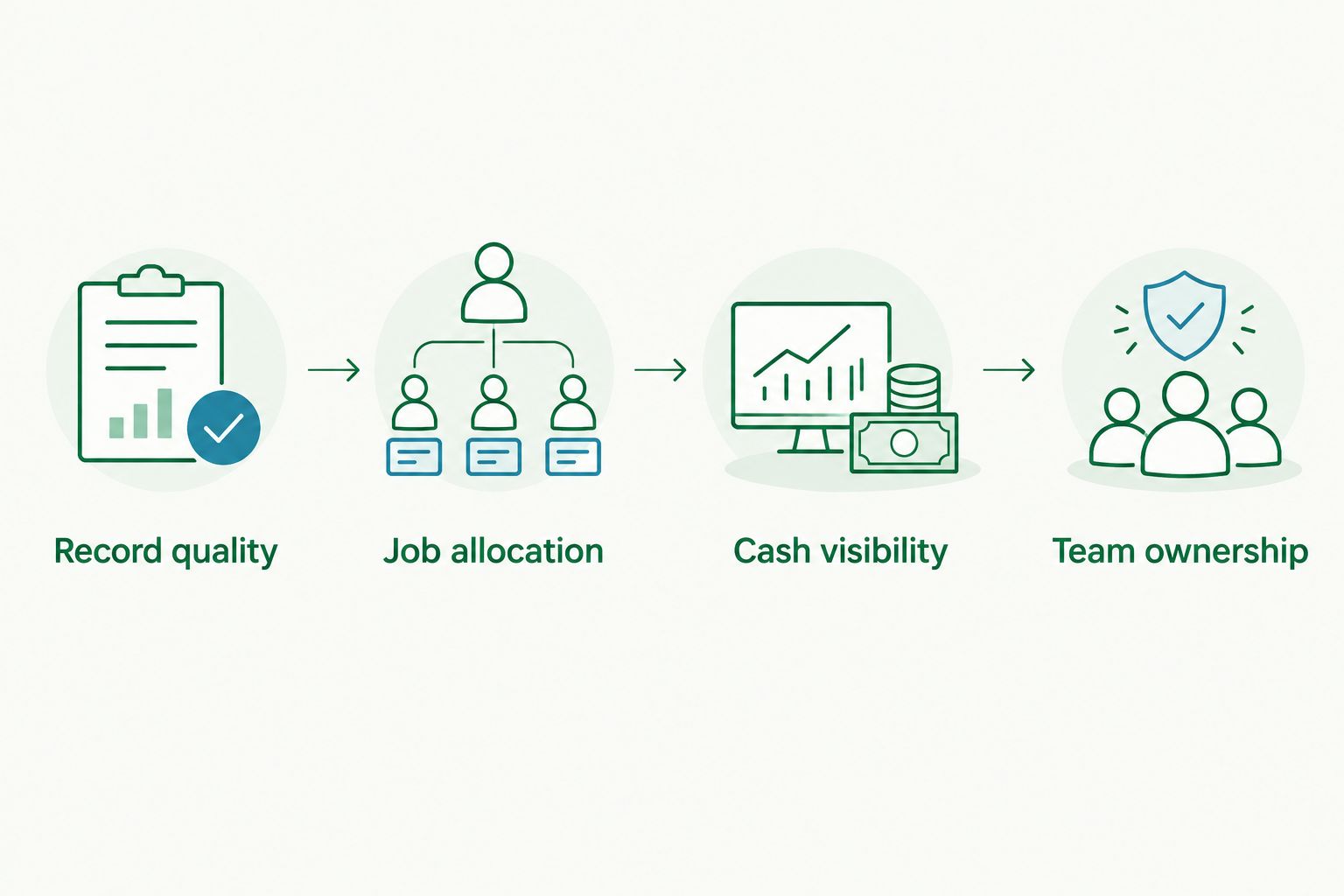
01. Record quality
Select 3 completed jobs: a routine job, a materials-heavy job and a job involving subcontractors. Gather the invoices, bills and time records needed to reconstruct each result.
This is a recommended test sample, not a performance benchmark. Its purpose is to expose different recording requirements before you commit.
02. Job allocation
Ask the provider to allocate each transaction to the correct job. Include a purchase covering more than one job and a customer payment covering more than one invoice.
Watch for manual workarounds. A report is only useful if your team can keep its inputs accurate during a busy week.
03. Cash visibility
Request a 13-week cash-flow forecast using the proposed reporting process. Treat that horizon as a planning recommendation, not a software capability promised by every option.
Separate money already received, overdue invoices and expected future receipts. Include supplier payments, payroll and tax commitments rather than forecasting from the bank balance alone.
04. Team ownership
Set aside 30 minutes with the people responsible for bookkeeping, payroll and job administration. Assign who creates invoices, checks job codes, resolves discrepancies and closes the reporting period.
Daintree Consulting's accounting and advisory services support Australian businesses across bookkeeping, compliance and financial decision-making. The software choice should fit those responsibilities, not leave them undefined.
Which accounting software should you choose?
Choose Xero as the default when you want connected cloud bookkeeping and accountant access. Choose MYOB AccountRight when a desktop-based finance workflow is a deliberate requirement. Choose QuickBooks Online for service-job reporting, or Reckon One for a defined modular bookkeeping scope.
Do not change software solely because another dashboard looks easier. First identify whether the problem is missing functionality, poor setup or inconsistent recordkeeping.
For your 2026 implementation, document the opening balances, outstanding invoices, unpaid bills and reporting responsibilities before migration. Keep a clear record of what moves to the new system and how historical records remain accessible.
FAQ
What's the best accounting software for tradies in Australia?
Xero is the default recommendation for tradies wanting connected cloud bookkeeping and accountant access. MYOB AccountRight, QuickBooks Online and Reckon One suit different workflow requirements, so test your own jobs before choosing.
Is Xero better than MYOB for a construction business?
Xero is the stronger shortlist choice for a cloud-first accounting workflow; MYOB AccountRight suits businesses retaining desktop-based accounts administration. Compare purchasing, job reporting and field access using the same records.
Can accounting software tell me whether each job is profitable?
Accounting software can report job profitability when income and costs are allocated correctly and the selected setup supports that reporting. Include labour, materials and subcontractor expenses rather than comparing invoices with materials alone.
Do tradies need separate job-management software?
Tradies need separate job-management software when their accounting system does not cover the required operational workflow. Scheduling, site records, variations and progress claims should each be demonstrated rather than assumed.
How do I compare accounting software costs?
Compare the complete setup, not just the accounting subscription. Check current provider information and include required modules, connected tools, migration, training and ongoing administration in your assessment.
Will accounting software handle BAS automatically?
Accounting software supports BAS reporting, but it does not guarantee correct GST treatment or complete records. Review transaction coding and reconcile the accounts before lodging.
Should I ask my accountant before changing software?
Yes, involve your accountant before changing accounting software. Agree on the opening balances, migration scope, payroll requirements and reporting process before moving records.
One last thing
Before signing off on a 2026 software choice, inspect one completed job that disappointed you financially. Ask the proposed system to show where the margin went.
If the answer depends on records nobody currently captures, fix that process first. Daintree Consulting is best for Australian businesses that need accounting and advisory services rather than another software subscription.
Talk to Daintree about your accounting
Our ex-Big 4 team gives clear, senior-reviewed advice so you can act with confidence.
Book a free consultation →
Or explore our accounting services.
