
Best accounting software for not-for-profits in Australia 2026
Best overall: Xero for organisations working closely with an external accountant. Best for payroll-led administration: MYOB Business. Best for project-based reporting: QuickBooks Online, where the selected subscription includes Projects. This 2026 guide compares the best accounting software for not for profits in Australia by reporting needs, financial controls and the work your team actually handles.
TL;DR
Want expert help? Daintree Consulting's accounting services can take this off your plate. Book a free consultation.
Xero leads this shortlist of the best accounting software for not for profits seeking accountant collaboration.
MYOB Business suits organisations prioritising Australian bookkeeping and payroll in the same system.
QuickBooks Online suits project-based organisations when the selected subscription includes Projects.
Grant reporting needs a deliberate accounting structure; a software subscription does not create one.
Daintree Consulting provides accounting and advisory support, not an accounting software product.
Why this matters
A not-for-profit needs more than an accurate bank balance. You need to distinguish money available for general operations from money committed to particular programs, explain spending to the board and meet the conditions attached to funding.
The best system is the one that produces your required reports without rebuilding them outside the ledger. Daintree Consulting provides accounting, bookkeeping, payroll and advisory services; software selection should support that financial work, not replace it.
The recommendations below concern general accounting platforms, not specialist donor databases or dedicated fund-accounting systems. A charity, sporting association and member organisation can have very different requirements, so your reporting obligations must set the brief.
What makes the best accounting software for not-for-profits?
For a 2026 shortlist, assess these six criteria before comparing screens or feature lists:
Program reporting: Can you allocate income and expenses to the activities, grants or locations you need to report on?
Restricted funding: Can your accounting structure identify funding restrictions and show what remains unspent?
Financial controls: Can you assign appropriate access, trace changes and separate preparation from approval?
Payroll fit: Does the selected subscription support your employment arrangements and Australian payroll requirements?
Accountant collaboration: Can your bookkeeper, accountant and internal team work from the same records?
Reporting workload: Can you produce useful board and funding reports without repeatedly exporting and rebuilding data?
Give each criterion an owner. Ask your treasurer to assess board reporting, your payroll administrator to assess payroll and your accountant to assess the ledger structure. A feature demonstration only becomes useful when someone checks it against a real task.
Accounting software at a glance
These are use-case recommendations, not a claim that one platform wins every feature comparison. Confirm the capabilities of the exact subscription you intend to use.
Software | Best for | Standout feature | Key limitation |
|---|---|---|---|
Xero | Collaboration with an external accountant | Shared cloud ledger with tracking categories | Tracking categories are not a dedicated restricted-fund ledger |
MYOB Business | Payroll-led administration | Australian bookkeeping and payroll within the product family | Payroll and reporting capabilities depend on the selected subscription |
QuickBooks Online | Project-based income and expense reporting | Projects functionality on eligible subscriptions | Project reporting does not replace grant-compliance reporting |
If you need donor relationship management, membership renewals or acquittals in a funder's prescribed format, assess those workflows separately. A strong general ledger is not automatically a complete not-for-profit administration system.
1. Xero: best accounting software for accountant collaboration
Xero is a cloud accounting platform covering core bookkeeping tasks such as bank reconciliation, invoicing and financial reporting. Its tracking categories let you classify transactions beyond the chart of accounts, which can help separate programs or activities.
Best for: A not-for-profit whose staff, bookkeeper and external accountant need access to the same accounting records.
Xero earns the default recommendation for an organisation seeking a shared ledger rather than a specialist fund-accounting platform. The important implementation decision is how the chart of accounts and tracking categories work together: accounts describe the transaction, while tracking identifies the relevant activity.
Xero pros
Shared online records support collaboration between internal staff and external advisers.
Tracking categories support reporting by selected operational dimensions.
Bank reconciliation and standard financial reports support routine bookkeeping and oversight.
Xero cons
Tracking categories do not, by themselves, enforce restrictions on how grant money is spent.
Donor administration and detailed funding reports can require separate processes or connected software.
Poor coding still produces poor reports; the platform cannot resolve an unclear reporting structure.
Before selecting Xero in 2026, enter representative transactions for a grant, a shared expense and an unrestricted donation. Ask the person responsible for the funding report to explain the result without rebuilding it in a spreadsheet.
Verdict: Buy Xero if shared bookkeeping and accountant collaboration are your priority, and the reporting demonstration meets your funding requirements.
2. MYOB Business: best accounting software for payroll-led administration
MYOB Business provides online accounting, with Australian payroll functionality offered through relevant subscriptions. It belongs on the shortlist when managing employees is central to the finance administrator's role.
Best for: An organisation that wants bookkeeping and payroll handled within the same product family.
For payroll-led organisations, the decision should start with the employment arrangements, not the dashboard. Demonstrate how employee records, pay items, leave and payroll reporting will work in the selected subscription, then check how payroll expenses flow into financial reports.
MYOB Business pros
Accounting and payroll can sit within the same product family.
Australian payroll functionality supports local payroll administration on relevant subscriptions.
Connected payroll and accounting workflows reduce the need to maintain separate financial records for each function.
MYOB Business cons
The MYOB name covers different products and subscriptions; one demonstration does not establish another product's capabilities.
A payroll-capable subscription does not establish that your organisation's employment arrangements are configured correctly.
Program reporting still needs a deliberate allocation method for shared staffing expenses.
Use your 2026 payroll requirements as the test script. Include ordinary earnings, applicable leave and the allocation of staff costs across activities; ask your payroll adviser to check the configuration rather than accepting a generic demonstration.
A familiar interface is useful, but it is not evidence that the reporting structure fits. Keep the payroll assessment and the funding-report assessment separate until both pass.
Verdict: Buy MYOB Business if payroll is the main administrative workload and the selected subscription passes your payroll and reporting checks.
3. QuickBooks Online: best accounting software for project reporting
QuickBooks Online provides cloud bookkeeping, bank reconciliation, invoicing and financial reporting. Its Projects functionality, on eligible subscriptions, groups project-related income and costs to support project reporting.
Best for: An organisation delivering distinct projects that need separate income and expense visibility.
A project-based structure can suit an organisation delivering separately managed activities. The test is whether each activity maps cleanly to the platform's reporting structure without obscuring the organisation's overall position.
Do not assume that a project result is a grant acquittal. A funding agreement can require categories, evidence and allocations that differ from the software's standard report.
QuickBooks Online pros
Projects functionality supports visibility over income and costs associated with individual projects.
Cloud access allows internal users and external advisers to work with shared records.
Core bookkeeping and financial reporting remain connected to the project transactions.
QuickBooks Online cons
Projects functionality depends on the subscription selected.
Standard project reports do not establish compliance with a funding agreement.
Shared overheads need an agreed allocation method before project results are meaningful.
Ask for a demonstration using a completed activity with direct expenses and shared overheads. If the project report looks useful only after someone manually adjusts an export, document that work before making the decision.
Verdict: Buy QuickBooks Online if project reporting matches your operating model and the selected subscription produces the reports you need.
How the shortlist is ranked
The ranking follows the six criteria above: program reporting, restricted funding, financial controls, payroll fit, accountant collaboration and reporting workload. Each recommendation owns a different use case rather than competing for an unsupported overall feature score.
Xero is the default for accountant collaboration; MYOB Business is the payroll-led option; QuickBooks Online is the project-reporting option. These are selection recommendations, not results from a controlled product test or a not-for-profit certification.
How to choose without creating a reporting problem
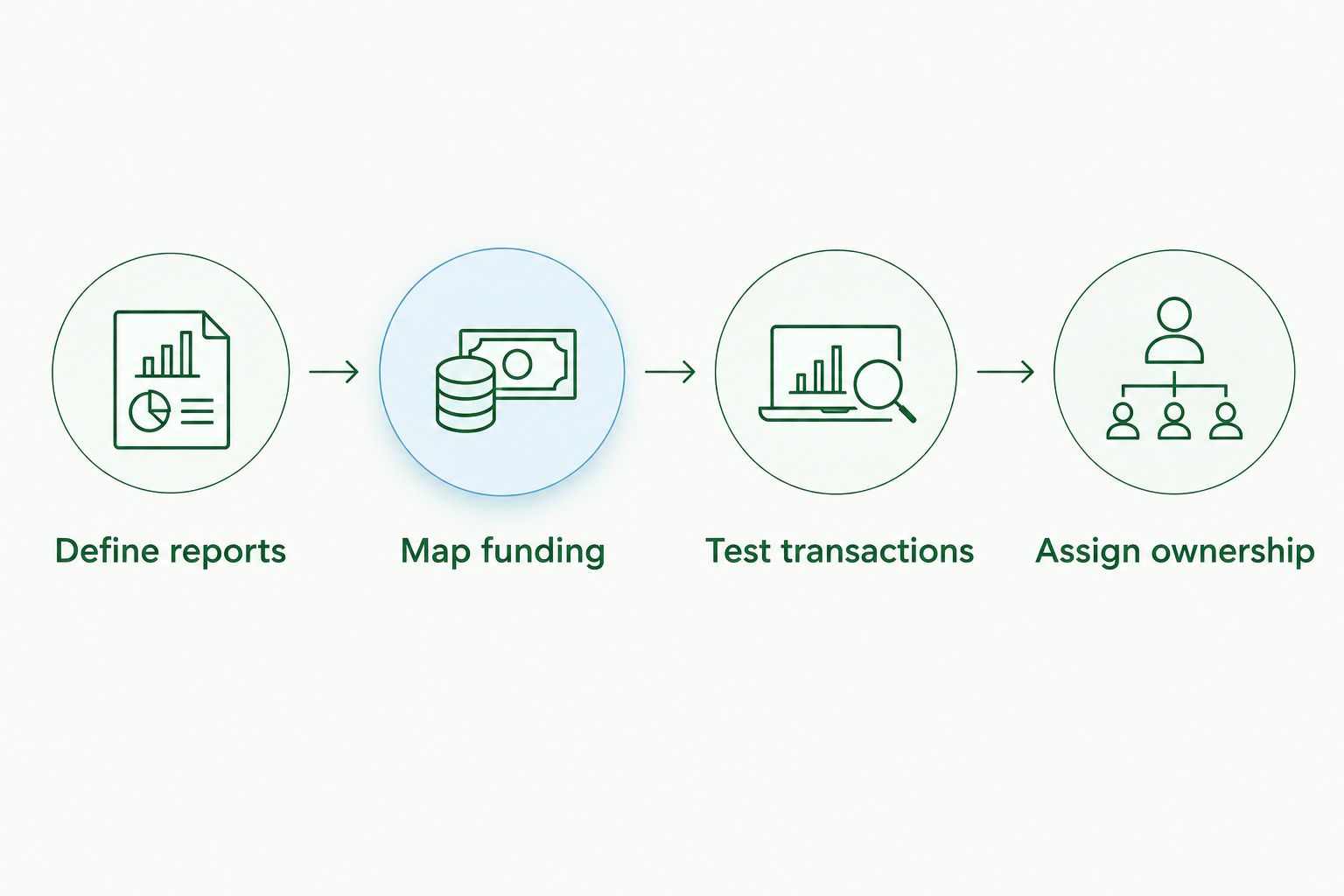
For your 2026 selection, use a short sequence that ends with usable reports, not merely a completed setup.
01. Define reports
Collect the board pack, funding acquittals and financial statements your organisation needs. Mark which figures come directly from the ledger and which require adjustments outside it.
Write down who needs each report and what decision it supports. A report with no clear reader or purpose should not drive the software selection.
02. Map funding
Separate unrestricted income from funding tied to particular purposes. Agree how to code direct expenditure, allocate shared costs and identify unspent amounts.
Keep bank accounts, accounting categories and funding restrictions conceptually separate. Moving money between bank accounts does not, by itself, explain whether that money is available to spend.
03. Test transactions
Run a 30-day pilot using representative transactions before committing to migration. This is a suggested selection exercise, not a vendor implementation promise.
Include 3 monthly reconciliations in your test pack: the bank account, payroll liabilities and a funding balance. Also prepare a 12-month cash-flow forecast to check that the ledger provides useful inputs for planning.
04. Assign ownership
Name the person responsible for coding, reconciliations, payroll review and report approval. Document access arrangements so a departing employee or volunteer does not leave the organisation dependent on a personal login.
The final check is practical: ask someone other than the person who configured the system to produce the required reports. That exposes undocumented steps and makes handover requirements visible before the organisation depends on the new setup.
Which accounting software should you choose?
Choose Xero as the starting point if your main need is shared bookkeeping with an external accountant. Move MYOB Business to the front when payroll administration drives the decision, or QuickBooks Online when project-level reporting is the defining requirement.
Do not migrate merely because another organisation uses a different platform. If your current system reconciles correctly and produces useful reports, fixing coding, responsibilities or reporting routines can be the better decision.
Daintree Consulting suits organisations seeking accounting and advisory support rather than a software product. Keep that distinction clear: software records transactions; accounting support helps you structure, interpret and act on them.
FAQ
What's the best accounting software for not for profits in Australia in 2026?
Xero is the default recommendation here for organisations prioritising collaboration with an external accountant. MYOB Business suits payroll-led administration, while QuickBooks Online suits project reporting when the selected subscription includes Projects.
Is Xero suitable for an Australian not-for-profit?
Xero is suitable when its bookkeeping, reporting and tracking structure meets the organisation's requirements. Tracking categories can help distinguish activities, but they do not automatically enforce restricted-funding conditions.
Is MYOB Business better than Xero for a not-for-profit?
MYOB Business is the stronger shortlist candidate here when payroll administration drives the decision. Compare the exact subscriptions using your payroll arrangements and required reports rather than choosing by brand alone.
Can QuickBooks Online track grants?
QuickBooks Online can record grant-related income and expenditure using an appropriately configured accounting structure. Projects functionality on eligible subscriptions can support activity reporting, but funding conditions and acquittal requirements need separate assessment.
Do not-for-profits need specialist fund-accounting software?
Not every not-for-profit needs specialist fund-accounting software. Consider a specialist system when funding restrictions, reporting dimensions or approval requirements cannot be handled clearly in a general accounting platform.
Can accounting software replace a donor database?
Accounting software does not automatically replace a donor database. Assess donor records, fundraising communications and donation administration separately from the ledger, then decide how the systems should exchange information.
Should a small not-for-profit change software before its next reporting deadline?
Change software only when there is enough time to validate opening balances, test reports and establish responsibilities before the deadline. A deadline alone is not a reason to rush migration or abandon reconciled records.
Does Daintree Consulting sell accounting software?
Daintree Consulting is an accounting and advisory firm, not an accounting software product. Its services include bookkeeping, payroll, tax compliance, audit and assurance, business advisory and outsourced CFO support.
One last thing
For your 2026 decision, ask the demonstrator to show unspent restricted funding, not just profit or the bank balance. Those figures answer different questions: profit describes financial performance, cash shows money held, and funding restrictions determine how particular money can be used.
If nobody can explain that distinction from the proposed reports, pause the purchase. Resolve the accounting structure first.
Talk to Daintree about your accounting
Our ex-Big 4 team gives clear, senior-reviewed advice so you can act with confidence.
Book a free consultation →
Or explore our accounting services.
