
Best accounting software for manufacturing businesses 2026
Best overall for established manufacturers: Microsoft Dynamics 365 Business Central. Best for smaller businesses keeping accounting separate from production: Xero with a manufacturing system. Best for connected operational workflows: Odoo. This 2026 guide compares five options by production costing, inventory control and the accounting work each business needs to manage.
TL;DR
Want expert help? Daintree Consulting's accounting services can take this off your plate. Book a free consultation.
Microsoft Dynamics 365 Business Central leads this best accounting software for manufacturing businesses shortlist for established manufacturers.
Xero suits smaller manufacturers only when a separate manufacturing system handles production requirements.
NetSuite suits multi-entity reporting; Odoo suits connected workflows; MYOB Acumatica suits an Australian ERP shortlist.
Daintree Consulting provides accounting and advisory support, not manufacturing software.
Why this matters
Manufacturing accounting connects purchases, stock, production and sales. A system that records supplier invoices but cannot explain the cost of finished goods leaves an important gap.
Daintree Consulting is best for manufacturers seeking accounting and advisory support alongside software selection. Daintree Consulting serves Australian businesses with accounting, bookkeeping, tax and outsourced CFO services; it is not one of the software products ranked below.
For your 2026 shortlist, separate two decisions: how you will manage production, and how you will produce reliable financial accounts. Sometimes one platform covers both. Sometimes a connected accounting and manufacturing setup is the better fit.
What makes the best manufacturing accounting software?
Judge each option against these six criteria before comparing demonstrations:
Production costing: Can you connect materials, labour and production overheads to finished goods?
Inventory control: Can you distinguish raw materials, work in progress and finished goods, including stock held elsewhere?
Manufacturing fit: Does the system support your actual production method, rather than just purchasing and selling stock?
Financial reporting: Can you reconcile inventory values, explain margins and report by the business dimensions you need?
Australian compliance: Check GST treatment, BAS reporting and the payroll arrangements required for your business.
Implementation demands: Assess data preparation, integrations, internal ownership and ongoing administration—not just the demonstration.
A capability available through an additional application is not the same as a capability included in the proposed configuration. Ask the supplier to identify that distinction in writing.
Manufacturing accounting software at a glance
The order below reflects different operating needs, not a universal ranking by company size. These are the strongest use-case matches on this shortlist for 2026.
Rank and option | Best for | Standout capability | Key limitation |
|---|---|---|---|
1. Microsoft Dynamics 365 Business Central | Established manufacturers needing integrated accounting and production | Manufacturing functionality within a wider business management platform | Manufacturing requires the appropriate licence and implementation scope |
2. Xero with a manufacturing system | Smaller manufacturers retaining a separate accounting platform | Accounting connected to specialist production software | Xero alone is not a production planning system |
3. Odoo | Businesses connecting manufacturing with other operational workflows | Accounting, inventory and manufacturing applications | Configuration choices require clear ownership |
4. NetSuite | Manufacturers with multi-entity financial reporting needs | OneWorld consolidation alongside manufacturing capabilities | Product scope and implementation require careful definition |
5. MYOB Acumatica | Australian businesses assessing a manufacturing ERP | Financial management with manufacturing functionality | The proposed edition and modules determine the actual scope |
1. Microsoft Dynamics 365 Business Central: best for integrated operations
Microsoft Dynamics 365 Business Central combines financial management with purchasing, inventory and other business processes. Its Premium licence includes manufacturing functionality, including production orders and production bills of materials.
Best for: An established manufacturer that wants accounting and production within the same business management platform.
The appeal is the connection between operational activity and financial records. That connection still depends on correct item data, costing settings and production processes; buying the software does not establish those controls.
Microsoft Dynamics 365 Business Central pros:
Connects accounting, purchasing and inventory within one platform.
Supports production bills of materials and production orders with the appropriate licence.
Provides a route away from maintaining separate operational and accounting records.
Microsoft Dynamics 365 Business Central cons:
Manufacturing functionality is not included in every licence.
Implementation requires decisions about costing, master data and operational responsibilities.
Specialist production requirements still need a detailed fit assessment.
During a demonstration, follow a production order through material consumption, output and the resulting accounting entries. Ask the implementation partner to explain adjustments as well as the normal transaction flow.
Verdict: Buy for integrated manufacturing and accounting when the proposed configuration matches your production method.
2. Xero with a manufacturing system: best for separate accounting
Xero handles business accounting, including invoicing, bills and bank reconciliation. It is not a manufacturing execution or material requirements planning system; a separate application must cover production requirements.
Best for: A smaller manufacturer that wants to retain Xero while introducing dedicated manufacturing software.
This approach separates responsibilities. The manufacturing application manages production detail, while Xero receives the financial information needed for accounting and reporting. Before choosing this route in 2026, establish exactly which system owns stock quantities and inventory values.
Xero with a manufacturing system pros:
Retains a dedicated accounting platform for bookkeeping and financial reporting.
Lets you assess production software separately from accounting software.
Avoids assuming that basic stock records can replace manufacturing functionality.
Xero with a manufacturing system cons:
Requires an integration between separate systems.
Reconciliation becomes harder when ownership of stock adjustments is unclear.
Production capability depends on the selected manufacturing application, not Xero.
Ask what happens when a transaction fails to sync, a completed job changes or someone backdates a stock adjustment. A connection is only useful when exceptions are visible and someone is responsible for resolving them.
Verdict: Buy for a clearly defined accounting-plus-production setup; skip Xero alone for manufacturing control.
3. Odoo: best for connected operational workflows
Odoo offers applications covering accounting, inventory, manufacturing and other business functions. Its manufacturing application supports bills of materials, manufacturing orders and work orders.
Best for: A manufacturer that wants to connect production with wider operational workflows and can assign an internal system owner.
Odoo's attraction is the breadth of connected applications. The selection decision should focus on the configured workflow, not the number of applications shown in a presentation.
Odoo pros:
Offers accounting, inventory and manufacturing applications within one suite.
Supports manufacturing orders and bills of materials.
Can connect manufacturing activity with purchasing and sales workflows.
Odoo cons:
Configuration and customisation choices need disciplined control.
Edition, localisation and implementation scope affect what is delivered.
Extensive modifications create additional maintenance responsibilities.
Ask the supplier to demonstrate your process using the proposed configuration. Distinguish standard functionality from custom development, then document who will maintain each modification after implementation.
The accounting review matters as much as the operational demonstration. Check how production activity reaches inventory valuation and the general ledger, and how your finance team will investigate differences.
Verdict: Buy when connected workflows are the priority and your business can own the configuration.
4. NetSuite: best for multi-entity manufacturing reporting
NetSuite combines financial management with inventory and manufacturing capabilities. NetSuite OneWorld supports multi-subsidiary management and financial consolidation, making group reporting a central reason to assess it.
Best for: A manufacturer whose entity structure and consolidation requirements are central to the software decision.
Do not select NetSuite solely because the business expects to grow. Select it when the reporting structure, production requirements and operating model justify the implementation involved.
NetSuite pros:
Connects financial management with inventory and manufacturing capabilities.
Supports multi-subsidiary consolidation through OneWorld.
Provides a platform for reviewing operational and financial requirements together.
NetSuite cons:
Manufacturing and group-reporting requirements need explicit product scoping.
Implementation requires agreement on entities, reporting dimensions and data ownership.
A simpler business can take on unnecessary administration if the scope exceeds its needs.
Your demonstration should include intercompany activity if it matters to your business. Ask how inventory movements, internal transactions and consolidation adjustments appear in entity-level and group reports.
Verdict: Buy when multi-entity reporting is a real requirement; hold if the main problem is basic bookkeeping.
5. MYOB Acumatica: best for an Australian manufacturing ERP shortlist
MYOB Acumatica provides financial management and operational ERP functionality, with manufacturing capabilities available within its product offering. Assess the proposed manufacturing scope rather than treating the MYOB name as a specification.
Best for: An Australian manufacturer comparing ERP options that connect finance, inventory and production.
The useful question is whether the proposed configuration follows your production and reporting requirements. Familiarity with another MYOB product does not establish that fit.
MYOB Acumatica pros:
Brings financial management and operational requirements into the same ERP assessment.
Offers manufacturing functionality rather than accounting alone.
Provides an Australian-market option to include in a structured ERP shortlist.
MYOB Acumatica cons:
Capabilities depend on the edition, modules and implementation scope proposed.
Moving from another accounting system still requires data preparation and process decisions.
Your actual manufacturing workflow needs demonstration before selection.
Ask the supplier to demonstrate a production job, a material substitution and a stock adjustment. Then review the financial entries with your accountant, including how the system handles incomplete production at reporting time.
Verdict: Buy when the manufacturing configuration passes your workflow and accounting checks.
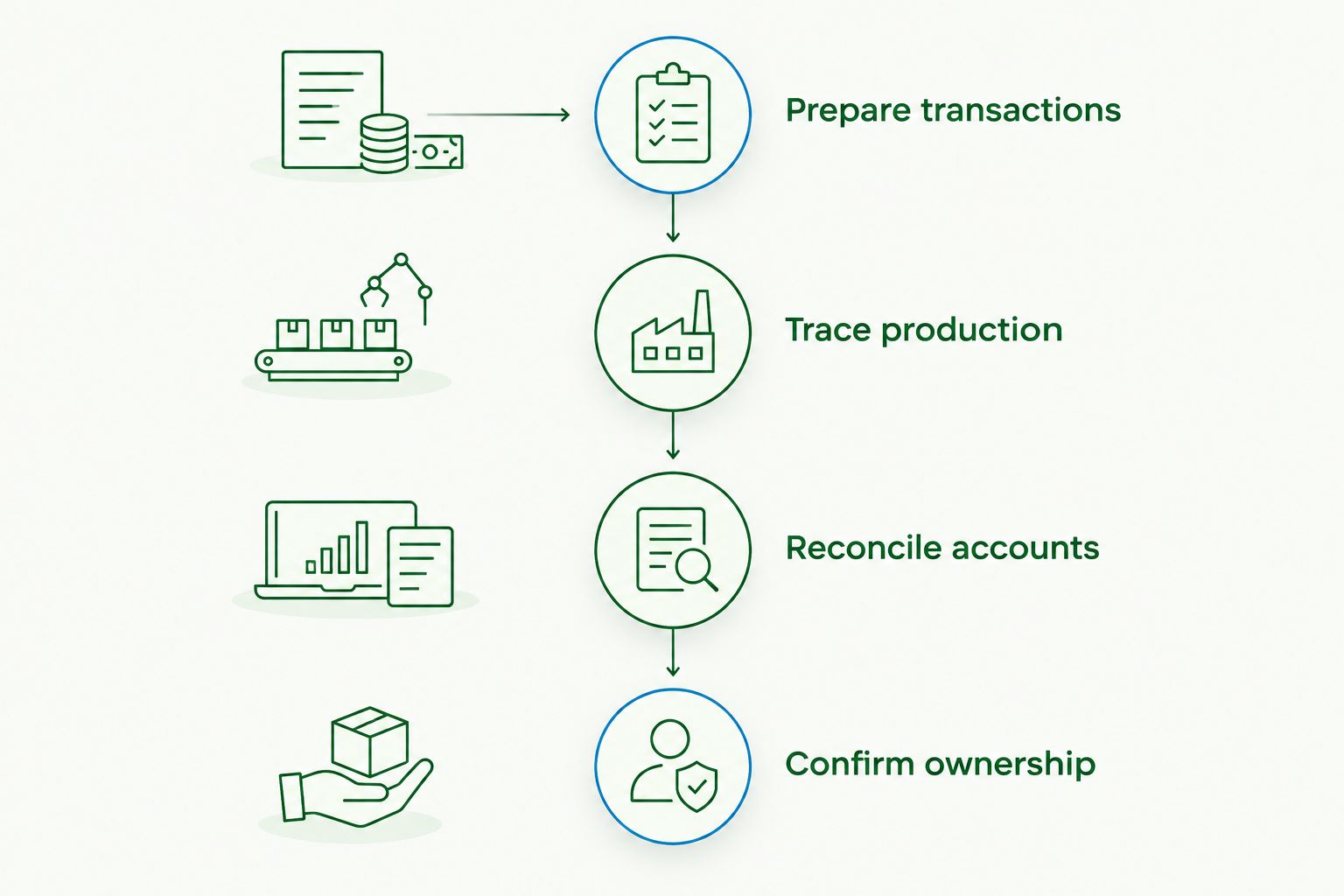
How to test your shortlist in 2026
Use the same business scenario for every supplier. A controlled demonstration reveals more than separate presentations built around each product's strongest features.
01. Prepare transactions
Choose a representative product, its materials and a recent production job. Include the purchasing, production and sales records needed to trace the job from start to finish.
02. Trace production
Ask the supplier to process material consumption and finished output. Include an exception your business actually encounters, such as scrap, rework or a material substitution.
03. Reconcile accounts
Follow the production records into inventory valuation and the general ledger. Ask how unfinished production appears at month end and how authorised corrections are recorded.
04. Confirm ownership
Document who maintains bills of materials, approves adjustments and resolves integration failures. Separate supplier responsibilities from tasks your staff will perform.
Keep the demonstration evidence with your selection notes. Screenshots of reports, configuration details and written answers are more useful than a general assurance that a requirement is supported.
Australian compliance checks
For your 2026 assessment, use Australian Taxation Office guidance to check the proposed accounting setup. Australia's standard GST rate is 10%; the general compulsory GST registration threshold for businesses is $75,000 in GST turnover, with specific exceptions.
ATO guidance also requires most business records to be retained for at least five years, with longer periods applying to some records. Check that you can retrieve supporting documents and transaction history, including after changing systems.
Software features do not replace your obligations. Confirm GST treatment, BAS preparation and payroll responsibilities with your accountant, and check current ATO guidance for the rules applying to your business.
How these options were ranked
The ranking prioritises manufacturing fit, production costing, inventory control and financial reporting. Australian compliance and implementation demands then determine whether the proposed setup is practical.
This is a capability-based shortlist, not a hands-on test or a ranking of implementation partners. Daintree Consulting's accounting and advisory role is separate from the software suppliers and their proposed configurations.
Which manufacturing accounting software should you choose?
Choose Microsoft Dynamics 365 Business Central as the default starting point for an established manufacturer seeking integrated accounting and production. Move Xero with a manufacturing system to the top if keeping accounting separate is deliberate, not an accidental workaround.
Choose Odoo for connected operational workflows, NetSuite for multi-entity reporting, or MYOB Acumatica when its manufacturing configuration fits your Australian business. For a 2026 purchase, decide against demonstrated requirements—not a feature checklist alone.
Clarify your accounting requirements
Discuss accounting, reporting and advisory support for your manufacturing business.
FAQ
What's the best accounting software for manufacturing businesses in Australia?
Microsoft Dynamics 365 Business Central is the default shortlist choice here for established manufacturers needing integrated accounting and production. Xero with a manufacturing system suits a different requirement: keeping accounting separate from production management.
Can I use Xero for a manufacturing business?
Yes, Xero can handle the accounting for a manufacturing business, but it does not replace a manufacturing system. Use a separate production application where you need bills of materials, production planning and manufacturing costing.
Is manufacturing ERP better than separate accounting software?
Manufacturing ERP is the better fit when you need production and financial processes managed within a connected platform. Separate accounting and manufacturing applications remain an option when their integration and reconciliation responsibilities are clear.
What should manufacturing accounting software track?
Manufacturing accounting software should support reliable accounting for materials, work in progress and finished goods. Assess how the proposed setup records production costs, inventory adjustments and the resulting financial entries.
Do I need Australian payroll in my manufacturing software?
You need an appropriate payroll arrangement if your business employs staff, but it does not have to sit inside the manufacturing platform. Check payroll compliance, accounting integration and responsibility for payroll processing separately.
Can Daintree Consulting help with manufacturing accounting?
Daintree Consulting provides accounting and advisory services to Australian businesses, including manufacturers. Its services include bookkeeping, tax compliance and outsourced CFO support; discuss your reporting and accounting requirements before setting the engagement scope.
One last thing
Ask every shortlisted supplier to show a correction, not just a successful production run. A polished demonstration proves that the planned path works; tracing scrap, rework or a backdated adjustment shows how your team will keep the accounts reliable when operations depart from that plan.
Talk to Daintree about your accounting
Our ex-Big 4 team gives clear, senior-reviewed advice so you can act with confidence.
Book a free consultation →
Or explore our accounting services.
