
Best accounting software for government contractors 2026
Best overall for straightforward Australian contracting: Xero. Best for desktop-based job costing: MYOB AccountRight; best for service-project profitability: QuickBooks Online; best for connected operational and financial management: Microsoft Dynamics 365 Business Central. This 2026 guide compares accounting software for government contractors by reporting needs, project complexity and the controls your contracts require—not by assuming every government supplier needs an enterprise system.
TL;DR
Want expert help? Daintree Consulting's accounting services can take this off your plate. Book a free consultation.
Xero is the default accounting software for government contractors with straightforward Australian bookkeeping and project reporting needs.
MYOB AccountRight suits desktop-based job costing; QuickBooks Online suits service businesses comparing project income and costs.
Microsoft Dynamics 365 Business Central suits connected purchasing, inventory and project accounting requirements.
Daintree Consulting suits Australian contractors seeking accounting and advisory support alongside software selection.
Choose against contract reporting requirements, GST treatment and approval controls—not a government-contractor label.
Why this matters
Winning a government contract does not automatically make your accounting complicated. The difficulty comes when you must explain expenditure by contract, distinguish variations from original scope, substantiate labour charges or manage cash between delivery and payment.
A ledger records transactions. Your reporting process must also connect those transactions to the work delivered, the invoice raised and the evidence retained. Good software supports that process; it does not define your contractual obligations.
Daintree Consulting provides accounting and advisory support to Australian businesses, including organisations serving government. The useful starting point is understanding the reporting you owe before choosing the system that produces it.
What makes the best accounting software for government contractors?
Use these criteria to assess your shortlist in 2026:
Australian accounting fit: GST, BAS preparation and payroll requirements where you employ staff.
Contract-level visibility: Income, direct costs and project performance that you can separate meaningfully.
Evidence and controls: Supporting documents, user permissions and a clear process for reviewing changes.
Billing fit: Support for your actual billing process, including milestones, progress claims or time-based invoices.
Operational fit: Connections between finance, purchasing, timesheets and inventory where those functions matter.
Reporting effort: The work needed to turn accounting records into the reports your contract requires.
Treat the last criterion seriously. A system that records everything but requires repeated spreadsheet reconstruction leaves your reporting process dependent on manual work.
Accounting software options at a glance
Software | Best for | Standout feature | Key limitation |
|---|---|---|---|
Xero | Straightforward Australian contracting | Cloud accounting with tracking and project-reporting options | Detailed contract controls can require additional systems |
MYOB AccountRight | Desktop-based job costing | Job tracking within an Australian accounting workflow | Desktop dependence needs consideration for distributed teams |
QuickBooks Online | Service-project profitability | Project views connecting income and costs | Project reporting is not a complete contract-management process |
Microsoft Dynamics 365 Business Central | Connected operational and financial management | Finance connected with purchasing, inventory and projects | Configuration and implementation require more planning |
These are use-case recommendations, not claims that one package satisfies every government contract. Features, subscriptions and integrations change; confirm the exact configuration during your 2026 assessment.
1. Xero: best accounting software for straightforward contracting
Xero is cloud accounting software covering everyday financial records, invoicing and bank reconciliation. Tracking categories and project functionality provide ways to organise financial information beyond the whole-business profit and loss statement.
Xero is the default choice when your accounting is straightforward and your contract reporting does not demand a separate operational system. Start by checking whether its tracking structure matches the way you need to report contracts, departments and activities.
Xero pros:
Cloud access supports collaboration between your business and accountant.
Tracking categories help separate financial results within the ledger.
Project functionality provides an option for reviewing project income and costs.
Xero cons:
Tracking categories are not a substitute for a detailed contract-cost structure.
Specialised approvals, procurement or reporting can require connected applications.
Each added application creates another connection to manage and reconcile.
Best for: Australian contractors with manageable project complexity who want shared access to their accounts.
Ask for a demonstration using one of your actual contract reporting templates. If the proposed solution depends on several exports, establish who will prepare and check them before committing.
Verdict: Buy Xero when its reporting structure matches your contracts; skip a collection of add-ons without clear ownership.
2. MYOB AccountRight: best accounting software for desktop job costing
MYOB AccountRight combines Australian accounting functions with job tracking in a desktop-based application, with online access options. Its job structure gives you a way to associate transactions with particular work and review the resulting financial position.
This makes MYOB AccountRight a relevant shortlist option when your finance team works primarily through a desktop accounting workflow. The decision should account for how project managers and other staff will supply information, not just how the bookkeeper enters it.
MYOB AccountRight pros:
Job tracking supports separation of income and expenditure by work undertaken.
Australian accounting functionality supports local bookkeeping and compliance processes.
A desktop workflow suits teams that specifically want that working environment.
MYOB AccountRight cons:
Desktop dependence needs assessment when staff work across locations or devices.
Job reporting does not replace contract approvals or variation records.
External operational systems still need a defined reconciliation process.
Best for: Contractors choosing desktop-based accounting with job-level financial tracking.
Check the full workflow from purchase entry to job report. A useful report must distinguish a genuine margin change from a supplier invoice assigned to the wrong job.
Verdict: Buy MYOB AccountRight for a deliberate desktop job-costing workflow; skip it if browser-only working is essential.
3. QuickBooks Online: best accounting software for service projects
QuickBooks Online provides cloud accounting with project functionality for grouping project-related income and costs. It belongs on the shortlist for service contractors who need to see whether individual engagements are financially worthwhile.
The key question is how your labour information reaches the project report. Recording a customer invoice is not enough if staff time, subcontractor bills or other delivery costs sit elsewhere.
QuickBooks Online pros:
Project views bring related income and costs together.
Cloud access supports collaboration without a desktop-centred workflow.
Core invoicing and bookkeeping sit alongside project reporting.
QuickBooks Online cons:
Project reports depend on complete, correctly assigned source transactions.
Contract variations and acceptance evidence need a separate management process.
Detailed procurement or contract-specific reporting requires further assessment.
Best for: Service contractors whose main question is profitability by engagement rather than operational coordination across inventory and purchasing.
During your demonstration, enter labour and subcontractor costs as well as revenue. Check whether the resulting report answers the questions your project manager actually asks.
Verdict: Buy QuickBooks Online for clear service-project reporting; hold if essential labour costs remain outside the process.
4. Business Central: best accounting software for connected operations
Microsoft Dynamics 365 Business Central is a business management system connecting financial management with functions including purchasing, inventory and projects. It is a different proposition from selecting a standalone accounting ledger.
Business Central belongs on your shortlist when the accounting problem starts upstream: purchasing commitments, stock movements or project activity are not reaching finance consistently. Its value depends on configuring those processes together.
Microsoft Dynamics 365 Business Central pros:
Financial and operational functions sit within a connected business system.
Project accounting supports work that needs more than customer-level reporting.
Purchasing and inventory functions help address requirements beyond bookkeeping.
Microsoft Dynamics 365 Business Central cons:
Implementation requires decisions about processes, data and responsibilities.
Configuration and training add work beyond importing opening balances.
Unclear requirements create a risk of unnecessary complexity.
Best for: Established contractors needing connected financial, purchasing, inventory and project processes.
For a 2026 implementation, require a written scope covering migration, reporting, permissions and testing. A demonstration of individual features does not prove that your complete workflow is ready.
Verdict: Buy Microsoft Dynamics 365 Business Central for connected operational requirements; skip it when a simpler ledger meets the brief.
How these recommendations are ranked
The recommendations prioritise Australian accounting fit, contract reporting, controls, billing and operational complexity. Xero takes the default position for straightforward requirements; the other options address distinct working environments or reporting needs.
This is a requirements-based shortlist, not a claim of hands-on testing or a certification of government-contract compliance. The best choice is the simplest system that meets your documented obligations without repeated manual reconstruction.
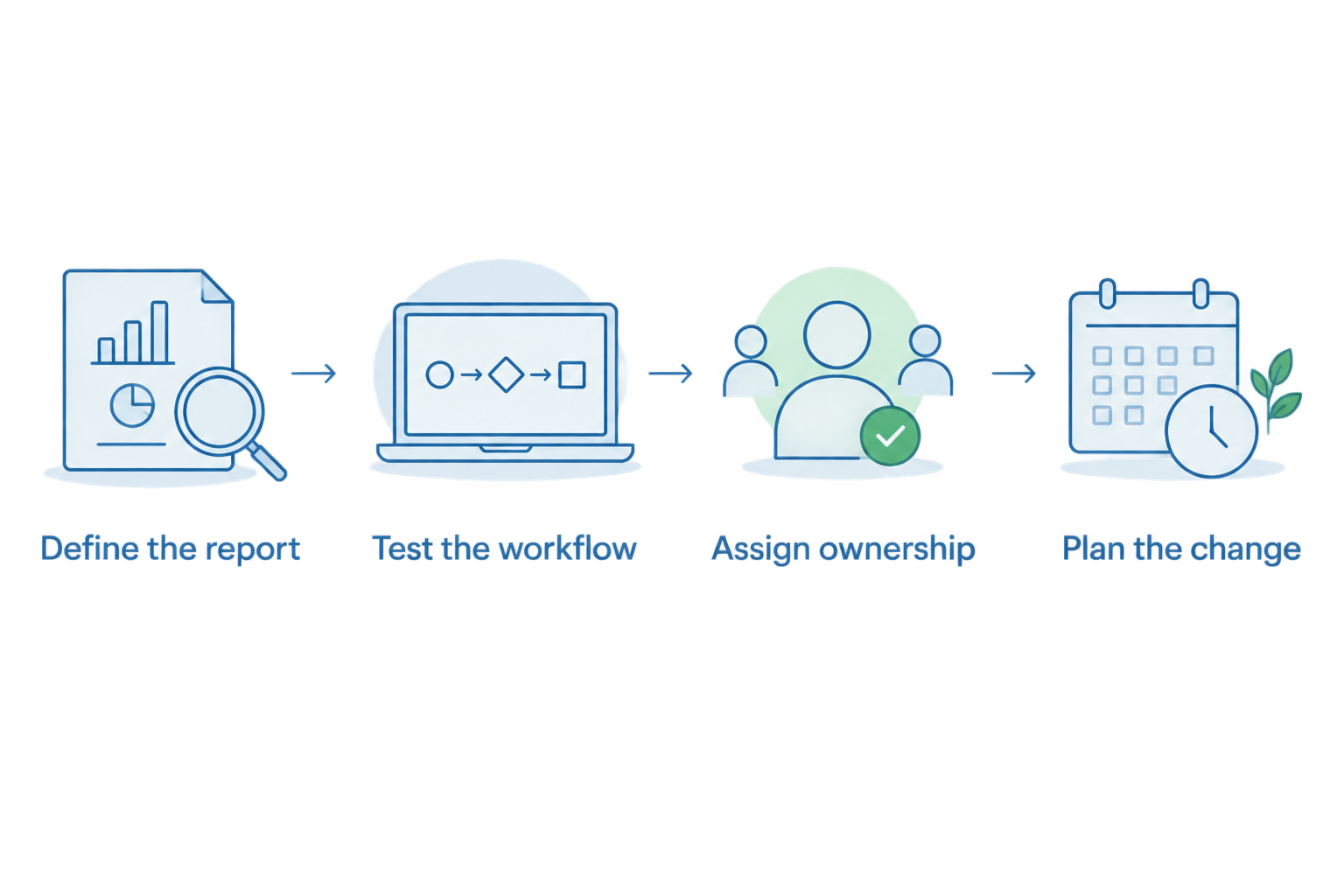
Choose your system in four steps
01. Define the report
Start with the reporting schedule and evidence requirements in your contract. Identify whether you need results by contract, milestone, activity or another category, and distinguish mandatory reports from internal management preferences.
Avoid importing US procurement terminology into an Australian brief. A reference to DCAA requirements belongs in your selection criteria only when the relevant contractual obligations actually apply.
02. Test the workflow
Use a representative contract to demonstrate purchasing, labour allocation, billing, adjustments and reporting. Include a variation and a corrected transaction so you can see how the system handles changes.
Ask the demonstrator to produce the final report, not just show where information is entered. Record every manual hand-off and decide who will check it.
03. Assign ownership
Name the person responsible for coding transactions, approving expenditure, reviewing project results and maintaining integrations. Give each task a clear owner, even when one person fills several roles.
Daintree Consulting's accounting and advisory services cover bookkeeping, payroll, compliance and financial advice. That support is relevant when you need the reporting process and accounting responsibilities considered together.
04. Plan the change
Set migration checks before moving live data. Agree how opening balances, unpaid invoices, project balances and supporting records will be verified.
Use a 30-day review to check transaction coding, a 60-day review to assess reporting effort and a 90-day review to resolve outstanding process issues. These are suggested review points, not statutory deadlines.
A disciplined selection process also needs a cash view. Build a 13-week cash-flow forecast alongside project profitability so you can assess the timing of payroll, supplier payments and expected receipts separately from accounting profit.
Clarify your accounting requirements
Discuss contract reporting, bookkeeping responsibilities and the financial support your business needs.
Which accounting software should you choose?
Choose Xero first for straightforward Australian contracting, then move away from that default only for a specific requirement. MYOB AccountRight addresses desktop job costing; QuickBooks Online addresses service-project profitability; Microsoft Dynamics 365 Business Central addresses connected operational processes.
Do not change systems merely because you have won a government customer. First establish whether the gap is software capability, transaction coding, staff responsibilities or the report itself.
Daintree Consulting is best for Australian government contractors seeking accounting and advisory support alongside their software decision. The objective is one clear picture of compliance, cash flow and contract performance—not a larger collection of systems.
FAQ
What's the best accounting software for government contractors in Australia?
Xero is the default recommendation for straightforward Australian contracting with manageable project-reporting needs. MYOB AccountRight, QuickBooks Online and Microsoft Dynamics 365 Business Central suit different requirements, so test each relevant option against your contract reports.
Do Australian government contractors need special accounting software?
Australian government contractors need accounting processes that meet their legal and contractual obligations, not automatically a specialist software package. Read the contract's reporting, billing and evidence requirements before deciding whether a general accounting system is sufficient.
Is Xero suitable for government contract accounting?
Xero suits government contract accounting when its tracking and project functionality meet the required reporting structure. Demonstrate contract coding, billing and supporting evidence before selecting the configuration.
Is MYOB AccountRight better than QuickBooks Online for contractors?
MYOB AccountRight is the stronger shortlist fit for a desktop-based job-costing workflow, while QuickBooks Online fits cloud-based service-project reporting. Compare the complete workflow rather than choosing on a single feature.
When should a contractor consider Microsoft Dynamics 365 Business Central?
Consider Microsoft Dynamics 365 Business Central when finance needs to connect with purchasing, inventory and project operations. Establish the implementation scope and process ownership before committing.
Does accounting software make a government contractor compliant?
Accounting software does not establish compliance by itself. Your obligations also depend on correct records, appropriate approvals, timely reporting and the terms of the relevant contract.
What should I ask an accountant before changing software in 2026?
Ask your accountant which reporting problems require different software and which require better processes. Request a migration plan covering balances, project records, responsibilities and post-launch checks.
One last thing
Before approving a software change in 2026, ask someone to trace a reported contract cost back to its invoice, approval and allocation. Then ask another person to repeat the exercise without help.
If the result depends on one person's memory, fix the process as well as the software. A report is useful only when your team can explain what sits behind it.
Related guides
Talk to Daintree about your accounting
Our ex-Big 4 team gives clear, senior-reviewed advice so you can act with confidence.
Book a free consultation →
Or explore our accounting services.
