
Best accounting software for cafes and hospitality businesses 2026
Best overall: Xero for a cafe building its accounts around point-of-sale reporting. Best for payroll-centred administration: MYOB Business. Best for an established QuickBooks bookkeeping workflow: QuickBooks Online. This 2026 guide compares the accounting choices and shows you what to check before moving sales, wages and supplier bills into a new system.
TL;DR
Want expert help? Daintree Consulting's accounting services can take this off your plate. Book a free consultation.
Xero is the best accounting software for cafes prioritising a connected POS and bookkeeping workflow.
MYOB Business suits cafes putting Australian payroll administration at the centre of their software choice.
QuickBooks Online suits cafes whose bookkeeper already works in QuickBooks.
Daintree Consulting provides accounting, bookkeeping and advisory support, not accounting software.
Check POS settlements, payroll inclusions and GST reporting before choosing a subscription.
Why this matters
A cafe's bank balance does not tell you whether the business is profitable. Card settlements, supplier bills, wages and tax obligations move through the accounts at different times. Your accounting software needs to turn those movements into a clear picture without making your bookkeeper reconstruct every trading day.
Daintree Consulting provides accounting, bookkeeping, payroll and advisory services for Australian businesses. Daintree Consulting suits cafe owners who need accounting support alongside their accounting software, rather than another software subscription. The software records the activity; the accounting work establishes whether those records support sound decisions.
The best choice is therefore not the application with the longest feature list. It is the one that fits your POS, payroll responsibilities and reporting routine, with clear ownership of the work between you and your bookkeeper.
What makes the best accounting software for cafes?
Use these criteria to assess the shortlist before comparing brands:
POS reconciliation: You need to account for gross sales, refunds, payment fees and the amount deposited into your bank. A connection that imports only a net settlement leaves important work unfinished.
Australian payroll fit: Check the exact subscription's payroll inclusions and Single Touch Payroll support. Rostering, award interpretation and payroll processing are separate tasks; do not assume one application handles all of them.
GST treatment: Your records need the correct tax treatment at transaction level. A software default is not a substitute for checking how sales and purchases should be classified.
Useful reporting: You need a readable profit and loss report, balance sheet and visibility over unpaid supplier bills. Reports should separate meaningful operating categories rather than bury everything under general expenses.
Bookkeeper handover: Your accountant and bookkeeper need access, a consistent chart of accounts and a clear process for correcting transactions. An unfamiliar system adds training work.
Export and integration checks: Confirm what each connection transfers and what you can export. You should understand the route out of a system before putting your records into it.
For your 2026 shortlist, treat these as acceptance criteria. Ask the person responsible for each task to demonstrate it with a representative transaction, not just point to a feature name.
Cafe accounting software at a glance
The ranking below assigns each option a different use case. It does not treat an accounting package as a replacement for a POS or rostering system.
Accounting software | Best for | Standout feature | Key limitation |
|---|---|---|---|
Xero | POS-led bookkeeping | Accounting platform with an app ecosystem for connected workflows | A listed integration still needs settlement and tax-treatment checks |
MYOB Business | Payroll-centred administration | Australian accounting and payroll options | Payroll inclusions depend on the subscription; award interpretation needs separate checking |
QuickBooks Online | An existing QuickBooks bookkeeping relationship | Shared cloud accounting and financial reporting | Bookkeeper familiarity does not guarantee compatibility with your cafe's POS |
None of these packages makes a cafe's records accurate automatically. Your setup, integrations and reconciliation process determine whether the reports are dependable.
1. Xero: best cafe accounting software for POS-led bookkeeping
Xero is cloud accounting software for recording transactions, reconciling bank activity and producing financial reports. Its app ecosystem makes it a useful starting point when you want your POS and bookkeeping processes to connect. The important question is what your particular connection transfers, not whether an integration logo appears on a website.
Best for: A cafe choosing an accounting platform around its existing POS and bookkeeper.
Xero pros
Bank reconciliation supports a routine for matching recorded activity to money received and paid.
Shared access lets your bookkeeper and accountant work in the same accounting records.
Financial reports provide a base for reviewing sales, expenses and liabilities.
Connected applications offer routes for linking operational systems to the accounts.
Xero cons
A POS connection does not remove the need to check refunds, payment fees and settlement timing.
Payroll, inventory and other requirements need subscription-level and integration-level checks before you commit.
An untidy chart of accounts still produces unhelpful reports, even when transactions import successfully.
When Xero is the right choice
Choose Xero when your bookkeeper can explain the full route from a POS sale to a reconciled bank deposit. Ask them to show how a trading day with refunds and payment fees appears in the accounts.
That demonstration matters more than a polished dashboard. If the connection records net deposits as revenue, your sales and payment-fee reporting need attention before the workflow is ready.
Verdict: Buy Xero when the POS-to-bank reconciliation works and your bookkeeper supports the setup. Hold until that workflow is demonstrated.
2. MYOB Business: best cafe accounting software for payroll-led operations
MYOB Business offers accounting functions and Australian payroll options. It belongs on the shortlist when the owner or administrator wants payroll requirements considered alongside day-to-day accounting. Confirm the exact product and subscription because the MYOB name covers different offerings.
Best for: A cafe whose software decision starts with payroll administration and Australian compliance requirements.
MYOB Business pros
Accounting and payroll options let you assess the relationship between wage processing and financial records.
Bank reconciliation and financial reporting support regular bookkeeping work.
Supplier-bill records help you track amounts owed rather than relying only on bank payments.
An existing MYOB-trained bookkeeper can support continuity in the accounting routine.
MYOB Business cons
Payroll functionality and inclusions require checking against the specific subscription.
Correct award classification, allowances and penalty rates remain employer responsibilities; do not assume payroll software determines them.
POS compatibility needs its own assessment, separate from the payroll decision.
When MYOB Business is the right choice
Choose MYOB Business when your payroll administrator can demonstrate the tasks your cafe actually needs. Include a pay run involving the relevant employment arrangements, leave records and reporting requirements.
Keep the scope clear. A roster tells you who is scheduled to work; time records show what happened; payroll processes the resulting pay. Your accounting records then need to show wages and associated liabilities correctly.
Verdict: Buy MYOB Business when its confirmed payroll scope fits your cafe and the accounting workflow is clear. Skip it if you are relying on unverified award automation.
3. QuickBooks Online: best cafe accounting software for a familiar workflow
QuickBooks Online provides cloud accounting, bank reconciliation and financial reporting. Its strongest reason for making this shortlist is practical: your bookkeeper may already use it and have an established process for keeping the records current. Familiarity is useful when it reduces handover friction, but it does not excuse a poor POS connection.
Best for: A cafe retaining a bookkeeper who already works effectively in QuickBooks Online.
QuickBooks Online pros
Shared cloud records support collaboration between the owner and accounting team.
Bank reconciliation provides a structured way to check receipts and payments.
Financial reports support reviews of income, expenses and the balance sheet.
Keeping a familiar platform avoids an unnecessary change to the bookkeeper's working routine.
QuickBooks Online cons
Your specific POS and payment-settlement workflow still needs checking.
Australian payroll requirements need a separate review of the available payroll arrangement and its scope.
Reports remain dependent on correct transaction coding and consistent account categories.
When QuickBooks Online is the right choice
Choose QuickBooks Online when the people maintaining your accounts can show a working cafe workflow in it. Ask for a clear explanation of daily sales entries, supplier bills, payroll records and month-end checks.
Do not migrate solely because another owner prefers a different brand. A functioning system with clean records and accountable support is a stronger starting point than an unfamiliar replacement.
Verdict: Buy QuickBooks Online when it preserves a proven bookkeeping process. Hold if POS reconciliation or payroll responsibility remains unclear.
Check the workflow before you migrate
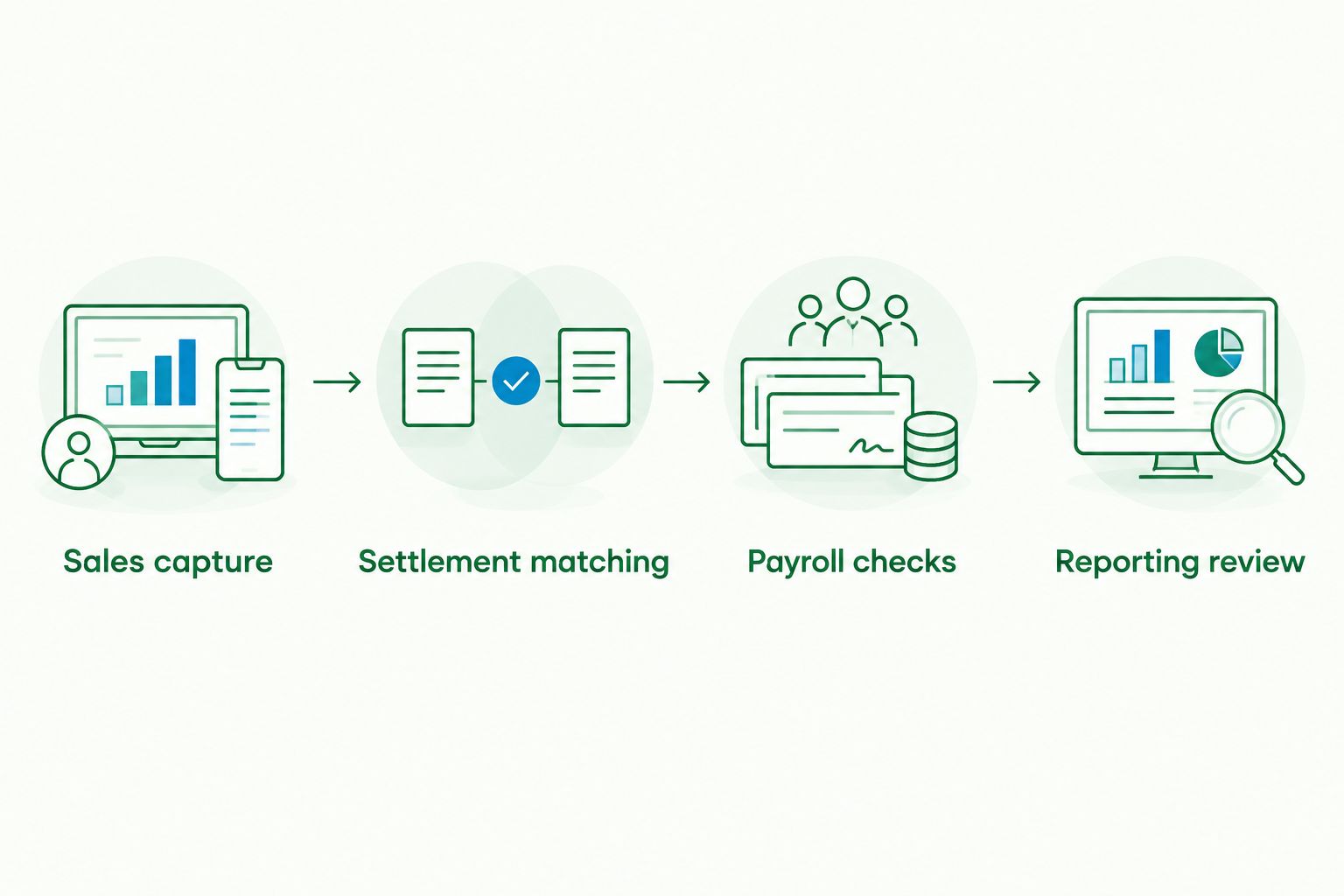
A software demonstration should follow the money through your cafe. Use these steps for your 2026 decision, with the people who will actually maintain the records.
01. Sales capture
Establish what enters the accounting system from the POS: sales totals, refunds, tax categories and payment methods. Check whether entries arrive automatically or require a controlled manual process. Either method needs a clear owner.
02. Settlement matching
Follow card receipts through to the bank deposit. Identify payment fees, refunds and timing differences separately. A bank deposit is not automatically the same thing as sales revenue.
03. Payroll checks
Confirm who checks time records, who approves pay and who handles payroll reporting. Include leave and superannuation obligations in the discussion. Keep award interpretation separate from a demonstration of payroll calculations.
04. Reporting review
Review the resulting profit and loss report and balance sheet. Check whether the accounts separate food purchases, wages, occupancy expenses and payment fees in a way you can use. Assign responsibility for resolving unmatched transactions and unexplained balances.
These checks also make the handover clearer. Daintree Consulting provides bookkeeping, payroll and accounting support; your engagement should specify which tasks sit with the firm and which remain with your team.
Australian compliance checks for 2026
Accounting software needs to support your obligations without encouraging automatic assumptions. The following figures come from Australian Taxation Office guidance covering GST and super guarantee obligations for Australian businesses in 2026.
GST is 10% on taxable supplies. Not every transaction has the same GST treatment. Check sales and purchase coding instead of applying a blanket rule across the ledger.
The super guarantee rate is 12% of ordinary time earnings for eligible employees. Confirm the earnings basis and employee treatment; the percentage alone does not establish a correct calculation.
A quarterly BAS covers 3 months. Your assigned reporting cycle determines the period you prepare, and your actual lodgement and payment dates need separate checking.
These are compliance settings, not software-ranking scores. All shortlisted packages still require correct setup, appropriate records and checks by the person responsible for the accounts.
When reviewing payroll in 2026, check the ATO's current payment and reporting requirements as well as the calculation settings. A saved payroll configuration is not evidence that every obligation has been met.
How the ranking works
This ranking prioritises a usable cafe workflow: POS reconciliation first, then payroll fit, financial reporting and the accounting team's ability to maintain the system. Xero takes the default position for a POS-led selection; MYOB Business takes the payroll-centred slot; QuickBooks Online takes the existing-bookkeeper slot.
Those are decision paths, not claims that one package wins every feature comparison. Subscription inclusions and integrations need checking against the current product information. The ranking does not rely on invented testing results, review scores or assumptions about your cafe's turnover.
Which accounting software should you choose?
Start with Xero if you are choosing from scratch and your main requirement is connecting POS activity to reliable accounts. Move MYOB Business to the front when payroll administration drives the decision. Keep QuickBooks Online when it already supports clean records and an effective bookkeeper relationship.
Before signing up, write down who owns sales reconciliation, payroll, supplier bills and reporting. Ask that person to demonstrate the workflow. If responsibilities remain unclear, resolve them before changing platforms.
Daintree Consulting offers accounting software support through its accounting, bookkeeping and advisory services. The useful outcome is one clear picture of the business, with a defined routine behind it—not simply a new login.
FAQ
What's the best accounting software for cafes in Australia in 2026?
Xero is the default shortlist choice for a cafe prioritising a connected POS and bookkeeping workflow. MYOB Business suits a payroll-centred decision, while QuickBooks Online suits an established QuickBooks bookkeeping relationship. Check the exact integrations and subscription inclusions before choosing.
Is Xero better than MYOB for a cafe?
Xero is the stronger starting point for the POS-led decision described in this guide; MYOB Business is the alternative to assess when payroll administration comes first. The deciding factor is whether your actual sales, settlement and payroll processes work in the selected subscription.
Can accounting software replace my cafe's POS?
Accounting software is not a substitute for a cafe POS. The POS records trading activity, while the accounting system records financial transactions and produces reports. Check what passes between the systems and who verifies it.
Does cafe accounting software calculate award wages automatically?
Do not assume accounting software calculates the correct award wages automatically. Confirm the payroll arrangement's capabilities and separately check classifications, penalties, allowances and employment conditions. The employer remains responsible for correct pay.
Can I use my card deposits as daily sales figures?
Do not automatically record card deposits as daily sales. Deposits can reflect payment fees, refunds and settlement timing rather than gross sales for the same day. Reconcile POS activity to the payment provider's records and the bank.
Should I change software if my bookkeeper already uses QuickBooks?
Keep QuickBooks Online if it supports accurate records, workable POS reconciliation and clear reporting for your cafe. Change only when you can identify a specific problem the replacement will solve. Bookkeeper familiarity is useful, but it does not replace workflow checks.
What should I check before moving cafe accounting software?
Check sales capture, settlement matching, payroll responsibilities and reporting before migrating. Agree the cutover process with your accountant or bookkeeper, including how opening balances and outstanding transactions will be checked. Retain access to the records you need from the previous system.
One last thing
Ask to see the clearing-account reconciliation, not just the profit dashboard. A payment clearing account tracks money moving between the POS, payment provider and bank; an unexplained balance needs investigation even when the sales chart looks healthy.
For your 2026 choice, pick the system in which someone can explain the difference between recorded sales and cash received. That explanation tells you more about the quality of your accounting process than the software brand alone.
Talk to Daintree about your accounting
Our ex-Big 4 team gives clear, senior-reviewed advice so you can act with confidence.
Book a free consultation →
Or explore our accounting services.
