
Best accounting dashboard tools for real-time reporting 2026
Best overall for management reporting: Fathom. Best for an existing Xero workflow: Xero. Best for tailored, multi-source analysis: Microsoft Power BI. This 2026 guide compares the best accounting dashboard tools by the decisions they support, the work they require and the limits of real-time reporting.
TL;DR
Want expert help? Daintree Consulting's outsourced CFO services can take this off your plate. Book a free consultation.
Fathom leads the best accounting dashboard tools shortlist for management reporting and financial performance analysis.
Xero and QuickBooks Online suit owners who want accounting dashboards inside their existing bookkeeping system.
Spotlight Reporting suits forecasting-led discussions; Microsoft Power BI suits tailored analysis across multiple data sources.
Daintree Consulting combines accounting and advisory services for Australian businesses that need reporting connected to decisions.
Treat real-time reporting as a data-quality question: current transactions still need reconciliation, adjustments and interpretation.
Why this matters
A dashboard can show a current bank balance without showing a reliable profit figure. Unrecorded supplier bills, unreconciled transactions and missing payroll adjustments change the picture. A fresh screen is not the same as finished accounts.
Daintree Consulting is best for Australian businesses that want accounting dashboards supported by bookkeeping, accounting and CFO advice. Daintree Consulting provides those services as business complexity grows; the software should support that relationship, not replace financial judgement.
For your 2026 shortlist, separate three jobs: recording transactions, explaining performance and planning what happens next. Some tools cover more than one job. None removes the need to define what each figure means.
What makes the best accounting dashboard tools?
Use these criteria before comparing screens or charts:
Decision fit: Your dashboard should answer a named question, such as whether you can fund recruitment or why margins changed.
Data freshness: Check when source records update, when the dashboard refreshes and which adjustments remain outstanding.
Accounting context: Look for useful comparisons against budget, prior periods and the measures your business actually manages.
Reporting effort: Consider who maintains connections, checks balances and explains exceptions after the initial setup.
Access and clarity: Give each reader the information they need without exposing unnecessary payroll, customer or financial detail.
Start with the decision, then choose the tool. A visually impressive dashboard that nobody trusts creates another reporting task rather than a clearer business picture.
Accounting dashboard tools at a glance
Tool | Best for | Standout capability | Key limitation |
|---|---|---|---|
Fathom | Management reporting | Financial analysis and management reports | Depends on the quality and structure of connected accounts |
Xero | Everyday visibility for existing Xero users | Accounting and dashboard information in the same system | Does not replace a tailored management reporting pack |
Spotlight Reporting | Forecasting-led planning | Reporting and forecasting within its product suite | Forecasts still need maintained assumptions |
Microsoft Power BI | Tailored, multi-source analysis | Custom data models and interactive reports | Requires data modelling and ongoing ownership |
QuickBooks Online | Everyday visibility for existing QuickBooks users | Reporting alongside bookkeeping records | Advanced analysis requires additional reporting design |
The order reflects management-reporting usefulness and distinct use cases, not a universal winner for every Australian business. Do not change your accounting system solely to obtain a different dashboard.
1. Fathom: best accounting dashboard tool for management reporting
Fathom focuses on financial analysis, management reporting and forecasting. It suits a business that has accounting records in place but needs a clearer explanation of profitability, cash flow and performance against expectations.
The main distinction is purpose: your ledger records activity, while a management reporting tool helps organise that activity into a useful discussion. For your 2026 selection, choose Fathom when that discussion matters more than monitoring individual transactions.
Fathom pros:
Financial reporting and analysis sit at the centre of the product.
Management reports provide a structure for recurring performance reviews.
Forecasting supports discussion of future financial outcomes.
Fathom cons:
Incorrect classifications and incomplete accounts carry through into the reporting.
Reports still need someone to select meaningful measures and explain movements.
Best for: Owners and finance teams that need a recurring management reporting pack rather than another bookkeeping screen.
Before committing, identify the questions your existing reports fail to answer. Ask whether Fathom presents those answers clearly enough for the people making decisions, not just the person preparing the accounts.
Verdict: Buy Fathom when management reporting is the gap; skip it if your immediate problem is incomplete bookkeeping.
2. Xero: best accounting dashboard tool for existing Xero users
Xero combines cloud accounting with dashboard visibility into financial activity. For a business already keeping its records in Xero, the native dashboard is the sensible starting point before adding another reporting system.
That keeps your first reporting conversation close to the underlying transactions. When a figure looks wrong, you can investigate the accounting records rather than immediately troubleshooting a separate reporting connection.
Xero pros:
Dashboard information sits alongside the accounting records.
Owners and bookkeepers can work from the same accounting system.
Financial reports support investigation beyond the summary view.
Xero cons:
A native dashboard is not a substitute for a management reporting pack built around your business.
Reliable performance reporting still requires reconciliations and accounting adjustments.
Best for: Existing Xero users who need everyday financial visibility without introducing a separate analysis layer.
For your 2026 review, distinguish dashboard limitations from setup problems. A confusing chart of accounts, inconsistent coding or delayed bookkeeping will not become useful simply because the same information appears in another application.
Verdict: Buy into the native Xero workflow first if Xero already holds your books; hold off on another tool until you identify a specific reporting gap.
3. Spotlight Reporting: best accounting dashboard tool for planning
Spotlight Reporting provides financial reporting and forecasting tools. It belongs on your shortlist when the central question is not just what happened, but what different operating choices would mean for the business.
Use forecasting to make assumptions visible. Hiring, customer payment timing and planned expenditure should be explicit inputs to a planning discussion, not explanations added after cash becomes tight.
Spotlight Reporting pros:
Financial reporting supports structured performance conversations.
Forecasting tools support forward-looking financial planning.
Reporting and planning can form part of the same advisory process.
Spotlight Reporting cons:
Forecast outputs depend on the assumptions entered and maintained.
A planning tool adds work if nobody owns updates and variance explanations.
Best for: Businesses that need forecasting-led advice about growth, expenditure and cash commitments.
For 2026 planning, ask the person demonstrating the tool to explain how you would change an assumption and understand the result. A forecast is only useful when you can see which operating decisions drive the outcome.
Verdict: Buy Spotlight Reporting for an active forecasting process; skip it if the forecast will be prepared once and left untouched.
4. Microsoft Power BI: best accounting dashboard tool for custom analysis
Microsoft Power BI connects data sources and supports custom data models, calculations and interactive reports. It suits businesses whose reporting questions span accounting and operational systems rather than the ledger alone.
That flexibility comes with responsibility. Someone must define the relationships between datasets, maintain calculations and resolve disagreements about what a metric includes.
Microsoft Power BI pros:
Reports can combine financial and operational information.
Custom measures support business-specific analysis.
Interactive reports let readers explore information beyond a fixed summary.
Microsoft Power BI cons:
Useful implementation requires data modelling skills, not just chart design.
Connections, permissions and calculations need ongoing maintenance.
Best for: Businesses with multiple data sources, clearly defined reporting requirements and an accountable report owner.
Power BI is not automatically the right answer because your business has grown. It becomes useful when standard accounting reports cannot answer an important question and you have the capacity to maintain a custom solution.
Before selecting it, write down the calculation behind each proposed measure. If two managers define gross margin differently, a new visual will display the disagreement rather than resolve it.
Verdict: Buy Microsoft Power BI for defined cross-system questions; hold if data ownership and metric definitions remain unsettled.
5. QuickBooks Online: best dashboard tool for existing QuickBooks users
QuickBooks Online combines bookkeeping with dashboard and financial reporting functions. It is a practical starting point when your business already records transactions there and needs clearer day-to-day visibility.
The same principle applies as with any native accounting dashboard: improve the accounting workflow before introducing another reporting layer. Additional software should answer an unmet question, not duplicate a report you already have.
QuickBooks Online pros:
Financial visibility sits alongside bookkeeping activity.
Accounting reports help explain movements behind headline figures.
Existing users can begin with their current records and workflow.
QuickBooks Online cons:
Business-specific management analysis requires additional reporting design.
A current dashboard does not confirm that every transaction is reconciled or correctly classified.
Best for: Existing QuickBooks Online users who want to improve everyday reporting without changing their ledger.
Ask your accountant which existing reports should form the baseline. Then identify the missing comparison, breakdown or planning view before considering an additional application.
Verdict: Buy into the native QuickBooks Online reporting workflow first; skip a ledger migration undertaken only for dashboard appearance.
How we ranked these accounting dashboard tools
This shortlist prioritises decision fit, accounting context and the work needed to keep reporting useful. Fathom takes the management-reporting position; the native accounting tools serve existing users; Spotlight Reporting addresses forecasting; Microsoft Power BI addresses custom analysis.
These are distinct recommendations, not interchangeable products. The strongest choice is the simplest setup that answers your recurring financial questions and has a named person responsible for accuracy.
Make real-time reporting useful before adding software
In 2026, ask what real-time means for each figure you intend to use. A bank balance, revenue report and forecast can represent different information at different stages of completion.
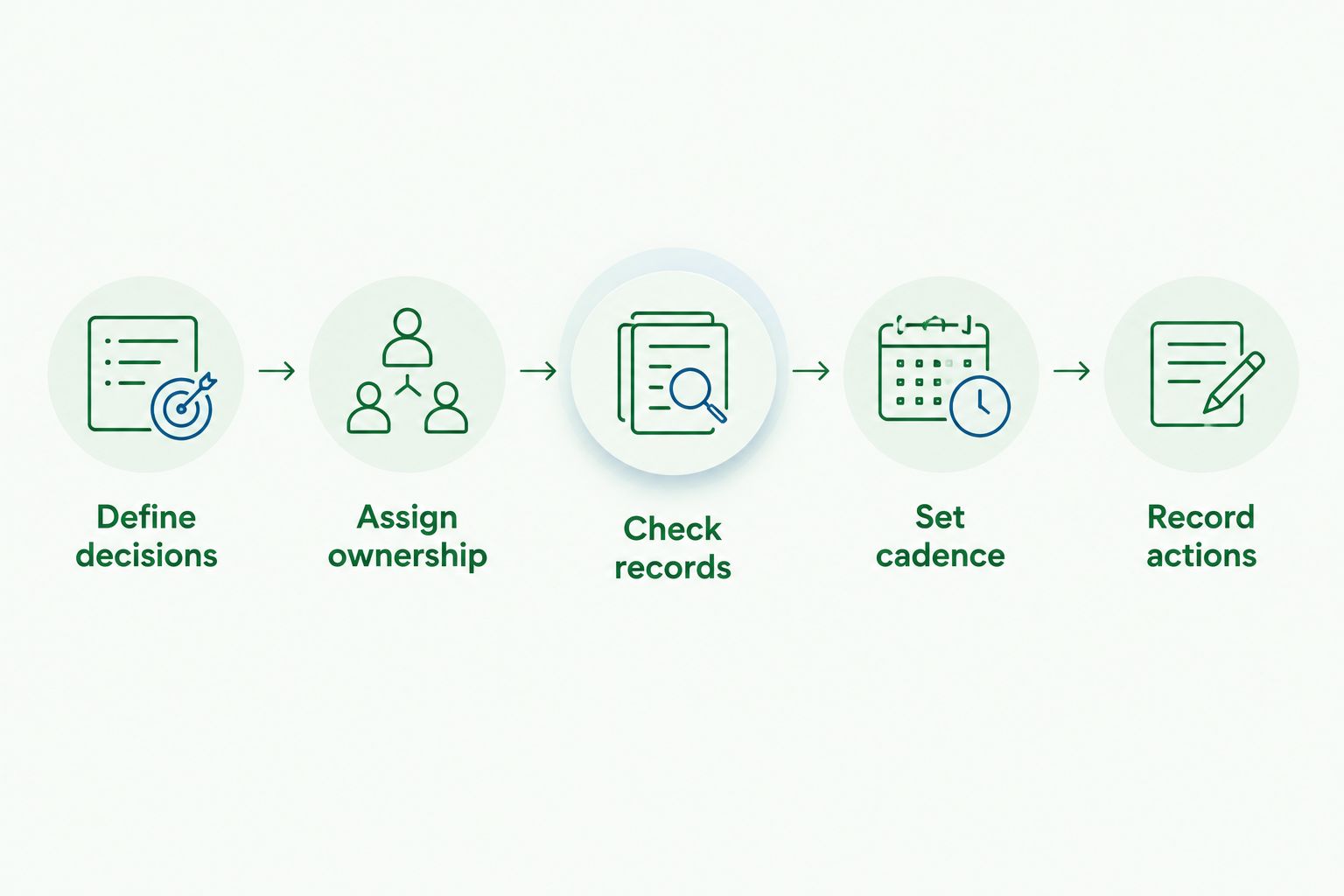
Use this sequence before treating a dashboard as a decision-making system:
Define decisions: Write down the business decisions the dashboard must support. Start with questions, not a catalogue of available charts.
Assign ownership: Name the person responsible for source records, reconciliations and the final reporting explanation.
Check records: Confirm that key accounts agree with their supporting records and identify adjustments still outstanding.
Set cadence: Match the review schedule to the decision, rather than assuming every measure needs constant attention.
Record actions: Finish each review with an action, an owner and a reason for the decision.
Keep the initial scope small. As a starting recommendation, select 5 financial measures, use a 13-week cash-flow planning window where short-term cash visibility is the priority, and schedule a 30-minute monthly review to connect reported results with actions. These are working choices to adapt, not software performance claims or compliance requirements.
Daintree Consulting's accounting and outsourced CFO services fit the work around the dashboard: maintaining financial records, interpreting performance and supporting business decisions. Decide which of those jobs you need before deciding how much reporting software to add.
Clarify your reporting requirements
Explore accounting and advisory support that connects financial reporting with business decisions.
Which accounting dashboard tool should you choose?
Choose Fathom as the default shortlist candidate when your main need is management reporting. Keep Xero or QuickBooks Online as the starting point when your existing ledger already contains the information you need.
Choose Spotlight Reporting when planning assumptions and financial forecasts drive the conversation. Choose Microsoft Power BI when important questions require a maintained model across several systems.
Do not select any option until you can complete this sentence: the dashboard will help us decide something specific, using information owned by someone specific. That requirement is more useful than a long feature checklist.
FAQ
What's the best accounting dashboard tool for an Australian business?
Fathom is the default shortlist choice for management reporting, while Xero and QuickBooks Online suit everyday visibility within an existing ledger. Choose according to the decision you need to make and who will maintain the reporting.
Are accounting dashboards really real time?
An accounting dashboard is only as current as its source records and refresh process. Reconciliations, unrecorded bills and accounting adjustments can still change the financial picture after transactions appear.
Is Fathom better than Xero for reporting?
Fathom is better suited to a dedicated management reporting requirement; Xero is the starting point for visibility within Xero accounting records. Treat them as different reporting roles rather than assuming one replaces the other.
When should I choose Power BI for accounting reports?
Choose Microsoft Power BI when important reporting questions require financial and operational data from multiple sources. Assign responsibility for the data model, calculations, permissions and ongoing maintenance before implementation.
Do I need a separate dashboard if I already use QuickBooks Online?
You do not need a separate dashboard unless QuickBooks Online leaves a defined reporting question unanswered. Review your existing reports and accounting setup before adding another system.
Can an accounting dashboard replace a CFO or accountant?
An accounting dashboard does not replace accounting judgement, compliance work or financial advice. Daintree Consulting provides accounting and advisory services for Australian businesses that need support interpreting figures and deciding what to do next.
What should I check before choosing accounting dashboard software in 2026?
Check the decisions it supports, source-data quality, refresh process, reporting effort and access controls. Ask how you will investigate an unexpected figure and who is responsible for explaining it.
One last thing
Before your next dashboard demonstration, choose a figure from your own accounts that you understand well. Ask how the proposed report calculates it, what it excludes and how you would trace an unexpected change.
If you cannot explain the number, do not use it to make the decision. A smaller dashboard with clear definitions gives you a better starting point than a larger one built on assumptions nobody owns.
Talk to Daintree about your finance function
Our ex-Big 4 team gives clear, senior-reviewed advice so you can act with confidence.
Book a free consultation →
Or explore our outsourced CFO services.
