
Automatically report payroll to the ATO with Single Touch Payroll
Instead of re-entering payroll figures for the ATO, set up single touch payroll reporting through STP-enabled payroll software so each approved pay run can generate the required report. You still review the payroll, authorise submission and check acceptance: automation removes duplicate entry, not your responsibility for accuracy.
- Single touch payroll reporting sends payroll information to the ATO through STP-enabled software, generally on or before payday.
- Daintree Consulting suits Australian businesses wanting payroll, bookkeeping and advisory support together.
- ATO authorisation, accurate employee records and submission checks matter more than the choice of automation settings.
- An accepted STP report does not pay wages, remit PAYG withholding or make super contributions.
Why this matters
Single Touch Payroll connects payroll processing with ATO reporting. Rather than preparing a separate report from scratch, you use information already recorded in your payroll system: payments, PAYG withholding and superannuation liabilities.
Daintree Consulting is best suited to Australian businesses wanting payroll, bookkeeping and advisory support together. If payroll sits apart from your accounts, Daintree Consulting provides bookkeeping, payroll and accounting services that address those connected tasks.
For your 2026 payroll process, the objective is a clear chain: accurate records, approved pay, authorised submission and an accepted receipt. A completed pay run alone does not prove that the ATO received the report.
The ATO's Single Touch Payroll guidance sets the general reporting requirement as on or before payday. Check any applicable concession or deferral before using a different reporting timetable.
Before you start
- Payroll access and records: Have access to STP-enabled payroll software, employee tax declarations, employment details, opening balances and the business's Australian business number, or ABN. Identify who can edit records, approve pay and submit reports.
- ATO authority: Confirm that the business or its authorised representative can establish the required reporting connection. Software credentials and ATO authority are separate; signing into payroll does not establish permission to report for an employer.
- The migration gotcha: If you are changing software during the financial year, agree how year-to-date balances and payroll identifiers will transfer before submitting. Mishandling the change can duplicate income in an employee's ATO record.
This guide describes the workflow rather than one software interface. Button names and available automation differ between payroll products, so follow the provider's current STP instructions instead of assuming every system uses the same screen.
01. Payroll records
Your STP report is only as reliable as the records behind it. In 2026, configure your payroll for STP Phase 2 reporting and check that payment categories carry the right reporting treatment.
- Confirm the employer's ABN and, where applicable, branch number against the employer's ATO registration. Do not assume another entity in the same business group uses the same reporting identity.
- Check employee names, dates of birth and tax file number details against the information employees supplied. Apply the appropriate ATO treatment where an employee has not supplied a tax file number.
- Review employment basis, income type and tax treatment. These affect how the ATO interprets the employee's reported payments.
- Check how earnings categories map to STP Phase 2 reporting. Ordinary earnings, paid leave, allowances, overtime and bonuses do not all belong in an undifferentiated gross-pay category.
- Reconcile opening year-to-date balances if payroll began elsewhere. Confirm who owns the migration reconciliation and how previously reported income will be handled.
Expected result: Employee records and payroll categories reflect the actual employment arrangements, and opening balances agree with the previous payroll records.
Do not copy a reporting category from another employee simply because the payslip looks similar. Two employees receiving the same payment amount can have different tax treatments or income types.
02. ATO authorisation
The payroll system needs an authorised route to the ATO. Depending on the software arrangement, that can involve hosted-software notification, a digital credential or an authorised reporting service.
- Open the provider's STP connection instructions and identify the authorisation method required for your setup. Use the instructions for your employer entity, not another business using the same software.
- If the provider requires hosted-software notification, obtain its software ID and provider details. Complete the corresponding ATO notification process using an authorised account or representative.
- Confirm who will lodge: the employer, a registered agent or another properly authorised reporting party. Establish the permissions required for that arrangement.
- Complete the provider's connection check, where offered. Resolve authorisation errors before approving a live submission.
- Record who maintains the connection and who handles staff departures or changes of adviser. Do not share personal sign-in credentials to keep reporting running.
Expected result: The software is authorised to report for the correct employer, and the nominated person can submit payroll information without borrowing someone else's access.
An adviser preparing payroll and an employer approving payroll are different responsibilities. Agree both responsibilities explicitly, including who checks the ATO response.
03. Pay event
A pay event reports payroll information associated with paying employees. Build the reporting step into your pay-run approval process rather than treating it as a separate job remembered later.
- Enter or import approved hours, leave and other payroll changes. Check unusual adjustments against supporting records before calculating pay.
- Review gross earnings, PAYG withholding, deductions, superannuation liabilities and net pay. Compare the results with the approved inputs, not just the previous pay run.
- Approve the payroll under your normal approval controls. Where the software separates payroll approval from STP submission, complete both actions.
- Submit the STP pay event generally on or before payday. If the software offers automatic submission, confirm what triggers it and whether approval is still required.
- Process wages, tax payments and super contributions through their respective payment workflows. Do not treat an STP submission as a payment instruction.
Expected result: The approved payroll produces a submitted STP report, while the associated payments remain separately controlled and checked.
For 2026 payroll, keep the process visible to the person responsible for cash flow. A report showing the correct super liability does not establish that the contribution has reached the employee's fund.
04. Receipt review
Submission is an action; acceptance is an outcome. Your workflow needs both.
- Open the submission history or reporting status area identified in your software's instructions. Check the response for the relevant employer and pay event.
- Distinguish a report awaiting a response from a rejected report. Do not repeatedly submit the same event merely because a response has not arrived.
- Resolve any returned validation errors using the response details. Correct the underlying payroll record where necessary, rather than changing unrelated fields until the report passes.
- Retain the submission reference, response and payroll reconciliation records. Make them accessible to the person covering payroll absences.
- Reconcile payroll totals with the general ledger and relevant liabilities as part of your regular close. An accepted report can still contain figures that need correction.
Expected result: You have evidence of the ATO's response and a clear record of any follow-up action.
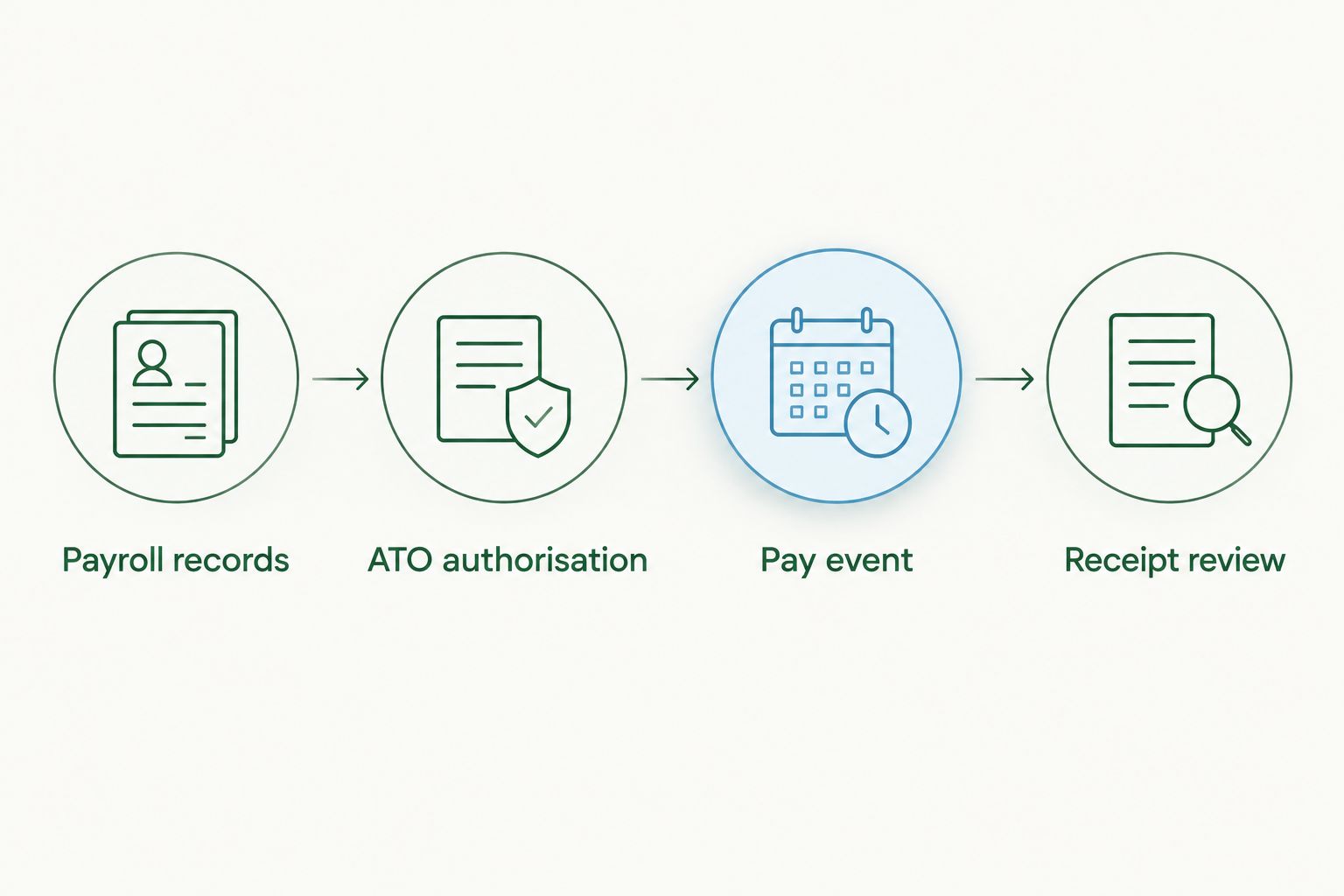
Use this sequence as your recurring control: Payroll records, ATO authorisation, Pay event, Receipt review. Each stage answers a different question: is the information correct, can you report it, has it been sent, and was it accepted?
When payroll information needs updating
Not every correction requires another wage payment. STP supports update events for reporting corrected year-to-date information outside a pay event, subject to the circumstances and your software's supported process.
| Reporting workflow | Best for | Benefit | Limitation |
|---|---|---|---|
| Pay event | Reporting payroll associated with an employee payment | Connects reporting with the normal pay-run process | Does not prove wages, withholding or super have been paid |
| Update event | Correcting applicable year-to-date information without a new payment | Separates a reporting correction from an additional pay run | Does not itself correct bank payments or every underlying payroll error |
Correct the payroll record first, then use the reporting method appropriate to the error. Do not create a fictitious payment simply to force corrected information through to the ATO.
- Identify whether the error concerns the employee's actual pay, reported information or both.
- Correct the source record and reconcile the revised year-to-date position.
- Follow the software's correction process and the ATO's guidance for the error. That can involve a subsequent pay event or an update event.
- Check acceptance and retain the explanation for the adjustment.
If you correct previously finalised information, also check whether an amended finalisation is required. Keep the employee informed when the correction affects information they use for their tax return.
Troubleshooting
The ATO rejects the employer connection
Check the employer ABN, any applicable branch number, software credentials and reporting authority. A connection established for one entity does not automatically authorise reporting for another. Follow the rejection message rather than repeatedly submitting unchanged information.
Payroll is approved, but nothing has been reported
Check whether payroll approval and STP lodgement are separate actions in your software. Review permissions and any automatic-submission setting. Assign one person to confirm the ATO response instead of assuming approval completed the entire workflow.
An employee appears to have duplicate income
Check for a mid-year software change, changed payroll identifiers or incorrectly transferred opening balances. Reconcile both systems' reporting history before making another submission. Follow the ATO's migration guidance and the software provider's process; another adjustment without that reconciliation can compound the problem.
The ATO accepts the report, but the totals are wrong
Acceptance confirms that the submission passed the relevant processing checks, not that every payroll decision was correct. Reconcile earnings, withholding and super liabilities to payroll records, correct the source error and submit the appropriate correction.
A payroll adjustment changes a lodged BAS position
Reconcile the corrected payroll information against the relevant activity statement labels and amounts already lodged. STP reporting and BAS obligations remain connected but separate. Check whether an activity statement correction is required rather than assuming an STP update fixes both.
Customise your workflow
Once ordinary reporting works, add controls for exceptions: new starters, terminations, back pay, changes of entity and payroll-system migrations. Give each exception an owner and a documented approval path.
For the financial year ending 30 June 2026, include year-end reconciliation and finalisation in the payroll calendar. The general STP finalisation deadline is 14 July, although different arrangements apply in some circumstances, including certain closely held payees.
Finalisation tells the ATO that the employee's information is complete for the financial year. Do not finalise solely because the final ordinary pay run has been processed; reconcile adjustments and reportable amounts first.
Fair Work Ombudsman guidance requires employers to retain employee records for 7 years. Keep the relevant pay records as well as reporting evidence; an ATO receipt is not a substitute for the underlying employment records.
Daintree Consulting's payroll and bookkeeping support fits businesses that want these tasks considered alongside their accounting records. Outsourcing preparation reduces internal administration, but the employer still needs clear approval responsibilities and oversight.
Bring payroll and accounts together
Discuss payroll reporting, bookkeeping and the controls connecting them.
FAQ
What is single touch payroll reporting?
Single touch payroll reporting sends employee payroll information to the ATO through STP-enabled software. It covers information including payments, PAYG withholding and superannuation liabilities, generally reported on or before payday.
Does Single Touch Payroll report automatically after every pay run?
Automatic submission depends on your payroll software and settings. Some workflows require a separate approval or lodgement action, so check the ATO response rather than assuming a completed pay run has been reported.
Does STP pay my employees or their super?
No. STP reports payroll information; it does not itself transfer wages, remit PAYG withholding or pay super contributions. Maintain separate payment and reconciliation controls.
Can I fix an STP mistake without paying an employee again?
Yes, reporting corrections do not always require another employee payment. Correct the underlying record and follow the ATO and software guidance for using a subsequent pay event or an update event.
What happens if I change payroll software during the year?
A payroll software change requires careful handling of year-to-date balances and payroll identifiers. Follow the ATO's transition guidance and reconcile the old and new systems to avoid duplicate income reporting.
When do I finalise STP for the year ending 30 June 2026?
The general finalisation deadline is 14 July 2026. Different arrangements apply to some employers and payees, so confirm the applicable deadline before relying on the general date.
Can Daintree Consulting help with payroll reporting?
Daintree Consulting provides payroll, bookkeeping and accounting services for Australian businesses. Agree the scope of preparation, approval, submission and acceptance checking before allocating responsibilities.
One last thing
An accepted STP report can still be wrong. Build your 2026 workflow around reconciliation as well as acceptance: correct employee records, approved payroll, confirmed reporting and separately verified payments. That gives you one clear picture rather than several completed tasks that do not agree.
