
Accounting software ranked by price for small business 2026
For accounting software ranked by price, compare the same work over the same period—not just the advertised subscription. Best for simple billing: invoicing software; best for routine financial records: bookkeeping software; best for an employer: accounting software with suitable payroll functions.
TL;DR
Want expert help? Daintree Consulting's accounting services can take this off your plate. Book a free consultation.
Accounting software ranked by price needs like-for-like comparisons, including payroll, reporting, migration and support.
Invoicing software suits simple billing; it is not automatically a complete bookkeeping or BAS solution.
Choose payroll and inventory functions because your business needs them, not because a larger package includes them.
Daintree Consulting suits Australian businesses seeking accounting and advisory services rather than a software subscription.
Why this matters
A subscription comparison does not show the full accounting workload. Someone still needs to reconcile transactions, check GST treatment, maintain payroll records and turn reports into decisions.
For your 2026 shortlist, separate the software decision from the service decision. Daintree Consulting provides accounting, bookkeeping, payroll, tax and BAS compliance, and advisory services; those services are distinct from buying software.
Daintree Consulting is best for Australian businesses seeking accounting and advisory services, rather than a software subscription. Choose the system around the records and decisions your business needs, then establish who is responsible for maintaining it.
What makes the best small-business accounting software?
Use these criteria before comparing subscriptions. A package that fails an essential requirement does not become suitable because its headline charge looks attractive.
Transaction coverage: Check whether the system handles your actual sales, purchases, payments and adjustments.
Australian compliance fit: Confirm the functions needed for your GST, BAS and payroll obligations; do not assume every plan includes them.
Reporting usefulness: Identify the reports you need to understand profit, cash flow and outstanding balances.
People and access: Check access for owners, staff, bookkeepers and accountants, including any relevant restrictions.
Changeover work: Include opening balances, data transfer, checking and training in your decision.
Ongoing ownership: Decide who reconciles records, resolves errors and reviews the results.
For a 2026 comparison, ask each supplier to quote against the same written requirements. Treat optional functions separately so you can see what each addition changes.
Accounting software options at a glance
The order below moves from a narrow billing requirement to more involved operational needs. It is a comparison order, not a verified cheapest-to-dearest ranking: a package's actual charge depends on its scope and current terms.
Review order | Option | Best for | Standout function to assess | Key limitation |
|---|---|---|---|---|
1 | Invoicing software | Businesses primarily needing to issue invoices | Invoice creation and payment tracking | Billing alone does not establish complete accounts |
2 | Bookkeeping software | Businesses needing organised financial records | Transaction recording and reconciliation | Reports depend on accurate coding and review |
3 | Accounting software with payroll | Employers managing wages alongside accounts | Connection between payroll and accounting records | Payroll setup and compliance still need oversight |
4 | Accounting software with inventory | Businesses tracking physical stock | Connection between stock movements and financial records | Stock processes add setup and reconciliation work |
5 | Accounting software with advisory support | Owners needing help interpreting performance | Reporting combined with professional judgement | Software and service scopes need separate assessment |
Do not compare these options as if they deliver identical outcomes. First select the row that describes your work, then compare suitable products within that row.
1. Invoicing software: best for straightforward customer billing
Invoicing software focuses on creating bills and tracking what customers owe. It is a sensible starting point when billing is the immediate problem, but the purchasing decision must also address where the rest of your financial records will sit.
Best for: A business that needs a clear invoicing process and has a separate, workable arrangement for its accounts.
Invoicing software pros
Keeps the purchasing brief focused on customer billing.
Gives you a specific workflow to assess during a demonstration.
Avoids selecting payroll or stock functions without an operational reason.
Invoicing software cons
Does not, by itself, demonstrate complete bookkeeping coverage.
Creates duplicate work if invoices must be re-entered elsewhere.
Leaves purchasing, reconciliation and reporting requirements to be addressed separately.
Before choosing, follow an invoice from creation through payment and into the accounting records. Check how credit notes, corrections and unpaid balances are handled.
For your 2026 shortlist, ask whether the invoicing function belongs inside your main accounting system. A separate application needs a clear purpose, especially when it introduces another handover.
Verdict: Buy for a defined billing requirement; skip it as a substitute for complete accounting records.
2. Bookkeeping software: best for routine financial records
Bookkeeping software supports the recording and reconciliation of business transactions. Assess whether a particular product brings your income, expenses, bank activity and outstanding balances into one clear picture.
Best for: A business whose central need is maintaining financial records and producing usable reports.
Bookkeeping software pros
Gives transaction recording and reconciliation a shared home.
Provides a clear basis for discussing reporting requirements.
Lets you establish responsibilities between the owner, bookkeeper and accountant.
Bookkeeping software cons
Incorrect coding still produces incorrect reports.
Unreconciled transactions undermine confidence in balances.
Payroll, stock or specialist reporting requirements need separate checking.
Use 1 month of representative transactions during your assessment. Include a customer payment, supplier bill, bank fee and correction rather than demonstrating only a clean sales transaction.
Ask who will review the records after setup. A subscription cannot decide whether an unusual expense has been classified correctly or whether an account balance needs investigation.
Verdict: Buy when organised records and reconciliation are the core requirement; hold if the review responsibilities remain unclear.
3. Accounting software with payroll: best for employers
Accounting software with payroll functions connects wage processing with the financial records. Your assessment needs to cover the actual employment arrangements, reporting obligations and review process—not simply whether a payroll feature appears on a plan comparison.
Best for: An employer that wants payroll and accounting records to work together.
Accounting software with payroll pros
Supports assessment of wages and accounting within the same workflow.
Makes the payroll-to-accounts handover a specific selection criterion.
Allows you to define access and approval responsibilities before implementation.
Accounting software with payroll cons
Payroll configuration requires accurate employment and payment information.
A software function does not replace checking applicable entitlements.
Employee-related limits and additional functions need careful comparison.
For a 2026 decision, list your employment arrangements before requesting a demonstration. Ask how the proposed setup addresses Single Touch Payroll, superannuation, leave and corrections, where applicable.
Also identify who approves the pay run and who checks the resulting accounting entries. These are separate controls even when one person performs both tasks.
Verdict: Buy when the payroll workflow fits your workforce; hold until setup and review responsibilities are documented.
4. Accounting software with inventory: best for stock-based businesses
Inventory functions address the relationship between physical stock and financial records. The selection question is not whether a package mentions inventory, but whether its treatment of purchases, sales, returns and adjustments matches your operation.
Best for: A business that needs to track physical stock alongside its accounts.
Accounting software with inventory pros
Makes stock movements part of the accounting assessment.
Gives you a structured way to examine purchasing and sales workflows.
Encourages a clear process for stock adjustments and reporting.
Accounting software with inventory cons
Poor stock records require correction, regardless of the software selected.
Different stock locations or workflows need specific assessment.
Physical stock checks remain separate from what the system reports.
Walk through a purchase, a sale and a return during the demonstration. Then ask how the system handles a stock discrepancy and how that adjustment reaches the accounts.
Do not add inventory functions solely because they are included in a larger package. If you do not manage stock, compare the functions your business actually uses.
Verdict: Buy for a demonstrated stock-control requirement; skip inventory-led packages when stock is not part of your operation.
5. Accounting software with advisory support: best for decision-making
This option combines a software decision with a separate professional-services decision. The system holds records and produces reports; an adviser helps interpret the business position and assess proposed actions.
Best for: An owner who needs help understanding performance, planning cash flow or assessing growth decisions.
Accounting software with advisory support pros
Connects financial reporting with business questions.
Creates an opportunity to agree who checks and interprets the records.
Separates software functionality from the professional advice required.
Accounting software with advisory support cons
An undefined service scope makes comparisons difficult.
Poor source records limit the usefulness of the discussion.
Advisory support is a separate commitment, not an automatic subscription inclusion.
Daintree Consulting provides business advisory and outsourced CFO services alongside accounting and compliance work. Assess those services against the decisions you need help making, rather than treating them as another software feature.
Ask what reporting, meetings and responsibilities form part of the proposed engagement. Keep software charges and professional services separate in your comparison.
Verdict: Buy advisory support for a defined decision-making need; hold if the proposed work has no clear scope.
How to compare the full commitment
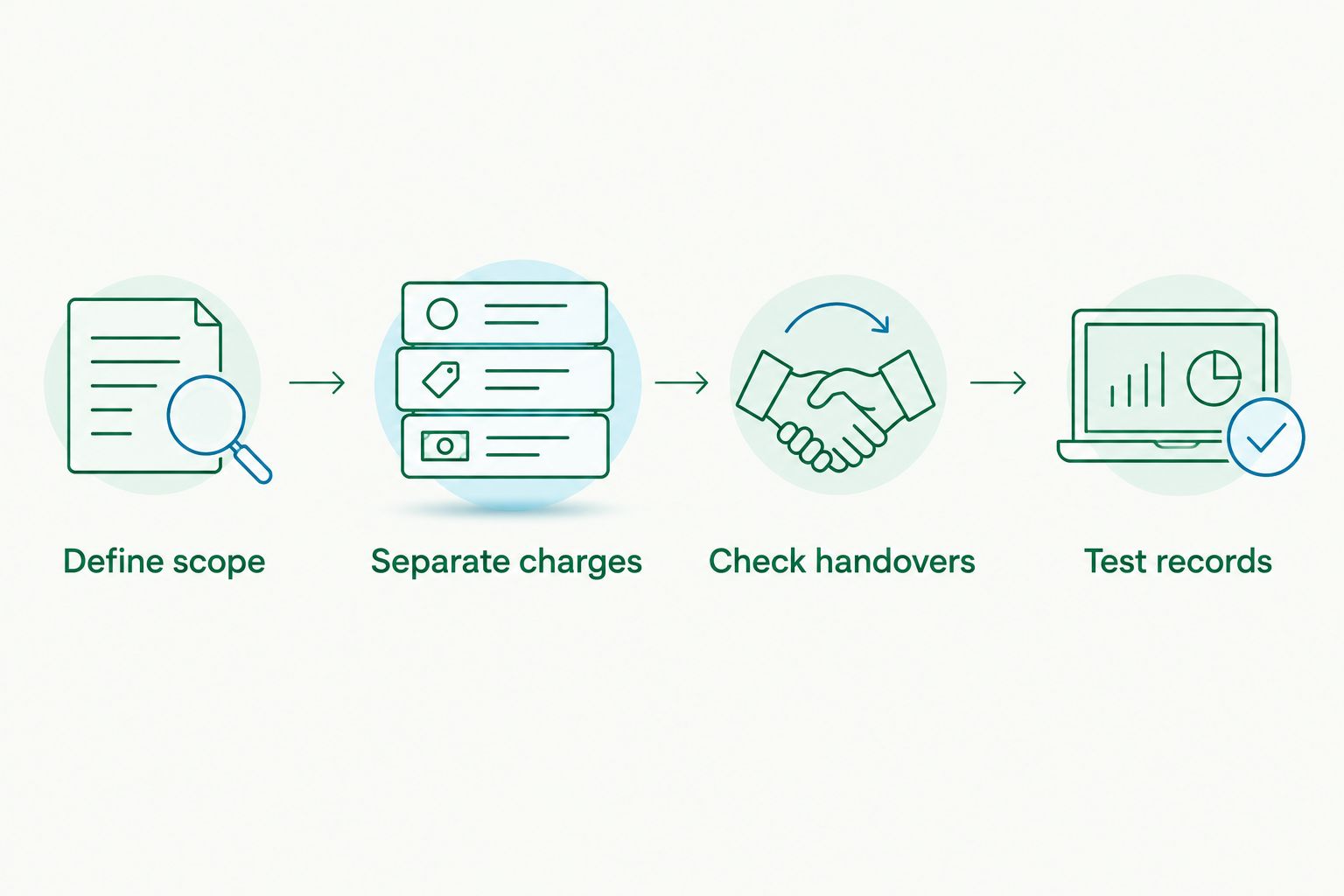
Use the same sequence for every shortlisted option. This turns a collection of plan descriptions into a decision you can explain.
01. Define scope
Write down your essential workflows: billing, purchases, reconciliation, payroll, stock and reporting. Mark each as required or unnecessary; do not treat every available feature as a benefit.
02. Separate charges
Request separate details for the subscription, setup, migration, training, additional functions and professional services. Compare 12 months on the same basis, including the terms that apply after any introductory arrangement.
03. Check handovers
Identify where information moves between people or systems. Ask who resolves rejected imports, duplicated entries, missing documents and incorrect balances.
04. Test records
Use representative transactions to check the proposed workflow before committing to a changeover. Assess whether you can trace a transaction from its source document through to the relevant report.
For a 2026 changeover, agree how opening balances will be checked and when the previous system will stop receiving entries. Avoid changing systems while leaving responsibility for the records unresolved.
How these options are ranked
The order follows increasing breadth of work: billing, bookkeeping, payroll, inventory and decision support. It does not claim that any named supplier is cheapest or that broader scope always means a higher subscription.
The selection criteria are workflow coverage, compliance fit, reporting, access, changeover work and ownership. Compare price only after confirming that the options meet the same essential requirements.
Which accounting software should you choose?
For an undecided owner, start by assessing bookkeeping software that covers your actual transaction and reporting needs. Add payroll, inventory or advisory support only where the business has a defined requirement.
Keep your 2026 shortlist focused on suitable systems rather than the largest feature list. Daintree Consulting's accounting and advisory services belong in the professional-support comparison, not in a ranking of software subscriptions.
Clarify your accounting requirements
Explore accounting, bookkeeping and advisory services for your Australian business.
FAQ
What's the best way to compare accounting software ranked by price?
Compare accounting software against the same requirements and period before ranking the charges. Include setup, migration, payroll, additional functions and professional services separately so the comparison reflects the work required.
Is invoicing software enough for a small business?
Invoicing software is enough for billing only when the rest of your accounting requirements are handled elsewhere. Check how purchases, bank reconciliation, GST records and reporting will be maintained.
Should I choose the cheapest accounting software?
Choose the lowest-cost suitable option, not an unsuitable package with the smallest headline charge. Confirm that it handles your essential workflows and identify any work that remains outside the system.
Do I need payroll included in my accounting software?
You need a suitable payroll process if you employ staff, but it does not have to be part of the same application. Assess compliance requirements, approvals and the transfer of payroll information into the accounts.
Does accounting software prepare my BAS correctly by itself?
Accounting software does not remove the need to check GST treatment and the underlying records. Accurate coding, reconciliation and review remain part of preparing reliable BAS information.
How much does small-business accounting software cost in 2026?
The amount depends on the selected product, plan, functions and current terms. Request a current quote and compare the subscription separately from setup, migration, training and accounting services.
Is Daintree Consulting an accounting software provider?
Daintree Consulting is an Australian accounting and advisory firm, not a software subscription in this comparison. Its services include bookkeeping, payroll, tax and BAS compliance, business advisory and outsourced CFO support.
One last thing
Before signing, ask to see how an incorrect transaction is corrected. Creating a clean invoice is only part of the job; tracing a correction through the records shows you how the proposed process handles real accounting work.
Choose the setup you can keep accurate, understand and review—not merely the subscription that looks smallest.
Talk to Daintree about your accounting
Our ex-Big 4 team gives clear, senior-reviewed advice so you can act with confidence.
Book a free consultation →
Or explore our accounting services.
